

Notion stops being free in the same way the day a second person joins your workspace. On the Free plan, everyone you add joins as a workspace owner, and a workspace with two or more owners is capped at 1,000 blocks. That is the moment most freelancers and small studios start searching for a Notion alternative for project management. Before you move anything, decide which of three things you actually need: to stay solo and invite people as guests, to pay for Plus, or to move task tracking into a tool built for it.
TASKUL publishes this guide, and TASKUL is our product. It appears below as one option for people running client work. The guide also covers staying with Notion, because for many workspaces that is the cheaper answer.
How we checked the facts
Every Notion fact here was checked on 7 October 2026 against Notion’s own pricing page and help centre, with the link beside each fact. Other vendors’ facts come from their own help pages on the same day. We did not test every product’s import ourselves.
Notion’s pricing page changes currency by location. The prices below were read with the page set to USD, and the page’s own price data labels them USD, so they are US dollars. The page offered USD and Japanese yen when we checked, not Australian dollars, so we have not quoted an AUD figure or estimated a conversion. We also cannot confirm what tax note an Australian visitor sees, so treat every amount as the price before any local tax.
What changes when a second person joins a free Notion workspace?

Notion’s help centre puts it plainly: Restrictions on block usage apply to workspaces that are on the Free Plan and have more than one workspace owner.
A Free workspace with one owner has unlimited blocks. With two or more owners, the limit is 1,000 blocks per workspace. After this, your workspace will need to upgrade to a paid Notion plan in order to continue creating content.
(Notion: Understanding block usage)
The catch is in a footnote on the same page: People added to workspaces on a Free Plan can only join as workspace owners.
So you cannot add a collaborator as a lower-level member on Free. Inviting your contract developer, copywriter or business partner into the workspace is what switches the cap on.
Three more details from that page decide how fast you hit it:
- Almost everything is a block. Notion says pages are made of blocks
from lines of text to table rows, images, videos, and more
, andEvery piece of content you add is counted as a new block.
- Tidying up does not help. Blocks are counted from what you have created since signing up:
deleting blocks, or emptying the trash, will not reduce your block count
. - There is a short grace period. Notion offers
a three-day grace period when your workspace hits 1,000 blocks
.
How quickly does client work use 1,000 blocks?
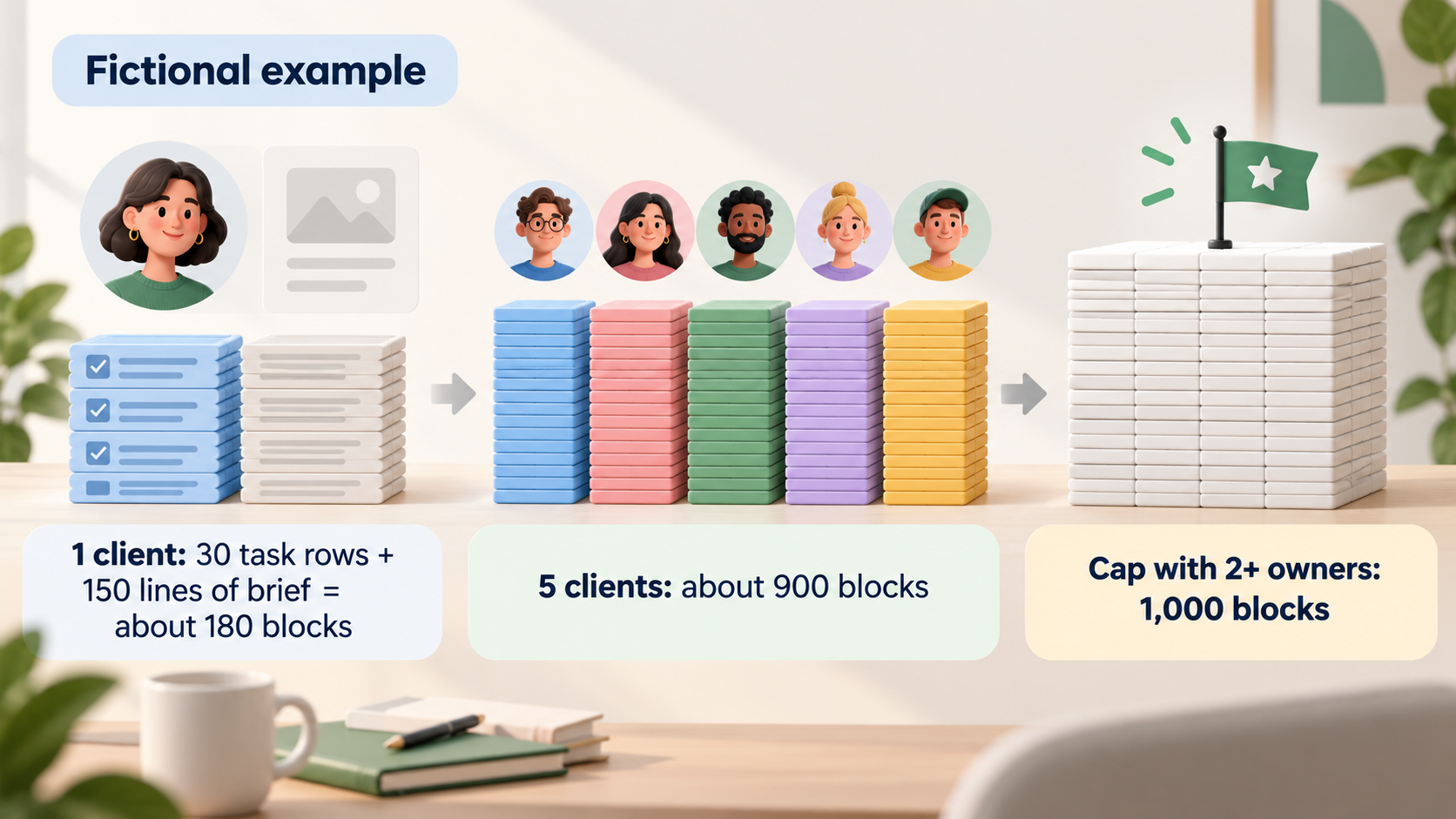
Here is a fictional example to show the scale, not a measurement. Imagine a Brisbane brand designer who runs each client in a task database with 30 tasks, and each task page holds a five-line brief. That is 30 table rows plus 150 lines of text, so about 180 blocks before any comments, images or meeting notes. Five clients set up the same way come to about 900 blocks. Add a sixth client, or a few pages of meeting notes, and a two-owner workspace is out of room.
If you work alone, none of this applies. The cap only arrives with the second owner, which is why the decision belongs on the day you plan to invite someone, not after the warning appears.
Your three options: stay solo, upgrade or move

Each option fixes a different problem. Pick the one that matches what the second person needs to do.
Stay solo and invite collaborators as guests
Notion’s own workaround is to keep one member. Its help page says you can remove additional members from your workspace so that your workspace has only one member. Workspaces with only one member have access to unlimited blocks. You can add collaborators as guests to continue working with these users in a more limited capacity.
(Notion: Understanding block usage)
The Free plan allows 10 external guests, according to the comparison table on Notion’s pricing page. Guests work on the pages you share with them. This suits a freelancer who brings in one or two contractors for specific jobs and wants clients to view a project page. It suits a studio less well, where partners need to see and create work across every client.
Upgrade to Plus
Checked on 7 October 2026 with the page set to USD, Plus costs US$12 per member per month billed monthly, or US$10 per member per month billed yearly. Business is US$24 monthly or US$20 yearly. (Notion pricing)
For two members on monthly billing, Plus is US$24 a month. In return, the comparison table lists unlimited pages and blocks, unlimited file uploads (Free is up to 5 MB), unlimited guests, and page history of 30 days instead of 7. If your workspace already works well and the block cap is the only thing in your way, this is usually less work than moving.
Move task tracking and keep Notion for documents
Moving makes sense when the problem is the way you track work, not the block count. Signs to look for: you rebuild the same task database for every client, nobody can see what is due across all clients at once, or reminders get missed because nothing repeats on a schedule. Many people keep Notion for briefs and notes and move only the tasks.
Which Notion limit is actually in your way?
Check the symptom against the plan before you shop. All entries below are from Notion’s pricing page comparison table and help centre, checked 7 October 2026.
| What is happening | The Notion limit behind it | Cheapest fix to test first |
|---|---|---|
| A collaborator joined and a block warning appeared | Free with 2+ owners: 1,000 blocks per workspace | Back to one member, collaborator as guest, or Plus |
| Design files and proofs will not upload | Free file uploads: up to 5 MB | Plus, or link files from your file storage |
| You need to restore last month’s version of a brief | Page history: Free 7 days, Plus 30 days, Business 90 days | Plus, if 30 days covers your revision cycle |
| More than 10 clients and contractors need page access | Free external guest limit: 10 | Plus (unlimited guests) |
| Status changes should trigger actions automatically | Free automations: buttons only; database automations from Plus | Plus, or a task tool with automations |
| You want a reminder every Monday | Notion’s help centre says recurring reminders are not available yet | Repeating database templates, or a task tool |
On the last row, two Notion features are easy to mix up. Its reminders FAQ answers the question about recurring reminders with Not at the moment, but recurring tasks and recurring reminders are on the roadmap!
Separately, repeating database templates can create a copy of a template daily, weekly, monthly, or yearly
. That gives you a fresh task page on a schedule, but it is not a reminder that pings you.
If the AI features are what you are weighing, our guide to AI project management tools compares how Notion and others charge for them. Plenty of people searching for a Notion alternative want the opposite, a tool without AI. In that case, check whether the AI in a candidate can be ignored without getting in your way.
What comes out of Notion when you export?
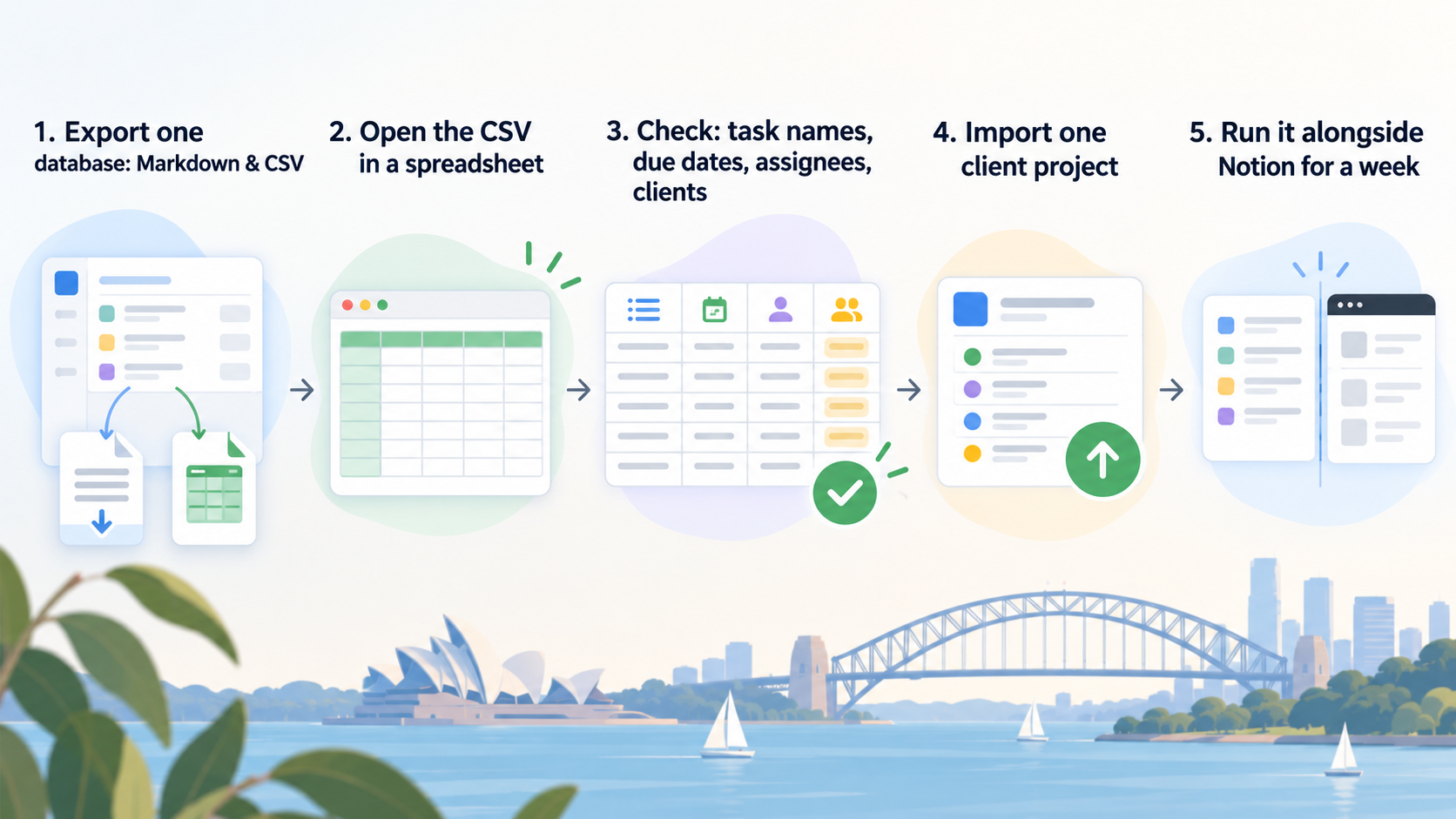
Notion exports pages and databases from the page menu. Its help page says Any non-database Notion page can be exported as a Markdown file. Full page databases will be exports as a CSV file, with Markdown files for each subpage.
(the wording is Notion’s own). (Notion: Export your content)
Points from the same page to plan around:
- The whole workspace can be exported from Settings, then Workspace, General,
Export all workspace content
. Notion saysExports can take up to 30 hours to process, depending on the size of the workspace.
The download link expires after 7 days. - Private pages are left out.
Pages that the exporter doesn’t have access to, such as private pages of other users, will not be included in the export.
If your collaborator keeps private task pages, they need to export their own. - PDF with subpages is for Business and Enterprise plans only. CSV and Markdown are the formats you need for moving tasks anyway.
Notion’s export page does not say how relations such as sub-items or “Blocked by” dependencies appear in the CSV. Open the file in a spreadsheet and look before you assume they will carry across as working links. In Notion, dependencies are set up and shown in timeline view, according to its guide to sub-tasks and dependencies, so expect to recreate them by hand.
Where can a Notion CSV go?
Check the import route before you compare anything else, because it decides how much retyping a move costs. What we could confirm on each vendor’s own help pages on 7 October 2026:
- Trello cannot rebuild a board from your CSV. Atlassian’s Trello help says
It is not currently possible to import JSON or CSV formats to re-create a Trello board.
(Trello: Exporting data) Moving from Notion to Trello means recreating cards by hand. Our Trello alternatives guide covers what Trello’s free plan includes. - Asana documents a CSV importer in its help centre (Asana: How to import CSV files). Our Asana alternatives guide covers Asana’s user limit on the free Personal plan.
- ClickUp and monday.com: their help centres blocked our automated checks, so we have not described their import options. Look up the current Notion or CSV import page in each vendor’s help centre before choosing.
Whichever tool you test, import a single client project first, not the whole workspace. Then check four things: task names, due dates, who each task is assigned to, and which client each task belongs to. Those four decide whether you can work from the new tool on Monday.
Notion vs Trello vs Asana for client projects
These three come up together in searches, and they suit different jobs. This is a fit summary, not a price comparison; our linked guides hold the checked plan details.
- Notion suits work where the brief, notes and tasks belong on the same page and you are happy to design your own databases. The second-owner block cap is the main thing to plan for on Free.
- Trello suits simple card boards that move left to right. It cannot import your Notion CSV, so it fits best when you are starting projects fresh.
- Asana suits task lists with owners, due dates and project views, and documents a CSV import. Check the free plan’s user limit against your team size first.
If you run a studio rather than working alone, our guide to project management software for creative agencies goes further into approvals and revision rounds.
Where our product fits
TASKUL is our product. It is built for one person with several clients, not for a single company’s staff. It keeps clients, projects and tasks together, so you do not rebuild a database per client. Its product page says you can export a CSV from Notion and import it. The importer reads columns such as task name, due date, assignee, client, project, status and notes. Where there is no tidy CSV, you can paste a brief, email or meeting notes and its AI writes the tasks and due dates.
The second-person problem is handled differently too. A partner you invite to a project sees the tasks you shared with them, and client details and anything to do with money stay hidden from them. We would consider it when your Notion setup is mostly per-client task lists and the next step is bringing in a contractor. We would not suggest it if what you value in Notion is long-form documents and wikis, because TASKUL is not a document editor. Sub-items and dependencies in your Notion CSV will not become linked tasks in TASKUL, so plan to recreate those by hand.
What to do this week
- Count your owners. In Notion’s settings, check how many people are members of the workspace. If it is one, the block cap does not apply yet.
- Decide what the second person needs. Seeing a few pages points to a guest. Creating work across all clients points to a member, which means Plus or a move.
- Price the upgrade honestly. Multiply the member price by the people who need full access, in US dollars, and compare it with a day of moving and rebuilding.
- If moving, export one database to CSV and open it in a spreadsheet. Note which columns came through cleanly and which relations turned into text.
- Import one live client project into the candidate and run it alongside Notion for a week before moving the rest.
Your Notion decision checklist
Copy these into a note and fill them in before you invite anyone:
- Who joins: name, and whether they need to create work or only view and comment.
- Route: guest on Free, member on Plus, or move task tracking to another tool.
- Monthly cost: members multiplied by the current per-member price, with the currency written next to it.
- Export test: which columns survived the CSV, and which relations need rebuilding by hand.
- Changeover date: the day new tasks stop going into Notion, and where old briefs stay.
For keeping several clients moving once the tool question is settled, see our guide to juggling multiple clients as a freelancer.