
A deadline is not enough to choose your next job. First separate work you can do from work waiting on a client. Then check whether the remaining production, review and quality-check time fits your actual week. If it does not, agree a changed date before promising more work.
The worked example below follows three fictional clients through a Monday plan and a late-copy problem on Thursday. The names, hours and dates are illustrative, not TASKUL customer data or a recommended industry benchmark. You can use the method with a spreadsheet, a notebook or your existing project tool.
Want the file first? Download the blank Excel project tracker or download the completed example. Both are free and need no account. The walkthrough below shows why the status and date fields matter.
Start with the real commitment, not the loudest request
Imagine it is Monday morning. A campaign client and designer have agreed that four revised banners will be delivered on Wednesday. The brief, sizes and assets are approved. A website client has asked to review a homepage on Friday, but has not sent approved copy. A brand client must choose one of two directions before the final artwork can be prepared.
A list sorted by deadline correctly puts Wednesday's banners first, but it does not tell you what to do about the other two clients. The website cannot reach a meaningful review without an input only the client can provide. The identity work can move after a decision. Each job has a different next action, even though all three are “active”.

For each job, write down four distinctions before scheduling anything:
- Promised or requested? A client asking for Friday is different from both sides agreeing to a Friday review. Preserve the message that confirms the commitment.
- Ready or blocked? “In progress” is too vague. Name the exact input, approval or decision missing.
- Who moves next? A designer can request copy; only the client can supply or approve it.
- What does “done” mean? Banner files sent for review, a homepage ready for review, and a site launched are different milestones.
The Australian Government's contract guidance recommends making scope, timeframes and processes for changes clear in the agreement. Use your actual contract when deciding whether a date can change; a planning sheet does not rewrite it.
Budget capacity before filling the calendar
Suppose this designer has 20 hours available for these three projects this week after meetings, administration and other commitments. Those 20 hours are not 20 hours of uninterrupted design. In this illustrative plan, 12 hours are reserved for production, three for responding to client reviews and revisions, two for final checks, and three remain as contingency. The parts add to 20.
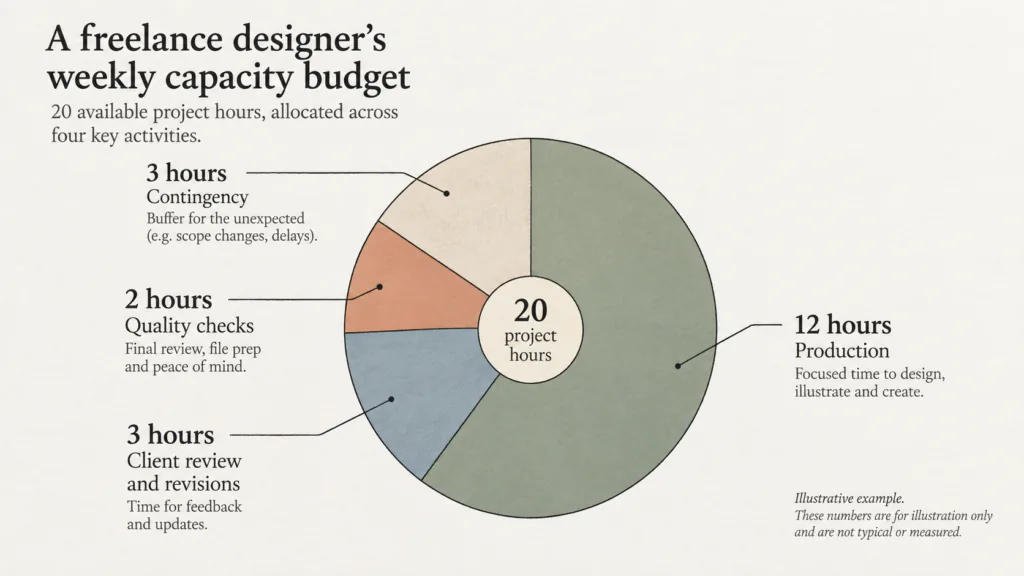
The Australian Graphic Design Association's studio-management guide explicitly advises allowing for client review and revisions in a schedule. The exact allowance depends on the work and your agreement. The point is to reserve it before filling every gap with new production. Atlassian's capacity-planning guidance likewise distinguishes available capacity from the work you hope to fit into it.
Here is the production part of the same illustrative week:
| Job | Production still needed | Separate check or response | Can it start Monday? |
|---|---|---|---|
| Four campaign banners | 4 hours | Export and size check before delivery | Yes: assets and revision brief are approved |
| Homepage with final copy | 5 hours | Content check and client review response | No: approved copy is missing |
| Brand artwork after direction choice | 3 hours | Presentation and response to the chosen direction | No: the client has not chosen |
The 4 + 5 + 3 production hours fill the 12-hour production allocation only if the two missing decisions arrive in time. Until then, do not treat the blocked hours as permanently free. Keep them conditional and put a check-in against each input. If the client responds late, recalculate rather than forcing the original sequence into a smaller window.
Turn three projects into a short action list
A project name is not a task. “Work on website” is not a useful next step while copy is missing. In the worked case, the Monday record becomes nine small actions across the three jobs:
- Check the banner revision notes against the approved brief.
- Make the four agreed banner edits.
- Export the required sizes, inspect them and send the agreed delivery.
- Ask the website client for final copy, its approval owner and the time it will arrive.
- Once copy is approved, place it in the homepage and check the layout.
- Run the homepage content and interaction checks before a client review.
- Ask the brand client to choose or amend a direction.
- Once that choice is recorded, refine the agreed artwork.
- Prepare the brand review package and record the next decision needed.
Only actions 1–4 and 7 are immediately available on Monday. Actions 5–6 depend on copy. Actions 8–9 depend on a direction. This is why a list of nine actions is more useful than three generic “in progress” project cards.
Download the Excel project tracker for multiple clients
The free Excel workbook turns that nine-action list into a plan you can change. It has four tabs: This Week shows capacity and client-by-client work; Projects records each deliverable and whether its date is agreed or only requested; Tasks holds the next actions, owners, remaining production hours and follow-up dates; and Instructions explains the formulas and limits. It contains no macros and needs no TASKUL account.
- Download the completed, fictional Excel example (.xlsx) — the three clients and nine actions in this article.
- Download the blank Excel tracker (.xlsx) — 20 project slots and 100 action slots, with drop-downs and formulas already in place.
Start with the completed example. Set This Week to the Monday of 28 September 2026: 20 available project hours less three for review, two for final checks and three for contingency leaves 12 production hours. The banner edits contribute four ready hours. The homepage and brand work contribute eight conditional hours because approved copy and a chosen direction are missing. The tracker also shows two client follow-ups. These are invented numbers that explain the method, not a recommended capacity for every designer.
Now open Tasks and change action A-005, “Place approved copy in homepage and check layout”, from Waiting on client to Ready only after the client has supplied approved copy. The summary changes from four ready and eight conditional production hours to nine ready and three conditional hours. The total potential load remains 12 hours. You still need to check whether the five-hour homepage block and the client's review window fit before confirming Friday. A weekly total cannot make that decision for you.
For a lighter, static record, the earlier worked CSV and blank CSV remain available. CSV has no live calculations or drop-downs. If you import the Excel workbook into another spreadsheet app, check that its formulas, dates and drop-downs survive before relying on it.
Choose today's work with four checks
Use this order when several clients want attention at once. It is a decision process, not a claim that one formula can rank every creative job.
1. Can the next deliverable move without a client decision?
If no, send the smallest question that would unblock it. Record when you will follow up. Do not fill the blocked time with speculative final artwork that may be discarded.
2. Is the date agreed, and what exactly is due?
A confirmed Wednesday banner delivery has a clearer commitment than an unconfirmed Friday homepage request. Check the deliverable and approval stage as well as the date. If the deadline was only requested, confirm whether it means a draft, review, approved version or launch.
3. Does the remaining work fit after review and checks?
Compare the remaining effort with your actual production time. Leave space for version checks, client replies and the normal uncertainty in creative work. A one-hour fix that unlocks a delivery tomorrow can be a better first move than starting a large draft that cannot yet be approved.
4. If it does not fit, which promise must be discussed?
Tell the affected client what input or decision changed the plan, what you can still complete, and when you can confirm a revised milestone. Do not silently slide an agreed date in your own tracker. Depending on your contract, the change may need written agreement.
In this case, the banners pass all four checks: they are ready, due first under an agreed brief, and have a manageable production and checking block. Begin them. At the same time, send the website and brand questions. “Start banners first” is not “ignore the other clients”.
Send an unblock request the client can answer
A message such as “just checking in on the copy” gives no decision, owner or consequence. A more useful version is:
Hi Alex, I can complete the homepage after the approved copy is in. Could you send the final text and confirm who signs it off by Tuesday midday in your time zone? If it arrives then, I will check whether a Friday review is feasible and confirm that date. If it arrives later, I will recalculate the remaining build and QA work and propose a new review slot. Please also confirm whether you are asking for a review or a public launch on Friday.
Replace the time and commitment with what your agreement actually says. If Friday was merely requested, say that it is still to be confirmed. Keep the answer in the decision channel your client uses so you can find the source later. Avoid putting confidential client copy into a public AI tool without permission.
For the brand job, ask a narrower question: “Which of the two presented directions should I refine, and is any element of that direction excluded?” Do not schedule final artwork from a vague “we like both”. If two stakeholders disagree, ask who has authority to resolve the choice.
Replan when an input arrives late
Now suppose the website copy expected Tuesday arrives on Thursday. The banner job has been delivered. The brand direction is still unanswered. The website's five-hour production block and its checks did not happen earlier in the week. Those five production hours were already part of the 12-hour budget; the question is whether usable work blocks and a client review window remain between Thursday and the requested Friday review. The weekly total alone cannot answer that. The three contingency hours are for uncertainty, not a reason to assume the original sequence still fits.
Work through the change in this order:
- Record the promised copy date, actual receipt and whether the new text is approved or only a draft.
- Identify work that was independent of the copy: components, existing page checks and asset preparation may already be complete.
- Estimate the work still required to place and check the final text. Include the client's response time and any required changes.
- Compare that work with the remaining capacity, including the time reserved for other commitments.
- If the work and a client review window still fit, confirm what Friday will contain. If they do not, propose a new review slot and check the effect on later approval or launch dates. Use the change process in your agreement if an agreed milestone is affected.
A practical update is: “The copy arrived on Thursday. The components and approved sections are ready, but I need to confirm that this text is final, place it and check the page. I will recalculate the remaining work today and confirm whether the Friday review you requested is possible. Please tell me who can approve the page.” It describes the dependency without blaming the client or promising an unverified date.
A blocked project can become urgent quickly when its input arrives. That is why the status and the next check-in matter as much as the nominal deadline. Review your plan when an answer lands, not only at the start of the week.
Keep one record that survives tomorrow
A usable project record has a deliverable, its agreed or requested date, its current state, the next action, the action owner, the next check-in and a link to the source decision. Keep the state vocabulary small: ready, waiting on client, waiting on you, in review, or delivered. Add a separate note if a date is being renegotiated; “late” alone does not say what will happen next.
At the end of a working day, update only what changed. Which file was delivered? Which approval arrived? What is ready for the next work block? Which request needs a follow-up? This is enough to let you start tomorrow without rereading every message. If the job later needs more collaborators or dependencies, move the same facts into a fuller project system; you do not need to start by recreating a complex board.
The method works independently of TASKUL. If you want to see the product, visit the English TASKUL page. The free files above work without an account; check the product itself before assuming this guide's workflow is automated.
If a client response contains several kinds of feedback, use the feedback decision guide before adding tasks. If the blocked work is a website with approval stages, use the web project timeline to separate review, launch and handover.
Questions designers ask in this situation
Should I always do the nearest deadline first?
No. First ask whether the work is ready and whether that date is an agreed commitment. A nearby blocked milestone needs an unblock request; a nearby ready deliverable may need production time now. Review capacity and the consequences of delay before choosing.
Should I book time for a client who has not replied?
Keep a conditional block or contingency rather than treating the hours as either fully booked or free. When the answer arrives, check what remains possible and confirm any changed promise. The right amount of reserve depends on your actual work and agreement.
What if two clients need the same hours?
Show each client the specific deliverable and decision affected, then propose a realistic date or scope change. Do not accept both promises in a private spreadsheet and hope one client responds late. If changing a contract term, use the agreed written variation process.
Do I need a new app to use this method?
No. The Excel tracker or the simpler CSV, plus a calendar, is enough to test the method. Change tools when keeping decisions, versions or collaborators together becomes harder than the setup time. The first test is whether you can tell what to do next without reopening every conversation.