
Client meeting notes are the short written record you send a client after a meeting: what was decided and who agreed, who is doing what by when, and anything that changes the scope or the dates. The free client meeting notes template below does that in six short sections under a five-line header. It comes as a blank Word file, a filled-in example (a fictional café job) and a plain-text version you can paste straight into an email.
It is written for freelance designers, web designers, video makers and small studios in Australia who meet clients to review work. Most meeting notes templates online are built for a different meeting: a team inside a company, with an agenda, minutes and actions for staff. After a client review on a creative job, the questions that cause trouble later are different. Was “looks great” an approval? Which round of changes was that? Did the extra request just become part of the job?
Download the client meeting notes template
All three files are free and need no sign-up:
- Blank client meeting notes template (Word, A4). Fill in the blanks, delete any section with nothing in it, then delete the first line.
- Filled-in example (Word, A4). A first-draft review for a fictional café reopening, carried on from our scope of work template.
- Plain-text email version. The same sections with a subject line, for pasting into the body of an email or a Google Doc.
The example is made up. The café, studio, people and dates in it do not belong to a real business. The quotes from business.gov.au and the OAIC below were checked against their pages on 20 October 2026. This guide is general information, not legal advice.
What should client meeting notes include?
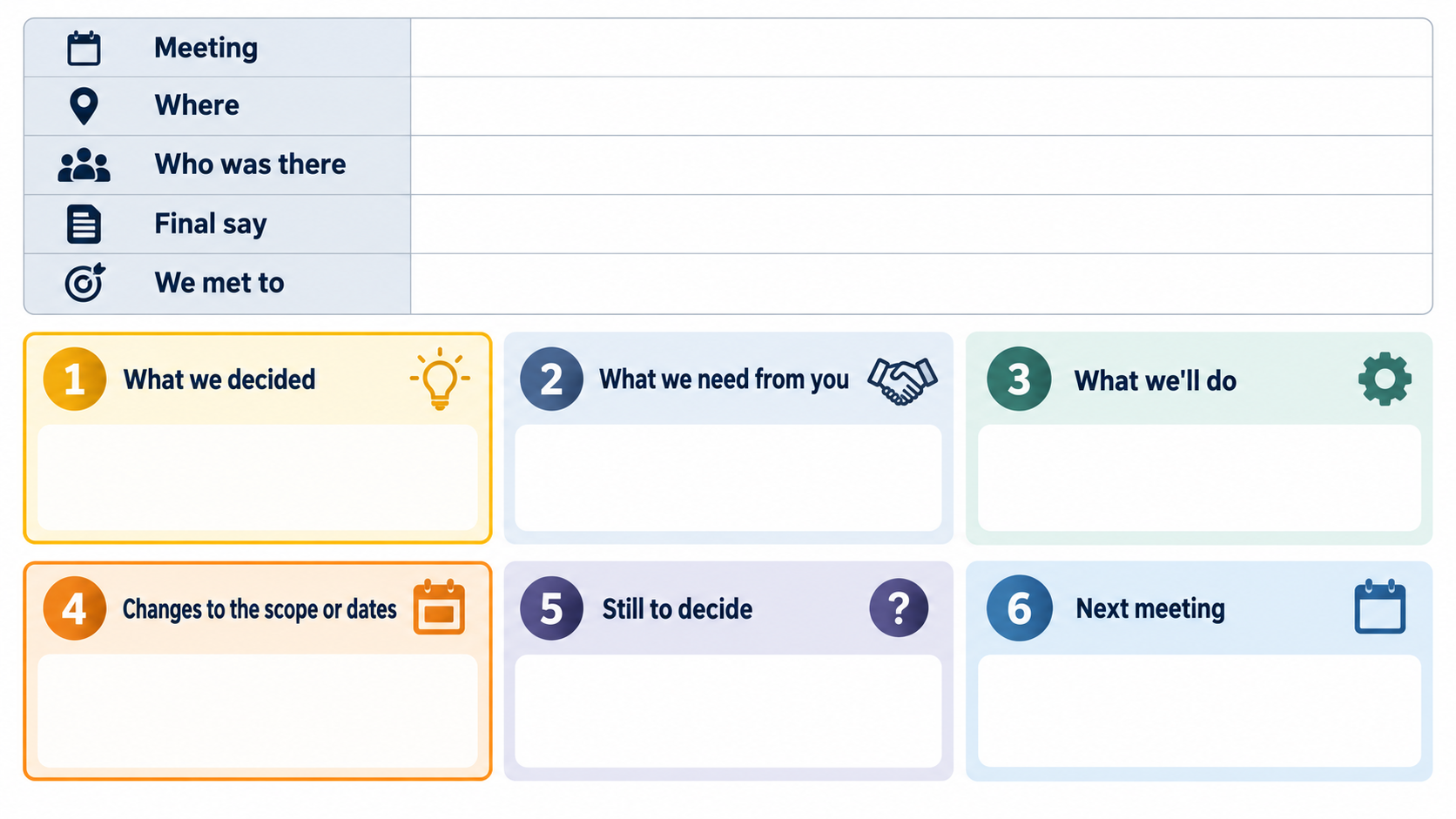
The template starts with five lines about the meeting:
- Meeting: day, date and time.
- Where: in person, video or phone.
- Who was there: names, with roles if the client sent more than one person.
- Final say: the one person who gives the final OK, and whether they were there.
- We met to: what the meeting was for, in one line.
Then six sections:
- What we decided. Each decision, who agreed to it, whether it was the final OK or changes for the next version, and which round of changes it was.
- What we need from you. What, by when, and what moves if it is late.
- What we’ll do. Your own tasks, each with a day.
- Changes to the scope or dates. Anything that adds work or moves a date, whether it is part of the agreed scope, and what happens next.
- Still to decide. What was not settled, who will decide it, by when, and what happens if it is left too late.
- Next meeting. Day, time and how, or when the next update will come instead.
It ends with one line: “If anything here is wrong or missing, please reply by [day].”
Generic templates cover attendees, the agenda and action items. Section 1 and section 4 are what a creative job needs most. The disagreements that come up weeks later are about what the client approved, how many rounds have been used, and whether an extra request was part of the price. Notes sent the same day are the cheapest written record of all three.
Leave out the conversation itself. Clients do not need an account of who said what. They need the outcome, in a form they can check in two minutes.
How do you fill in each section?
The header: who has the final say
Most of the header fills itself in. The line that matters is “Final say”. It is usually set in your scope of work: one person who gives the final OK. If that person was not at the meeting, write “waiting on [name]’s OK” next to each decision. A manager’s “yes” can be undone by an owner who was not there, and the notes are where you catch that early.
1. What we decided
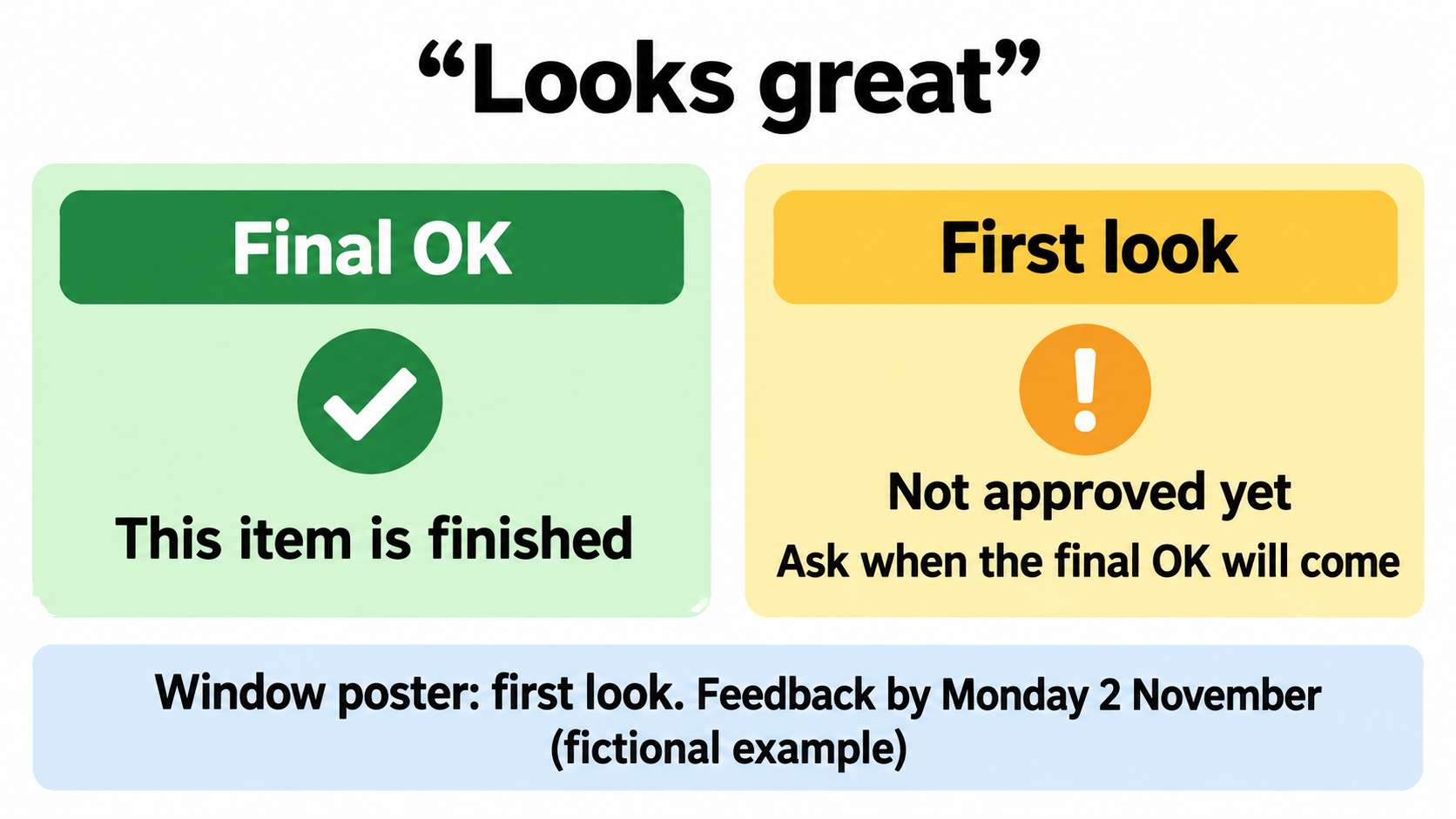
Write one line per item reviewed: what was decided, and who said yes. Then tick Final OK or Changes for the next version, and write the round, such as “Round: 1 of 2”.
In a review meeting, clients often say “looks great” about work they have not finished thinking about. If you treat that as the final OK and move on, you may hear a week later that it was never approved. Ask before the meeting ends: “Is that your final OK, or a first look?” Then write down the answer. If it was a first look, the item is not finished. Put the feedback you still need in section 2, with a date.
Count rounds the same way your scope does. In our scope of work template, one round is one consolidated set of feedback, sent once. Changes asked for in a meeting count as that round, so say so in the notes.
2. What we need from you
For each thing the client needs to send or do, write what it is, the date, and what moves if it is late. “If it’s late” is the line most templates leave out, and it is the reason the client reads this section. Keep it factual. “The final OK moves from Friday 6 November” works better than “this will cause delays”.
3. What we’ll do
Your own tasks, each with a day, so the client knows when to expect them. Include promises such as “written quote by Tuesday”. Those are easy to forget because they are not design work.
4. Changes to the scope or dates
Anything that adds work or moves a date goes here, even if it is small. For each change, tick whether it is part of the agreed scope (Yes, No or Not sure yet) and write what happens next. A date that moved because something arrived late is a change too: note it, even if it is inside the scope.
The template ends this section with a fixed line: “Nothing here changes the signed scope until we’ve both confirmed it in writing.” That follows business.gov.au’s guide to preparing a contract: “Contractors and hirers can make contract changes verbally, but it’s best to put them in writing and have both parties sign the document.” (business.gov.au, Prepare a contract). The notes record that a change came up. The written agreement comes after. Leave prices out of the notes and put them in the written quote.
5. Still to decide
Anything left open: what it is, who will decide, and by when. Add what happens if it is left too late, because that is what gets the decision made. “Changing prices after the files go to the printer on Monday 9 November means paying for a second print run” is hard to put off.
6. Next meeting
Day, time and how, and what it will cover. If you do not need another meeting, say when the next update will come instead.
The last line: reply by
“If anything here is wrong or missing, please reply by [day].” One or two business days is usually enough. The template adds “If I don’t hear back, I’ll work from these notes.” That is fine for the order of work and small choices. It does not cover section 4: a change to the scope still needs both of you to confirm it in writing, whatever happens to the email.
What should you keep out of the notes you send?
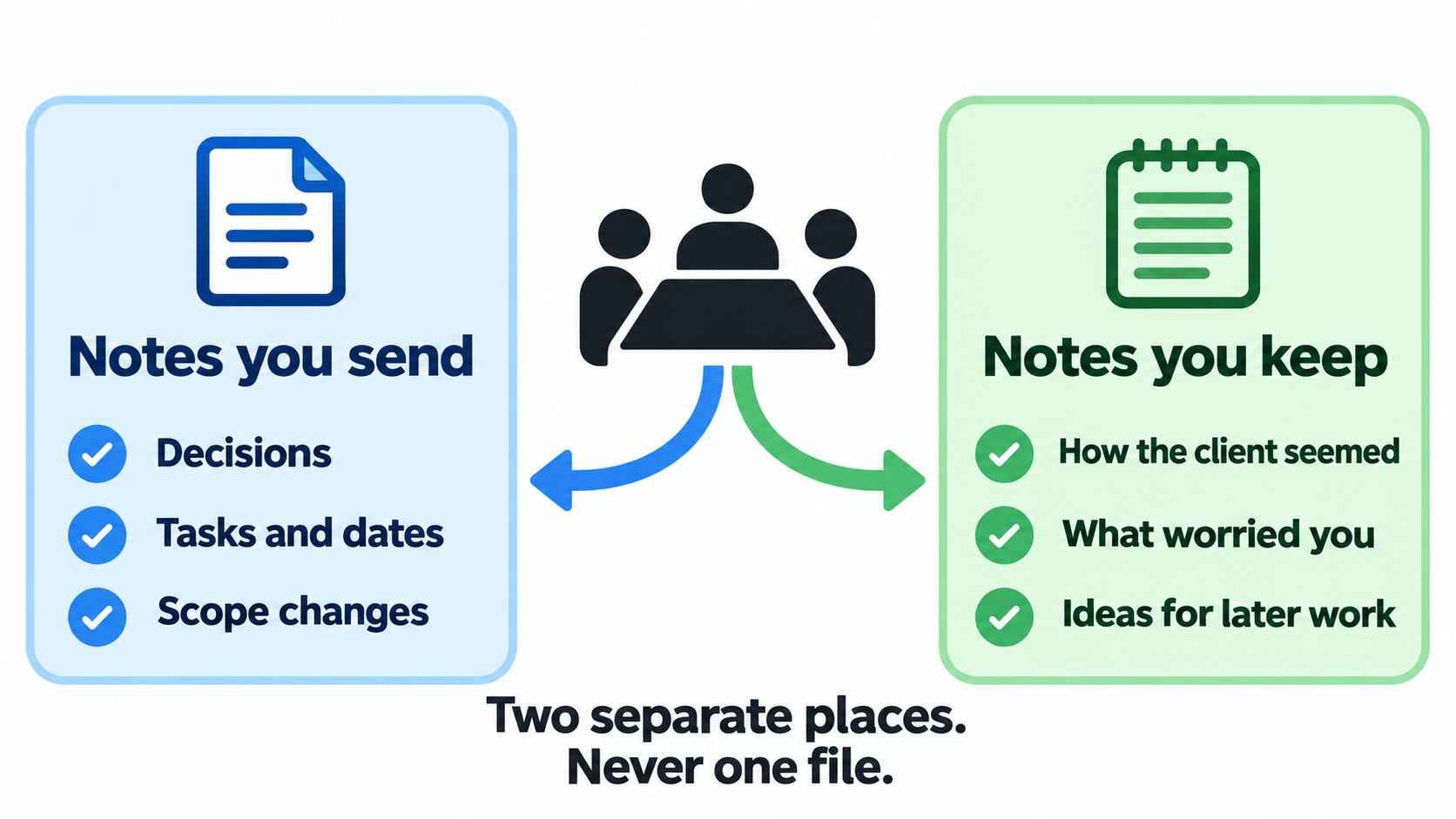
Keep two sets of notes from each meeting, in two separate places.
- Notes you send: the sections above. Facts the client can check and agree with.
- Notes you keep: how the meeting went, what the client cared about, anything that worried you, and ideas for later work. For example: “Sam is keen on more work after the reopening. Jane is watching costs, so send the cup stamp quote with two options.”
Do not keep both in one file with the private part at the bottom. Sooner or later the wrong version gets attached to an email. A separate document, a client folder or a notes app all work. In both sets, leave out personal details that have nothing to do with the job.
When should you send meeting notes after a client meeting?
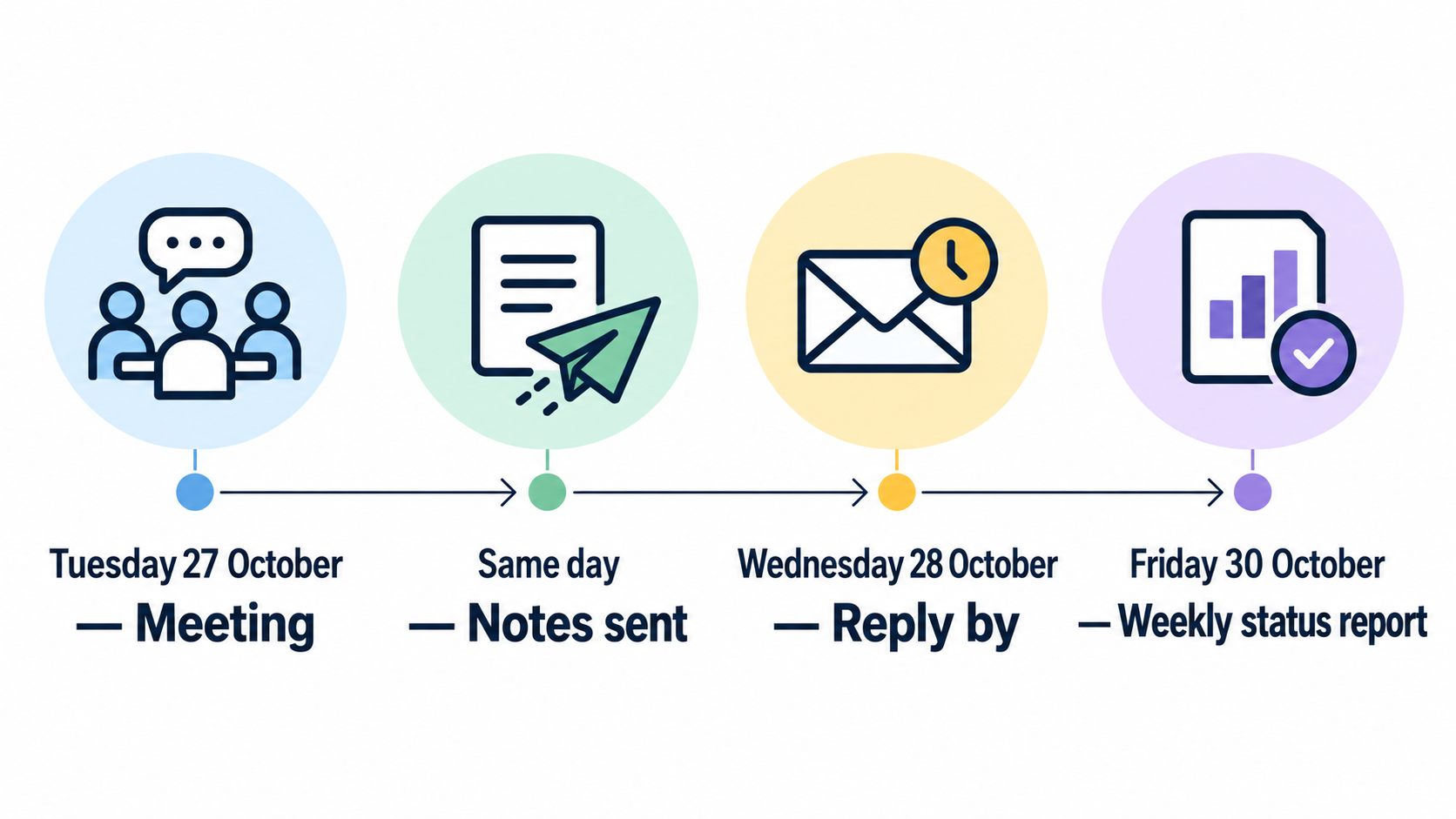
The same day, if anything was decided. The next morning at the latest. A client who reads the notes the same afternoon still remembers the meeting well enough to say “that’s not quite what I meant”.
Send them in the body of an email rather than as an attachment, unless the client has asked for a document to file. Use the same subject line pattern each time, such as “Example Street Café reopening — notes from our meeting on Tuesday 27 October”. The client can then find every set of notes by searching their inbox for the project name.
If you also send a weekly update, the notes feed straight into it. “What we need from you” becomes the same section of the client status report that week. Feedback that arrives later by email or chat is a different job, covered in our guide to turning client feedback into tasks.
A filled-in example: a first-draft review for a café reopening (fictional)
The example file continues the fictional café job from our creative brief template and scope of work template: a logo refresh, a menu, a window poster and six Instagram posts for a reopening on Saturday 21 November 2026. The scope includes two rounds of changes per item, set first drafts for Monday 26 October and the final OK for Friday 6 November, with Jane Citizen, the owner, giving the final OK. The meeting is at the café on Tuesday 27 October 2026, to go through the first drafts. In short:
- Who was there: Jane Citizen (owner, final say), Sam Example (café manager) and Chris Example (Example Design Studio).
- Decided: logo, keep the round badge, make the lettering heavier and use the darker green from option B (changes for the next version, round 1 of 2, agreed by Jane); Instagram posts, use the photo-led layout for all six and move the reopening date to the top (round 1 of 2, agreed by Jane, date suggested by Sam).
- A first look, not the final OK: Jane said the window poster “looks great”. It goes into section 2 as feedback still needed.
- Needed from the client: feedback on the window poster and the menu draft, in one email, by Monday 2 November, or the final OK moves from Friday 6 November; three photos of the new counter by Wednesday 4 November, or the studio uses the fit-out photos already sent.
- Studio: logo version 2 by Wednesday 28 October, menu first draft by Thursday 29 October, Instagram posts version 2 and a written quote for the coffee cup stamp by Tuesday 3 November.
- Changes: the menu first draft moves from Monday 26 October to Thursday 29 October because the wording was handed over at the meeting (it was due Friday 23 October), inside the scope; a coffee cup stamp design, which Sam asked for, is outside the scope and waits for a written quote and Jane’s written yes.
- Still to decide: keep the current menu prices or send new ones, Jane to decide by Monday 2 November.
- Next meeting: a 15-minute phone call on Thursday 5 November at 10:00 am. Reply by Wednesday 28 October if anything is wrong.
Our status report example picks up the same job three days later. The late menu wording, the poster feedback, the cup stamp quote and the menu price decision all appear there, with the same dates. That is the point of the notes: the weekly report does not have to rebuild the meeting from memory.
How to send meeting notes after a meeting: an email example
Here is the same meeting as the plain-text version, filled in (fictional):
Subject: Example Street Café reopening — notes from our meeting on Tuesday 27 October
Hi Jane and Sam,
Thanks for your time today. Here’s what we agreed, so we’re both working from the same list.
Meeting: Tuesday 27 October, 10:00 am, at the café
Who was there: Jane, Sam, Chris
Final say: Jane
We met to: go through the first drafts of the logo, window poster and Instagram posts1. What we decided
– Logo: keep the round badge, make the lettering heavier, use the darker green from option B. Agreed by Jane. Changes for the next version. Round 1 of 2.
– Instagram posts: photo-led layout for all six, reopening date at the top. Agreed by Jane. Changes for the next version. Round 1 of 2.2. What we need from you
– Feedback on the window poster and the menu draft, in one email — by Monday 2 November. If it’s late: the final OK moves from Friday 6 November. (Today’s “looks great” on the poster was a first look, not the final OK.)
– Three photos of the new counter — by Wednesday 4 November. If it’s late: we’ll use the fit-out photos you’ve already sent.3. What we’ll do
– Logo version 2 — by Wednesday 28 October
– Menu first draft — by Thursday 29 October
– Instagram posts version 2 — by Tuesday 3 November
– Written quote and new dates for the coffee cup stamp — by Tuesday 3 November4. Changes to the scope or dates
– Menu first draft moves from Monday 26 October to Thursday 29 October (the wording arrived today). Part of the agreed scope? Yes. Next: no other dates move if your feedback arrives by Monday 2 November.
– Coffee cup stamp design. Part of the agreed scope? No. Next: a written quote and new dates by Tuesday 3 November. We won’t start until you’ve said yes in writing.
Nothing here changes the signed scope until we’ve both confirmed it in writing.5. Still to decide
– Menu prices: keep the current ones, or send new ones? Jane decides by Monday 2 November. If it’s left too late: changing prices after the files go to the printer on Monday 9 November means paying for a second print run.6. Next meeting
Thursday 5 November, 10:00 am, by phone (15 minutes). To cover: the final menu and poster before your OK on Friday 6 November.If anything here is wrong or missing, please reply by Wednesday 28 October. If I don’t hear back, I’ll work from these notes.
Thanks,
Chris
Example Design Studio
Notice what is not there: no account of the discussion, no “as discussed”, nothing from the private notes. Everything in it is something Jane can check against her own memory of the meeting.
Where meeting notes fit with your brief, scope and status reports
On a creative job, the documents follow one another. The creative brief records what the client wants. The scope of work records what you agreed to deliver, how many rounds and by when. Meeting notes record what changed at each review. The weekly status report pulls it together. If a disagreement comes up near the end of a job, the answer is usually in one of those four.
For the first meeting with a new client, our client onboarding guide covers what to agree before work starts. When requests in section 4 keep coming, see our guide to stopping scope creep.
TASKUL, which publishes this guide, has two places for meeting notes. Each client has a Sales & Meeting Log for the notes you keep: paste them in and save them as they are, or press “Save with AI summary” to file them under Deal Summary, Their Style & What Resonated, Risks & Concerns and Next Actions. Separately, when you create a project, you can paste a brief or meeting notes and TASKUL’s AI writes the project summary and creates tasks, with due dates where the notes give them. Both AI features use AI credits from your plan’s monthly allowance, and saving without AI uses none. TASKUL does not record meetings, write the notes you send or email them to the client. The sections above are still yours to write.
Client meeting notes template FAQ
What is the difference between meeting notes and meeting minutes?
Minutes are a formal record, usually for a board or committee, and are often approved at the next meeting. Notes are shorter and less formal. For a client meeting on a creative job, notes are enough, as long as they record decisions, tasks and changes, and the client has had a chance to correct them.
How long should client meeting notes be?
One screen of email on a phone, for most meetings. Delete sections with nothing in them rather than writing “none”. If the notes run long, check whether you are describing the discussion instead of the outcome.
Can I record the meeting to write the notes?
Tell the client before you start recording and ask whether they are comfortable with it. Then write the notes from the recording. A recording or transcript does not replace the notes: clients rarely listen back, and the six sections are what they act on.
Can I put personal details about the client in my notes?
Keep both sets of notes to what the job needs. As for the law, the OAIC says: “Most small businesses are not covered by the Privacy Act 1988, but some are. A small business is one with an annual turnover of $3 million or less.” (OAIC, Small business). Some businesses are covered regardless of turnover, such as health service providers. The checklist on that OAIC page will tell you whether your business is one of them.
What if the client replies that something in the notes is wrong?
Thank them, correct the notes, and send the corrected version as a reply in the same email thread, so the corrected version is the last one in the thread. If the correction changes a date or a task, update your task list the same day.
Can I use the template in Google Docs?
Yes. Upload the Word file to Google Drive and open it with Google Docs, or paste the plain-text version into a new document.