
A client status report template for freelance creative work should tell the client four things each week: what is finished, what happens next and by when, what you need from them and what moves if it is late, and how many rounds of changes are left. The free template below does that in nine short sections. It comes as a blank Word file, a filled-in example (a fictional café job) and a plain-text version you can paste straight into an email.
It is written for freelance designers, web designers, video makers and small studios in Australia who send updates to clients. Most project status report templates online are built for a different job: a project manager reporting to executives inside a company, with budgets, resources and “RAG” colours for a steering committee. A café owner waiting on a new menu needs a short email that says where things are up to and what they need to do this week.
Download the client status report template
All three files are free and need no sign-up:
- Blank weekly status report template (Word, A4). Fill in the blanks, delete any section with nothing to report this week, then delete the first line.
- Filled-in example (Word, A4). Week two of a fictional café reopening, carried on from our scope of work template.
- Plain-text email version. The same nine sections with a subject line, for pasting into the body of an email or a Google Doc.
The example is made up. The café, studio, people and dates in it do not belong to a real business. The quotes from the ACCC and business.gov.au below were checked against their pages on 18 October 2026. This guide is general information, not legal advice.
What should a client status report include?
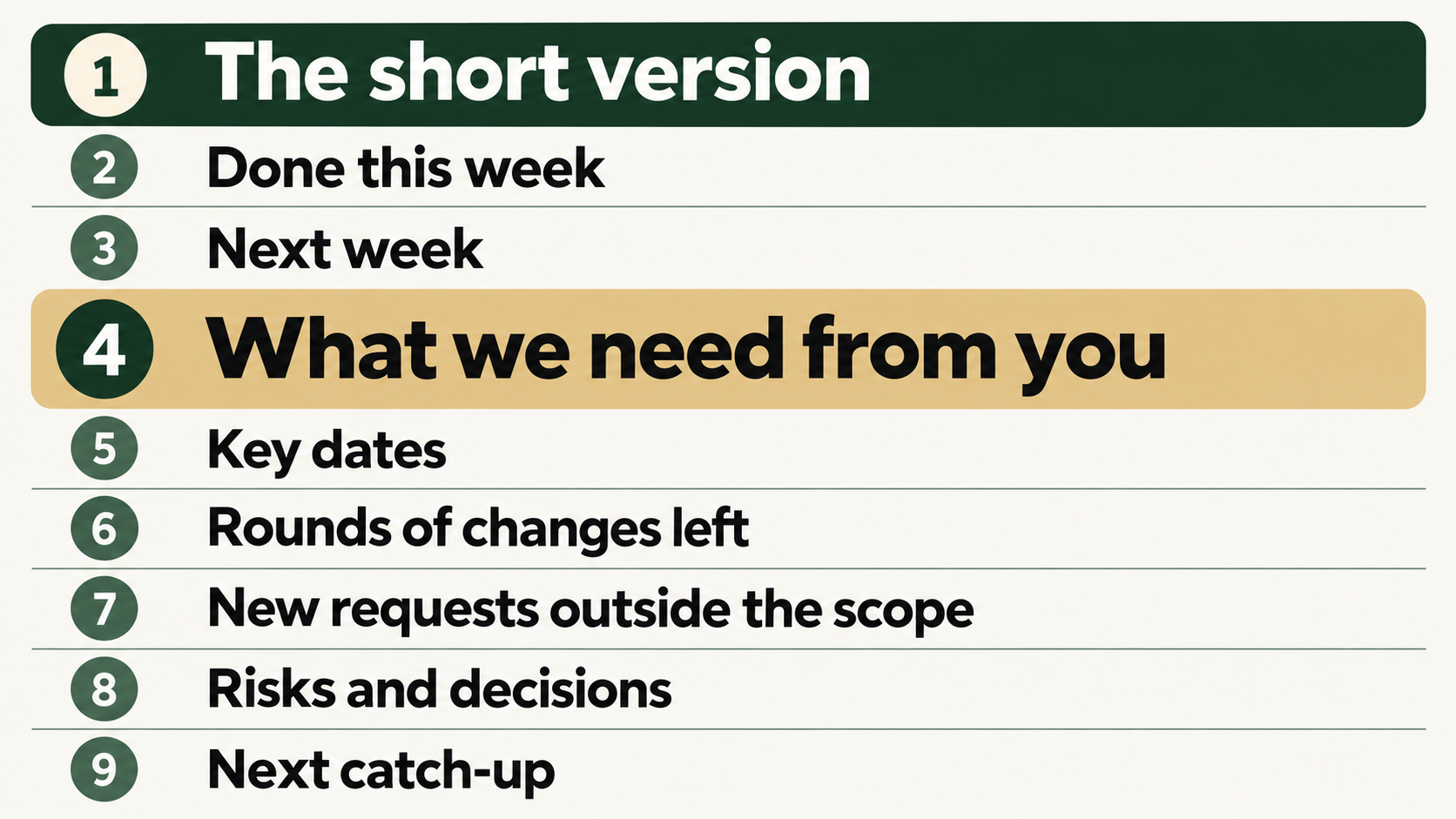
The template has nine sections, in this order:
- The short version. On track, at risk or behind, and one or two sentences on why.
- Done this week. Things that are finished.
- Next week. What you will do, each with a day.
- What we need from you. What, by when, and what moves if it is late.
- Key dates. The date you agreed, the date now, and the reason if it moved.
- Rounds of changes left. For each item, rounds used out of rounds included, and who gives the final OK.
- New requests outside the scope. Each request, and whether it is going ahead, on hold or not happening this time.
- Risks and decisions. Things the client can act on, with the day you need a decision.
- Next catch-up. Day, time and how, or a note that the next report will come instead.
Most templates for this search cover the first three, often under names like “accomplishments”, “upcoming tasks” and “overall status”. Sections 4 to 7 do the most work on creative jobs, and general templates either leave them out or reduce them to a single word like “blockers”. On a design or web job, three things tend to push dates around: the client’s content arriving late, the number of rounds of changes, and small extra requests. A weekly report is the cheapest place to keep a written record of all three.
Leave out what the client cannot use. Hours logged, internal task lists and percentage-complete bars mean something to you and very little to a client. The template has no budget section on purpose. If a request changes the price, it goes in section 7 as “on hold” and the price goes in a written quote.
How do you fill in each section?
Each section in the Word template has a one-line note under the heading. The notes below add what to watch for.
1. The short version
Tick one of On track, At risk or Behind, then write one or two sentences. If something has slipped, say so here at the top. A client who finds the bad news at the bottom of a report reads the next one with less trust.
“At risk” means a date will move unless something happens this week, and usually that something is in section 4. In the example: The menu draft went out three days late because the wording arrived late. If we have your feedback by Monday, the final OK and reopening day stay as planned.
2. Done this week
Write three to five lines, each one finished and dated. “Logo: first round of changes made. Version 2 sent Wednesday 28 October” is finished. “Worked on logo” leaves the client asking when it will be done.
3. Next week
Give every line a day. If a line depends on the client, say so (“within 1 business day of receiving your changes”), so the client can see which dates you control and which depend on them.
4. What we need from you
This is the section that asks the client to act, so write each request in three parts: what you need, the date, and what moves if it is late. The next part of this guide covers how to word it.
5. Key dates
Use the dates from your scope of work, in two columns: the date you agreed and the date now. When they match, write “No change”. When they do not, give the reason in a few words. Keep the agreed date on the page even after it moves. Then anyone reading the report later can see what was planned and what changed.
6. Rounds of changes left
Count rounds the way your scope does. If your scope says One round means one consolidated set of feedback, sent once, then three emails from two people about the logo are still one round, and the report says “Logo: 1 of 2”.
When an item reaches its last included round, say so before the client sends feedback: Logo: 1 of 2 used. The next round is the last one included. Any after that will be quoted before we start. It reads as a fact on a Friday. Raised for the first time after a third set of changes, it reads as a complaint.
Add the name of the person who gives the final OK. If more than one person at the client sends feedback, naming the one who signs off avoids a round of crossed emails.
7. New requests outside the scope
List each new request with one of three outcomes: Going ahead, On hold or Not this time, and what happens next. Keep prices out of the report. “A written quote and new dates will follow by Tuesday” is enough. Our guide on how to stop scope creep covers how to price the request itself.
8. Risks and decisions
Include risks the client can do something about, and put the decision first. “Decision: keep the current menu prices, or send new ones by Monday?” gives the client something to do. “Risk: printer delays” belongs in the report only if there is a choice for the client to make.
9. Next catch-up
Day, time and how. If there is nothing to discuss, write that the next report will come instead. Not every week needs a call.
How do you report a delay caused by the client?
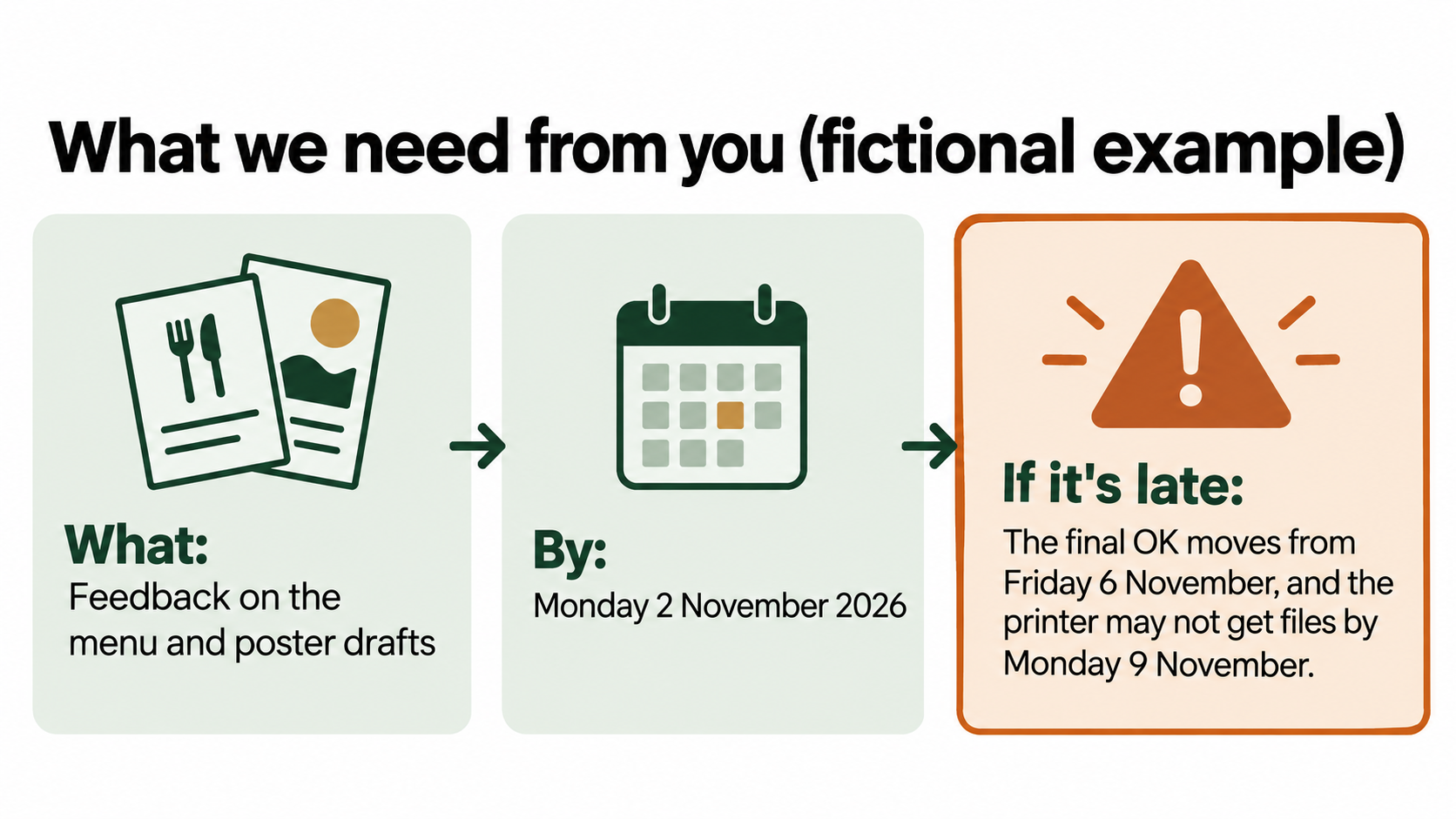
State the fact and the consequence, and leave out blame. Each item in section 4 has the same three parts:
- What: Feedback on the menu and poster drafts
- By: Monday 2 November 2026
- If it’s late: The final OK moves from Friday 6 November, and the printer may not get files by Monday 9 November.
The “if it’s late” line is the one most templates leave out. It shows the client what a late reply costs before it happens, which turns a reminder into a decision they can make.
To write it, work backwards from the date that cannot move. In the example, the café reopens on Saturday 21 November and the printer needs files on Monday 9 November. The final OK is Friday 6 November, the last working day before the files go to the printer, and changes take up to 1 business day. Feedback on Monday 2 November leaves time for the changes and a final check. If it arrives on Thursday 5 November instead, the changes land on Friday 6 November and the final OK has to happen the same day. If it arrives later than that, the files cannot reach the printer on Monday 9 November. Then the client has to choose: a later print date, or fewer changes. The next report should say which of those has happened, using the dates.
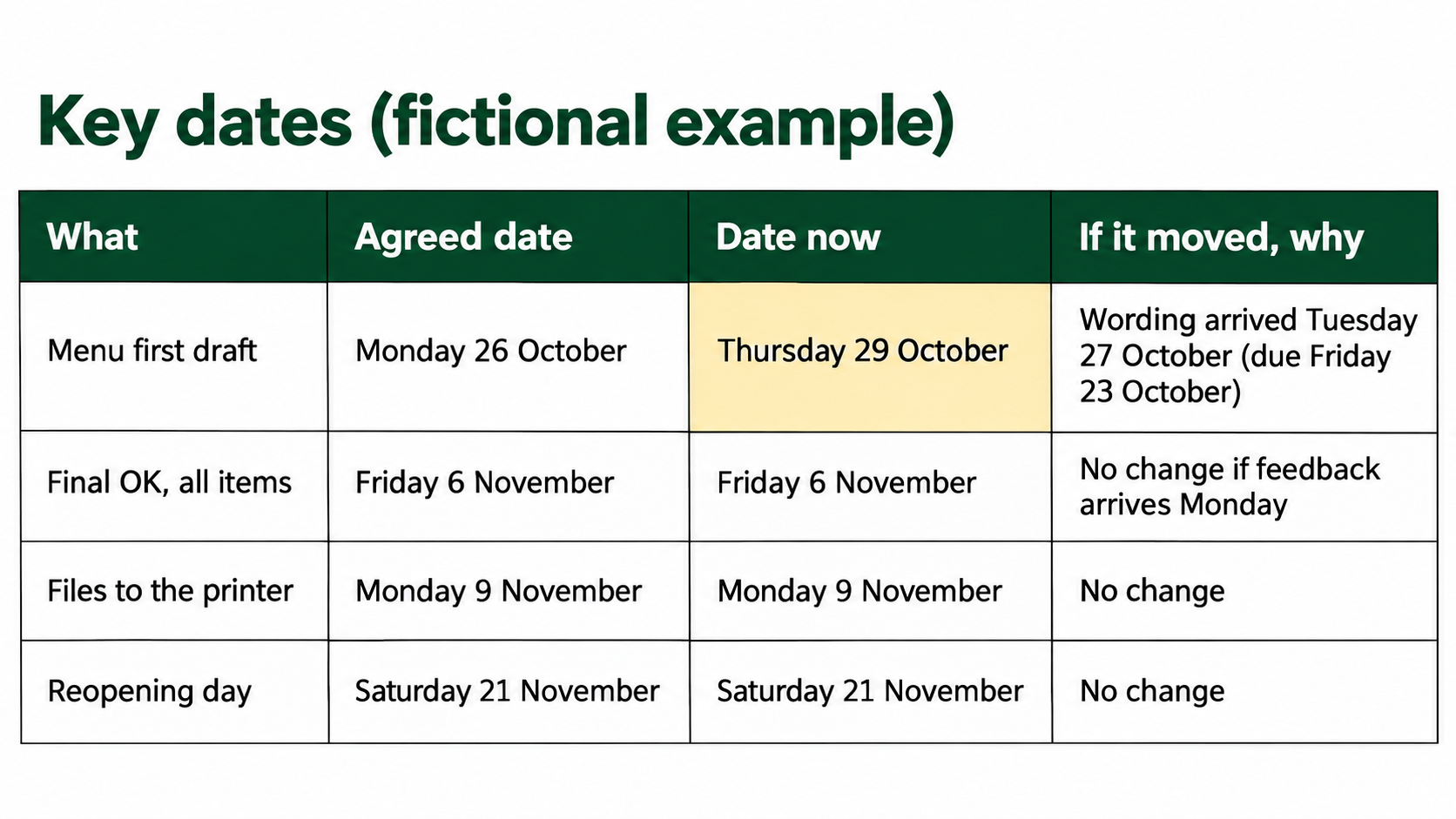
When something has already arrived late, put it in section 5 with both dates. In the example, the menu wording was due on Friday 23 October and arrived on Tuesday 27 October, so the menu draft moved from Monday 26 October to Thursday 29 October. The other first drafts went out on the agreed day. The report says that in one line, once, without an apology or an accusation.
In Australia, dates matter to your client as well as to you. If no time frame has been agreed, the ACCC says Services must be supplied within a reasonable time, if there’s no agreed time frame.
(ACCC: Consumer rights and guarantees). A business client can be covered by these consumer guarantees too, for example when the service costs less than $100,000 including GST
, though the same page lists exceptions. That is a rule you meet as the supplier. The simple habit that follows from it is to agree dates in your scope and keep them visible in the weekly report. If a disagreement about dates starts, get proper advice.
If a delay means the job itself has to change, such as a new launch date or fewer deliverables, the report is not enough on its own. Business.gov.au says contractors and hirers can make contract changes verbally, but it’s best to put them in writing and have both parties sign the document.
(business.gov.au: Prepare a contract). Use the report to raise it, then agree the change in writing in the way your scope sets out.
How often should you send a client status report?
Weekly suits most freelance creative jobs that run for a few weeks to a few months, especially while you are waiting on the client for content or feedback. Send it on the same day each week. Friday works well because section 4 can ask for things by Monday.
Send it fortnightly when a job is long and slow, such as a website with a three-month build and few client decisions in the middle. For a job that takes less than two weeks, a single “here’s the draft, here’s what I need by Thursday” email does the same work.
Send an extra update as soon as a key date is going to move. Bad news should not wait for Friday.
Red, amber and green are common in internal reports. The template uses words (On track, At risk, Behind) because the plain-text email has no colour, some readers cannot tell red from green, and “amber” means little to someone who has never sat in a project meeting.
A filled-in example: week two of a café reopening (fictional)
The example file continues the fictional café job from our creative brief template and scope of work template: a logo refresh, a menu, a window poster and six Instagram posts for a reopening on Saturday 21 November 2026. The scope set first drafts for Monday 26 October and the final OK for Friday 6 November. The report is for the week ending Friday 30 October 2026. In short:
- Short version: At risk. The menu draft went out three days late because the wording arrived late. If feedback comes by Monday, the final OK and reopening day stay as planned.
- Done: window poster and Instagram first drafts sent Monday 26 October; logo version 2 sent Wednesday 28 October; menu first draft sent Thursday 29 October.
- Needed from the client: feedback on the menu and poster, and an OK on logo version 2, both by Monday 2 November; three photos of the new counter by Wednesday 4 November, or the studio will use the fit-out photos already sent.
- Key dates: menu first draft moved from Monday 26 October to Thursday 29 October; final OK (Friday 6 November), files to the printer (Monday 9 November) and reopening day are unchanged.
- Rounds left: logo and Instagram posts 1 of 2 used; menu and poster 0 of 2. Final OK from the café owner.
- Outside the scope: a coffee cup stamp design, on hold, with a written quote and new dates to follow by Tuesday 3 November.
- Decision: keep the current menu prices, or send new ones by Monday 2 November. Changing prices after the files go to the printer on Monday 9 November means paying for a second print run.
Compare that with “Hi, just a quick update, things are going well, still waiting on a few bits from your end.” Both describe the same week. The first tells the owner what to do on Monday, and it will still make sense if someone asks in December why the menu was late.
Project status update email to client: a filled-in example
Most clients read the report in the body of an email. Here is the same week as the plain-text version, filled in (fictional, shortened where a section has nothing new):
Subject: Example Street Café reopening — weekly update, week ending 30 October
Hi Jane,
Here’s where the reopening project is up to this week.
1. The short version
At risk: the menu draft went out three days late because the wording arrived late. If we have your feedback by Monday, the final OK and reopening day stay as planned.2. Done this week
– Window poster and Instagram posts: first drafts sent Monday 26 October
– Logo: version 2 sent Wednesday 28 October
– Menu: first draft sent Thursday 29 October3. Next week
– Instagram posts: version 2 to you by Tuesday 3 November
– Menu and poster: your changes made within 1 business day of receiving them4. What we need from you
– Feedback on the menu and poster drafts — by Monday 2 November. If it’s late: the final OK moves from Friday 6 November, and the printer may not get files by Monday 9 November.
– Your OK on logo version 2 — by Monday 2 November. If it’s late: the menu and poster can’t be finalised until the logo is.5. Key dates
– Menu first draft: agreed 26 October, now 29 October. Wording arrived 27 October.
– Final OK 6 November, files to the printer 9 November, reopening 21 November: no change.6. Rounds of changes left
– Logo and Instagram posts: 1 of 2 used. Menu and poster: 0 of 2.
Final OK from: Jane7. New requests outside the scope
– Coffee cup stamp: on hold. A written quote and new dates will follow by Tuesday 3 November.9. Next catch-up
Thursday 5 November, 10:00 am, by phone. To cover: final menu and poster.Questions? Reply to this email, or call me.
Thanks,
Chris
Example Design Studio
Keep the subject line the same every week, with the date at the end. The client can then find every report by searching their inbox for the project name.
How do you send status reports to several clients and projects each week?
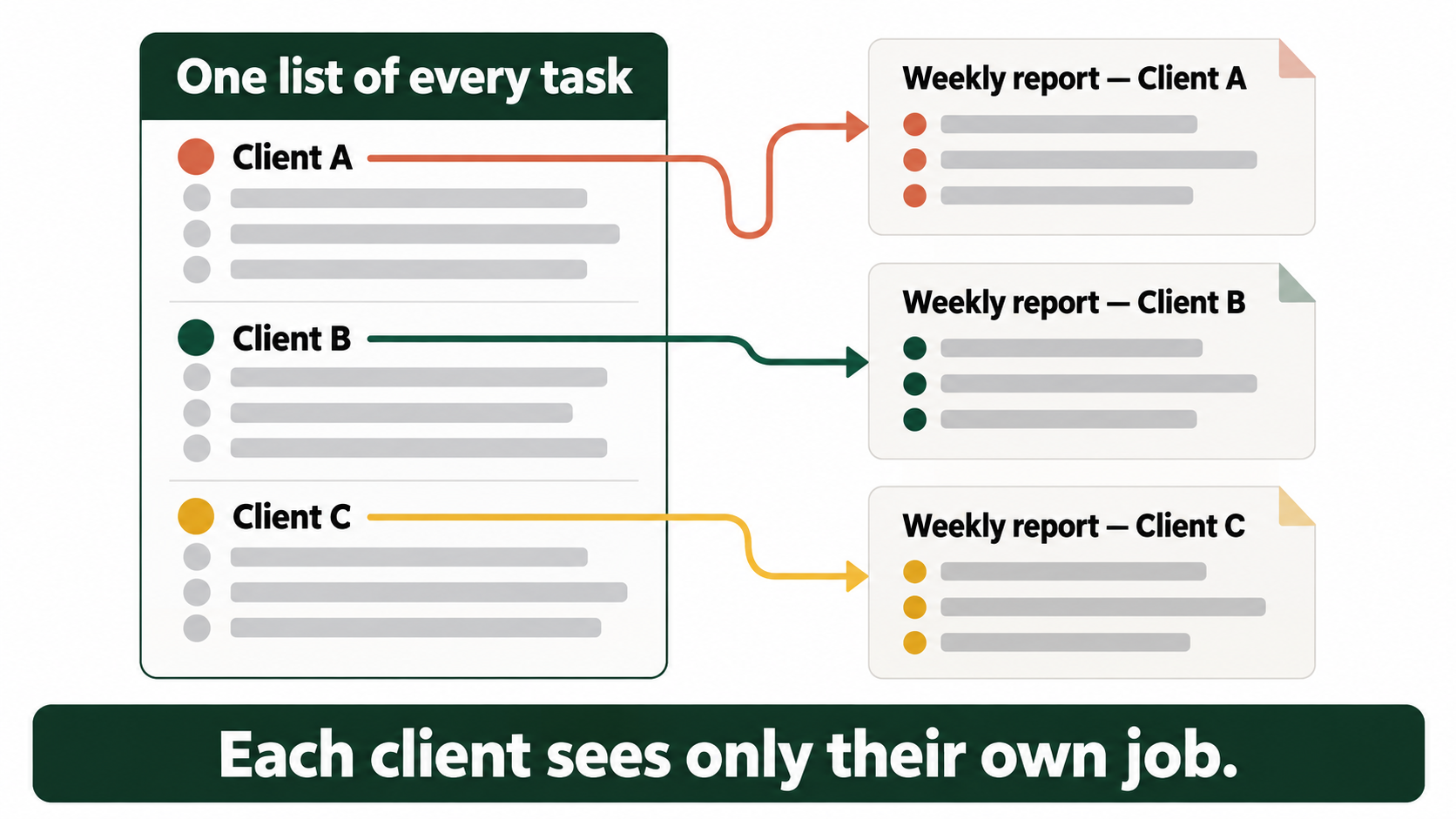
Keep the material in one place and the reports separate. Most multi-project report templates online put every project in one table for a manager, which suits an internal meeting. Clients each need their own report, and a report to one client must never show another client’s name, dates or files.
A routine for a handful of clients:
- Keep one list of every task across all clients, each with the client, a due date and whether it is waiting on you or on them. A spreadsheet works. Our guide to managing multiple client projects has a free tracker for this.
- On report day, filter by one client. Sections 2 and 3 come almost straight from the list: finished tasks this week, due tasks next week.
- Write sections 1 and 4 by hand. These need judgement, and they are what the client acts on.
- Copy section 6 from the scope and update the count.
- Check the recipient and the attachments before you send. Start a fresh email from the plain-text template for each client. Forwarding last week’s report to a different client is how names leak.
If a report takes a long time to write, look at the list first. Our guide on juggling multiple clients covers how to keep the “waiting on the client” items visible during the week.
TASKUL, which publishes this guide, can hold the list in step 1. It keeps each client’s projects and tasks, the status of each task, and a Due This Week list of unfinished tasks due in the next seven days. It does not write or send the report. Sections 1 and 4 are still yours to write.
Client status report template FAQ
How long should a client status report be?
Aim for one page, or one screen of email on a phone. Delete sections with nothing to report rather than writing “none”.
Should I send the report as an attachment or in the email?
In the body of the email, for most clients. They often read it on a phone, and an attachment is one more thing to open. Use the Word file when the client needs a document to file or forward, or when more than one person signs things off.
What should I write when there is nothing new this week?
Send a two-line update anyway if the client is waiting on you or you are waiting on them: what is next and by when, and what you still need. If neither is true, skip the week and say in the previous report when the next one will come.
What is the difference between a status report and a progress report?
People use the two names for the same thing. Some use “progress report” for a longer report at a milestone. For freelance creative work, a short weekly status report covers both.
Should a status report include the budget?
Not for most freelance creative jobs on a fixed quote. The client agreed the price in the quote. What they need to know is whether anything outside the scope has been requested, which section 7 covers. Put prices in a written quote.
Can I use the template in Google Docs?
Yes. Paste the plain-text version into a new Google Doc, or open the Word file in Google Docs. The nine sections are the same in all three files.