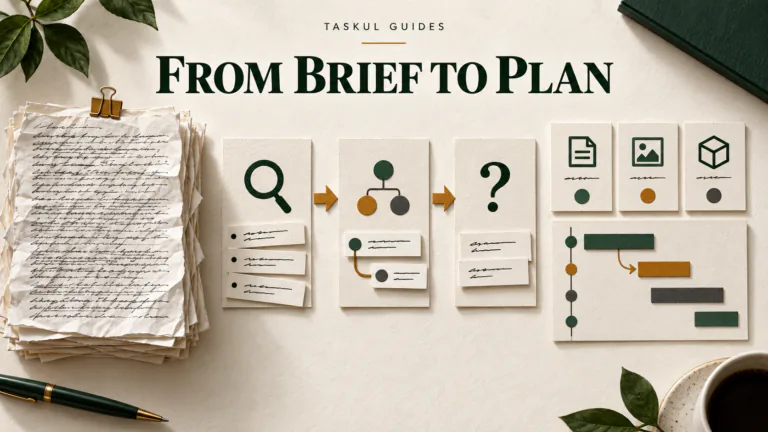

A WIP meeting (work-in-progress meeting) is a short weekly meeting where a studio goes through every live client job in one list: what is late or at risk, what is due this week, what is waiting on a client, and who has room for new work. The free WIP meeting agenda and WIP tracker below are built to get through all of that in 30 minutes. They come as a blank Word agenda, a filled-in example (three fictional jobs), an Excel WIP list and a short email for chasing clients after the meeting.
This guide is for design, web, video and marketing studios with two or more people. If you work alone, you do not need a meeting. You need one list you check every morning, and our guide to managing several client projects at once covers that.
Download the WIP meeting agenda and tracker
All four files are free and need no sign-up:
- Blank WIP meeting agenda (Word, A4). Five items in a fixed order, with the minutes for each and an actions table at the end.
- Filled-in agenda (Word, A4). One Monday meeting at a fictional studio with three live jobs.
- WIP tracker (Excel). One row per job. The first sheet is blank, the second is the same fictional example.
- Client chase email (plain text). One short email per client for everything you are waiting on, with an example underneath.
The examples are made up. The studio, clients, people and dates do not belong to a real business. The Excel file works in Google Sheets and Numbers too.
What is a WIP meeting in a studio or agency?
It is the one meeting a week where the whole team looks at the whole workload. Each person knows their own jobs. The WIP meeting is where someone notices that two jobs need the same designer on the same Thursday, that a client has not sent copy for nine days, or that a “small” job has become the biggest one in the studio.
“WIP” means different things in other fields. Accountants and builders use “WIP report” for the value of unfinished work on the books, and universities use “WIP” for research in progress. This guide is about the agency kind: a running list of client jobs and a meeting to go through it.
Three things make a WIP meeting different from a general team catch-up:
- It goes job by job, not person by person. The list is the agenda. Nobody gives a report on their week.
- It ends with names and dates. Every problem raised leaves the room with one person and one day next to it.
- It does not solve problems in the meeting. If a job needs a 20-minute conversation, the meeting decides who has that conversation and when, then moves on.
Who should be in the WIP meeting, and who runs it?
Everyone who works on client jobs, plus whoever talks to clients. In a three-person studio that is everyone. In a studio of 12, it may be the people who manage jobs plus one person from each team, so the meeting stays at 30 minutes.
One person chairs it. The chair is not always the owner. It is whoever keeps the WIP list up to date, because they are the one who notices a row that has not changed in two weeks. The chair’s jobs:
- Have the list up on a screen before anyone sits down.
- Keep to the order and the minutes.
- Stop discussions after two minutes and turn them into an action: who, what, by when.
- Read the actions back at the end and send them out the same morning.
Clients do not come to the internal WIP meeting. What they need from it, which is usually a date and what you need from them, goes to them in an email afterwards.
What goes on a WIP list?
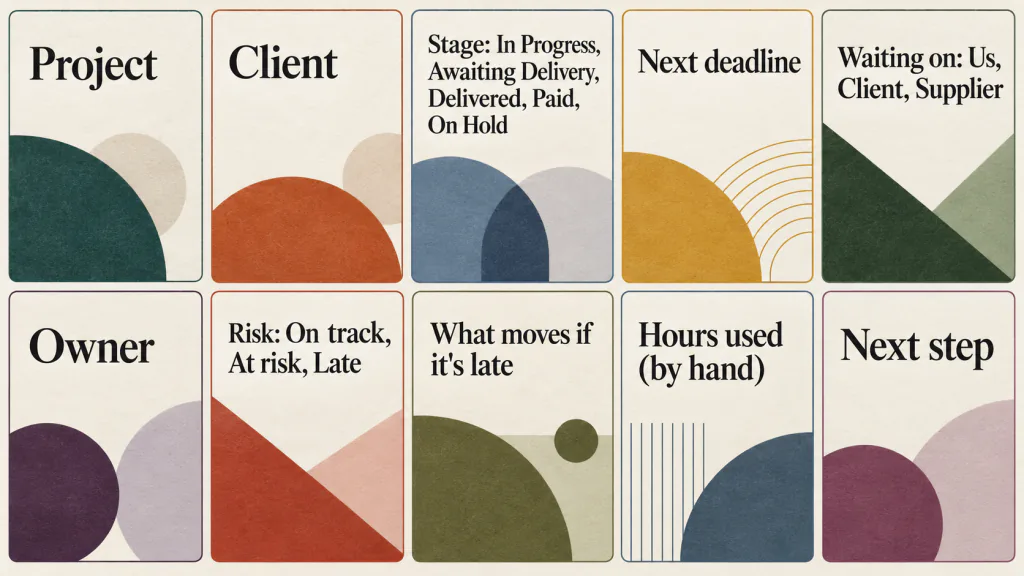
One row per live job. The tracker has ten columns:
- Project. The job name as the client knows it.
- Client.
- Stage. Pick one. In Progress: being worked on. Awaiting Delivery: the work is finished and waiting to be sent or handed over. Delivered: handed over, not paid yet. Paid: comes off the list next week. On Hold: stopped, with no restart date yet.
- Next deadline. The next date that matters, not the final one. For a website that might be “first draft of home page”, not “launch”.
- Waiting on. Us, Client or Supplier. If the job is stuck, this says where.
- Owner. One name. If two people own a job, nobody does.
- Risk. On track, At risk or Late (rules below).
- What moves if it’s late. The thing that slips if the next deadline is missed: a print date, a launch, a client’s own event.
- Hours used. Written in by hand, if you track time. Leave it blank if you don’t.
- Next step. The single next action, in a few words.
The column most templates leave out is What moves if it’s late. Without it, every late job looks equally late. With it, the meeting can see that a late logo for a café opening on a fixed date matters more this week than a late blog template nobody is waiting for.
Jobs you have won but not started go on the list too, with Stage left blank and the start date as the next deadline. That is what agenda item 4 looks at.
Keep tasks off the WIP list. If a row needs ten sub-lines, the detail belongs in the job itself. The WIP list is for deciding where the studio’s attention goes this week.
How do you run a 30-minute WIP meeting?
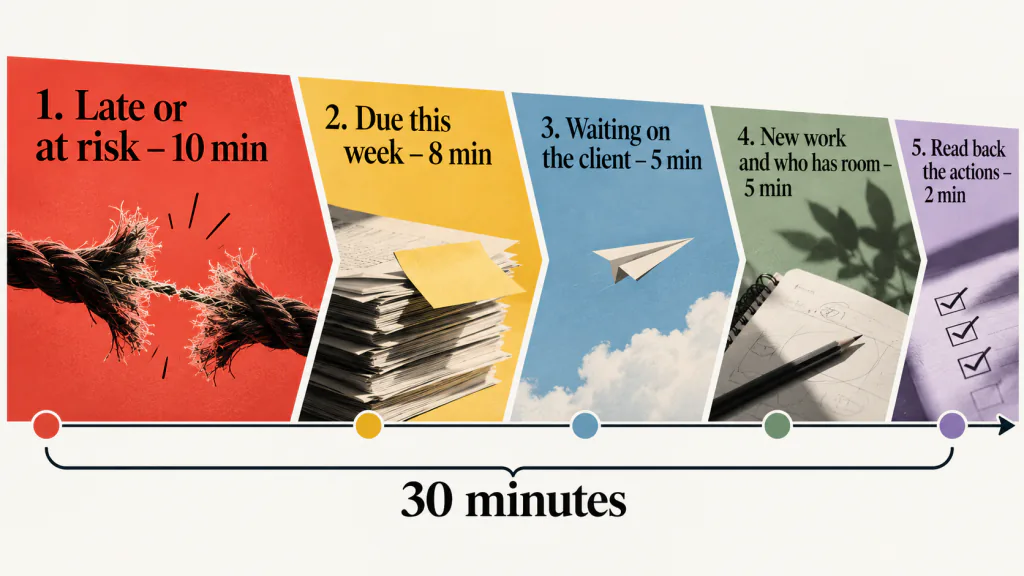
Same day, same time, same order every week. Many studios meet first thing on Monday, while the week’s deadlines are still ahead. The agenda has five items:
1. Late or at risk (10 minutes)
Sort the list by Risk and start with Late. For each row, answer three questions: what is the new date, what moves because of it, and who tells the client today. Then the At risk rows: what has to happen this week to keep the date, and who does it.
This item comes first for a reason. If the meeting runs out of time, it is better to have skipped new work than a job that is about to miss a print deadline.
2. Due this week (8 minutes)
Every row with a next deadline between today and Friday. Ask the owner two things: will it be done by the day, and do they have what they need? Look for two deadlines that need the same person on the same day.
3. Waiting on the client (5 minutes)
Every row where Waiting on says Client. For each, decide what you need, by when, and what moves if it doesn’t arrive. Then decide who sends the email and when. One email per client, even if you are waiting on three things from them.
4. New work and who has room (5 minutes)
Jobs that have been won or are about to start, and who will take them. Before the meeting, each person writes the days they have free this week next to their name, and nobody takes new work beyond that. Most studios skip this item, and it is the one that stops the same designer being booked twice.
5. Read back the actions (2 minutes)
The chair reads every action out: what, who, by when. Anything without a name or a day gets one now. The actions go out in writing straight after the meeting. Before next week’s meeting, the chair marks each one done or not done, and anything not done goes into item 1 or 2.
How do you decide if a job is on track, at risk or late?
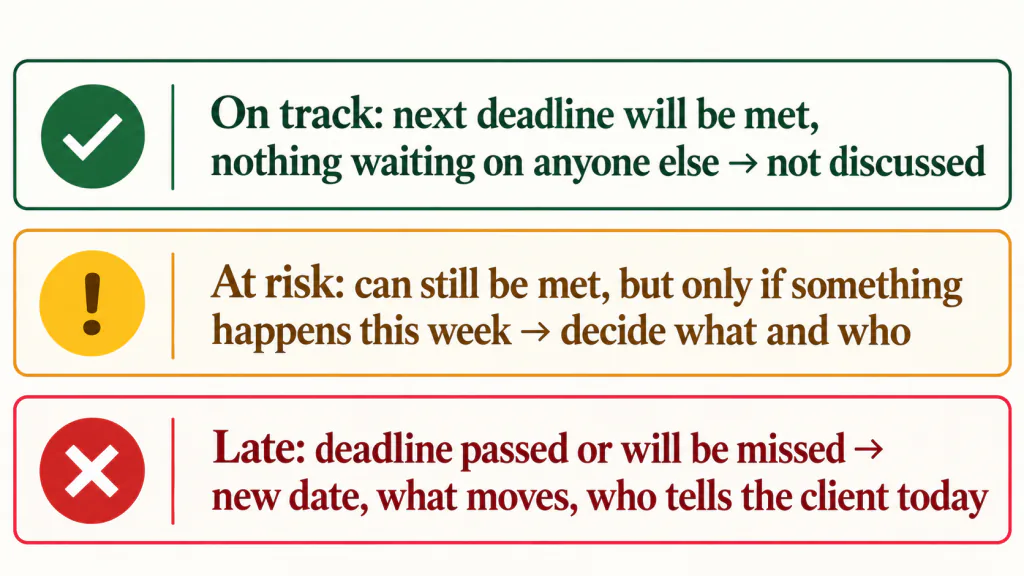
The labels only help if everyone uses them the same way. These are the rules in the tracker:
- On track: the owner expects to meet the next deadline and nothing is waiting on anyone else. The meeting does not discuss it.
- At risk: the deadline can still be met, but only if something happens this week. Something is waiting on the client or a supplier, or the work left looks bigger than the time left. The meeting decides what has to happen and who does it.
- Late: the next deadline has passed, or the owner already knows it will be missed. The meeting sets a new date, names what moves, and decides who tells the client today.
Two more rules. If you fill in Hours used and a job has used more than 80% of the hours you quoted while less than 80% of the work is done, mark it At risk. On Hold jobs get no label. They get a restart date or a date to close them.
The owner sets the label before the meeting, not during it. A job is not “on track” because nobody has looked at it. If a row’s next deadline has passed and it still says On track, the chair changes it to Late before the meeting starts.
What should you do with “waiting on the client” after the meeting?
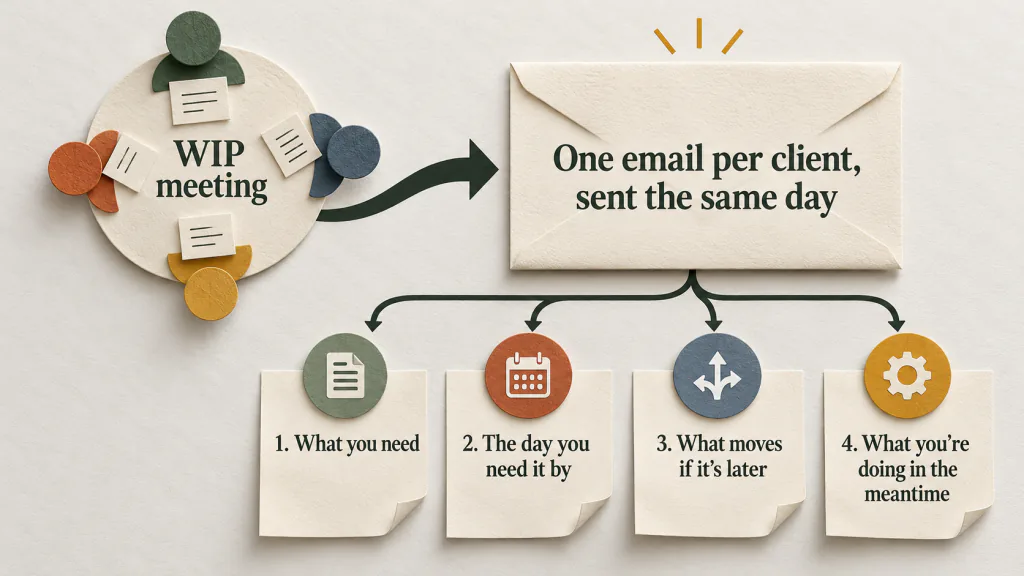
Send it the same day, from the person the client knows. A chase that goes out on Thursday has already cost three days of the week. The client chase email in the downloads has four parts:
- What you need, one line per item.
- The day you need it by.
- What moves if it arrives later. Be specific: “the printer needs files by Monday 9 November”, not “this may cause delays”.
- One line on what you are doing in the meantime, so the email does not read as if the job has stopped.
If the client gets a weekly update from you anyway, put the chase at the top of that instead of sending two emails. Our client status report template has a “What we need from you” section for this. If the client keeps answering a chase with a new request, our guide to stopping scope creep covers how to handle it.
A filled-in example: one Monday at a four-person studio (fictional)
Example Design Studio is made up. It has four people: Chris, Alex, Jordan and Pat. On Monday 2 November 2026 they meet at the studio from 9:00 to 9:30 am, with Jordan on video and Chris in the chair. The café job carries on from our scope of work, status report and meeting notes examples. Three jobs are live:
- Example Street Café reopening (Jane Citizen). In Progress. Next deadline Fri 6 Nov 2026, Jane’s final OK. Waiting on: Client. At risk, because the OK holds only if Jane’s feedback arrives today. What moves if it’s late: files to the printer move from Monday 9 November, and the reopening on Saturday 21 November is at risk.
- Citizen Physio website update (Lee Citizen). In Progress. Next deadline Wed 4 Nov 2026, the booking page test version to Lee. Waiting on: Us. Late. What moves if it’s late: go-live has already moved from Thursday 5 November to Thursday 12 November. If the test version misses Wednesday 4 November, go-live and the clinic’s email to patients move again.
- Citizen Bakery catering brochure (Morgan Citizen). On Hold, so no risk label. Restart date Mon 16 Nov 2026, if the new catering prices arrive. Waiting on: Client. What moves if it’s late: the printed brochures miss the start of Christmas catering orders on Tuesday 1 December.
Before the meeting, Chris marks last week’s actions. Three are done. One is not: the booking page test version for the physio clinic was due to Lee on Friday 30 October and has not gone. Jordan has already said go-live on Thursday 5 November cannot hold, so the physio job is Late, and it is the first thing discussed.
1. Late or at risk. Jordan is doing the booking page and the services pages for the physio site at the same time. Decision: go-live moves to Thursday 12 November, Pat takes the services pages, Jordan sends the booking page test version to Lee by Wednesday 4 November, and Chris tells Lee today. The fix itself happens after the meeting. The café is the other At risk job, and it is settled in item 3.
2. Due this week. Five dates between Tuesday and Friday. Three are on track. The booking page on Wednesday was already settled in item 1. Jane’s final OK on Friday 6 November holds only if her feedback arrives today.
3. Waiting on the client. Two clients, two emails. Chris emails Jane by 11:00 am: feedback on the menu and poster drafts and the OK on logo version 2 by 5:00 pm today, and three photos of the new counter by Wednesday 4 November. Pat emails Morgan by 5:00 pm: the new catering prices by Monday 16 November, or the brochure restarts in the new year.
4. New work and who has room. Pat has free days because the bakery job is on hold, so Pat takes the physio services pages. A possible new job for the café, a coffee cup stamp, goes to Alex from Monday 9 November, but only if Jane accepts the written quote Chris sends by Tuesday 3 November.
5. Read back the actions. Seven actions, each with a name and a day, sent to all four people straight after the meeting. The next WIP meeting is Monday 9 November 2026 at 9:00 am.
The physio job, which looked fine a week earlier, took most of the 30 minutes. The bakery job took one line. Nobody described their week, and the booking page was fixed after the meeting, not in it.
How do you run your first WIP meeting, and the weeks that don’t fit?
- The first meeting. On Friday, the chair fills in Project, Client, Owner and Next deadline for every live job. Owners add the rest before 9 am on Monday. Expect the first one to run over. The second should not.
- More than 20 live jobs. Don’t read every row. Filter Risk to Late and At risk for item 1, and Next deadline to this week for item 2. Rows that are On track and not due this week are not read out.
- A Monday public holiday. Meet on Tuesday at the same time. Don’t skip the week, because the week after a long weekend is when deadlines bunch up.
- The chair is away. Agree a second chair once, so nobody has to decide on the day. They run the meeting from the same list.
- Contractors. If a contractor owns a job, they update their row before the meeting. They join only for the items where their row comes up, or the owner reports for them.
What goes wrong in WIP meetings?
Most WIP meetings that stop working fail in one of five ways:
- Everyone gives a report. The meeting turns into each person describing their week. Go by the list, not by the people, and skip On track rows.
- Problems get solved in the room. Two people discuss a layout for 15 minutes while everyone else waits. The chair stops it: “Jordan and Pat, after this meeting, 15 minutes. Next row.”
- The list is updated in the meeting. If the first ten minutes are spent filling in dates, the list was not ready. Owners update their rows by Friday afternoon or before 9 on Monday.
- Actions have no name. “We should chase the copy” is not an action. “Chris emails Jane by 11 today” is.
- Nothing comes off the list. Jobs that are Paid come off the next week. Jobs On Hold for a month get a decision: restart date, or close.
Are weekly WIP meetings still worth it if you use project software?
Yes, for most studios. Good software makes the meeting shorter. Software is good at showing each person their own tasks and dates. It is not good at the decisions a WIP meeting makes: which late job matters most this week, whether the studio can take a new start date, and who will have an uncomfortable conversation with a client.
What software does change is the preparation. If every job’s stage, owner and next deadline are already kept up to date, the WIP list is something you filter on Monday morning instead of something you rebuild. The meeting is then 30 minutes of decisions instead of 30 minutes of collecting information.
Two signs your studio does not need a weekly WIP meeting yet: there are only two of you and you talk about every job every day anyway, or you have fewer than five live jobs. In both cases a 10-minute look at the list on Monday is enough.
Running your WIP list in TASKUL
TASKUL, which publishes this guide, is project management software for freelancers and small studios. Some of what a WIP meeting needs is already in it:
- The dashboard shows Due This Week: tasks due in the next seven days, with completed tasks left out. If you add each job’s next deadline as a task, it covers agenda item 2.
- Each project has a stage, including In Progress, Awaiting Delivery, Delivered, Paid and On Hold, which you can use as the Stage column.
- Projects are grouped by client, and tasks can have an assignee and a due date.
- A task can be set to Repeat weekly. When you mark it complete, TASKUL creates next week’s task with the next due date. Set one up for “Update WIP list before Monday” and one for the meeting itself.
TASKUL does not track time, so the Hours used column stays in the spreadsheet if you use it. It does not have a single WIP view with risk labels or a “waiting on” field, and it does not run the meeting or send the client chase for you. The tracker and agenda above are still the core of the meeting.
WIP meeting FAQ
What does WIP stand for in a meeting?
Work in progress. In a studio or agency, a WIP meeting is the weekly meeting that goes through every live client job on one list. In accounting and construction, a “WIP report” is something else: a report on the value of unfinished work.
How long should a WIP meeting be?
Thirty minutes is enough if about eight people or fewer are in the room and the list is ready before you start. If it regularly runs over, the list is not being updated before the meeting, or problems are being solved in the room. A bigger agency can split it by team and keep a short meeting for the people who manage jobs.
What is the difference between a WIP meeting and a stand-up?
A stand-up is daily and person by person: what I did, what I’m doing, what is in my way. A WIP meeting is weekly and job by job, and it is where the studio decides priorities and who takes new work. Many small studios do not need both. A weekly WIP meeting plus a shared list is often enough.
Should clients come to the WIP meeting?
No. The internal meeting is where the team can say a job is at risk before the client hears it. What the client needs, usually a new date or something you are waiting on, goes to them in writing afterwards. A regular meeting with a client is a different meeting, and our client meeting notes template is built for that one.
Can we run a WIP meeting online?
Yes. Share the WIP list on screen and keep cameras on if the team is small. Keep to the same time and order as you would in a room. Send the actions in writing straight after, because people remember less from a video call.
Can I use the templates in Google Docs and Google Sheets?
Yes. Upload the Word and Excel files to Google Drive and open them with Google Docs and Google Sheets. The pick lists in the tracker usually carry across. Check them once after uploading.