A design proposal template is the document you send after a client’s brief comes back and before the scope of work, often with your quote attached. It tells the client what you understood, what you are assuming, how the job will run, what they will get and how to say yes. It does not include the design itself. The free template below has a cover page and nine short sections that usually come to three to five pages. Download it below as a Word file, a filled-in example or plain text, with no sign-up.
It is written for freelance designers, web designers and small studios in Australia. It works for graphic design, branding and website jobs. Most design proposal templates online are galleries from proposal software companies: they look good, but you have to sign up to download them, and they say nothing about GST, how long the offer stays open or who owns the work. This one covers those, and it stays in Word so you can send it as a PDF from your own email.
Download the design proposal template
All three files are free and need no sign-up:
- Blank design proposal template (Word, A4). Replace the words in square brackets, delete the tips, and save it as a PDF before you send it.
- Filled-in example (Word, A4). A fictional café rebrand, carried on from the example in our creative brief template.
- Plain-text version. The same sections without formatting, for a Google Doc or the body of an email.
The example is made up. The café, the studio, the people and the dates in it do not belong to a real business, and it contains no prices. The quotes from business.gov.au, the ATO and AGDA (the Australian Graphic Design Association) below were checked against their pages on 26 October 2026. This guide and the template are general information, not legal or tax advice.
Do you need a proposal, or is a quote enough?
Most small design jobs only need a quote. If a client asks for a logo tidy-up or a flyer and the job is clear, a one-page quote that sets out the work, the price and the payment terms is enough. Writing a proposal for it slows you down and makes a small job look bigger than it is.
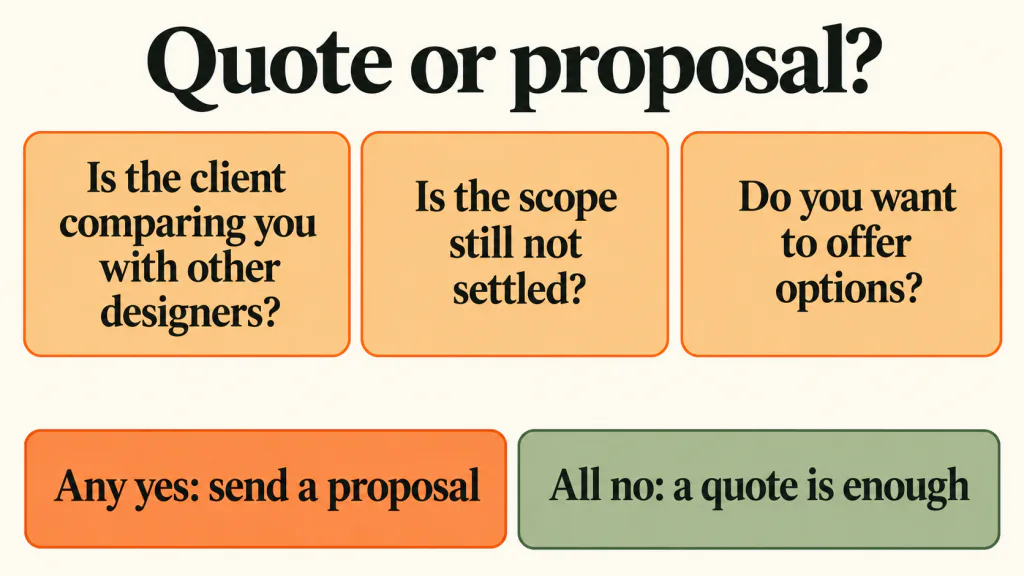
A proposal earns its place in three situations:
- The client is comparing you with other designers. They need something to put side by side, and a price alone tells them very little.
- The scope is not settled yet. The brief leaves open questions, such as who writes the text or how many pages the site needs, and you want to agree on those before you put a number on them.
- You want to offer options. For example, a smaller package and a larger one, so the client chooses the scope rather than asking you to cut the price.
If none of these apply, skip the proposal and use our guide to writing a freelance quote in Australia.
Where does a proposal sit between the brief and the scope of work?
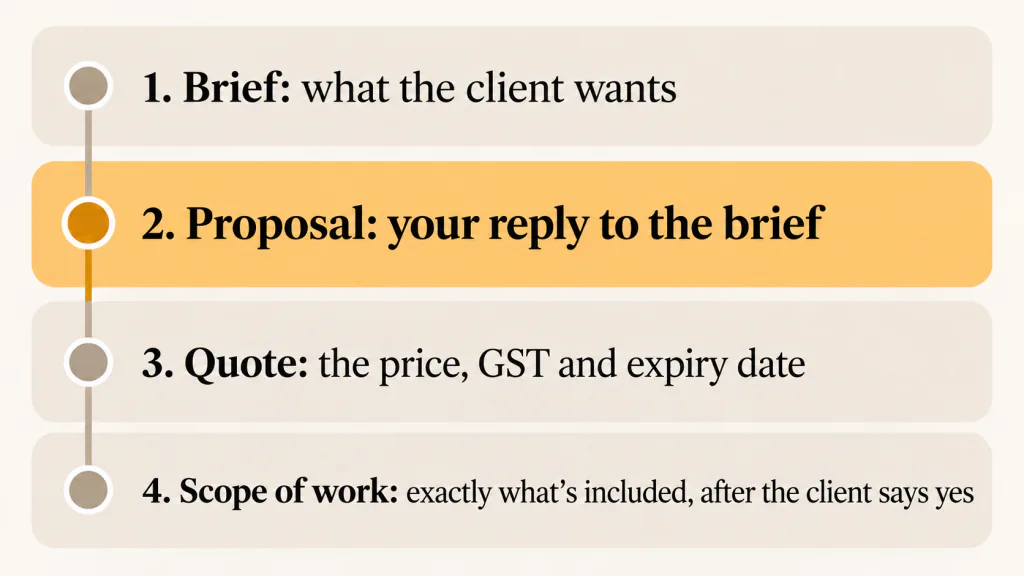
On a design job that needs one, the proposal is the second of four documents:
- The brief. The client tells you what they want, in their words. Our creative brief template is a questionnaire for this step.
- The proposal. You reply to the brief: what you understood, what you are assuming, how you will work and what the options are.
- The quote. The price for each option, with GST and an expiry date. Most designers attach it to the proposal. You can also send it once the client has picked an option.
- The scope of work. Once the client has said yes, a one- or two-page document that fixes exactly what is included. Our scope of work template covers this.
The proposal is the only one of the four where you are still persuading. That is why it carries the parts the others do not: how you will work, what you will show the client at each stage, and the work you have done before. It is also why it should be short. The client needs to be able to read it in one sitting and answer yes or no.
What goes in a design proposal?
AGDA publishes a proposal template for designers. It describes the document like this: “This template can be used as a basis for creating a proposal document when responding to a client’s brief, request for quotation or request for proposal.” Our template follows a similar order, cut down to what a freelancer or a two-person studio needs. AGDA’s template also has a fee schedule. Ours moves the amounts into the quote, for the reasons in section 6 below.
- Cover page: who it is for, who it is from, the date, the version and the date the offer is valid until
- 1. What you asked for: the job in two or three sentences, in the client’s words
- 2. What we’re assuming: the things you have taken as given, and the questions you still need answered
- 3. How we’ll work: the stages, what the client sees at each one, and what you need back from them
- 4. What you’ll get, and what’s not included: the deliverables, file types and handover, and what sits outside the job
- 5. Key dates: which dates can move and which cannot
- 6. Price and options: the options, and a pointer to the quote
- 7. Who owns the work, and licences: what happens to copyright, and who pays for photos and fonts
- 8. About us: two or three pieces of past work that relate to this job
- 9. Next steps: how to say yes, by when, and what happens after
Most proposals land at three to five pages. If yours is longer, the extra is usually in section 8 or in describing your process in general terms rather than for this job.
How do you fill in each section?
The blank template has a short tip under each heading. These notes add the reasons behind them.
Cover page: the date it is valid until
Put a “Valid until” date on the cover, usually a few days to two weeks out. business.gov.au lists a “quote expiry date” among the things to include in a quote, and the same logic applies here: your diary and your prices change, and an open-ended proposal can be accepted months later. Give each version a number (v1, v2) so you both know which one you are talking about.
1. What you asked for
Two or three sentences that restate the job. AGDA’s template says to “Summarise the project based on the client brief, highlighting their needs, any challenges and objectives.” Use the client’s own words where you can. If they read this section and think “yes, that’s it”, the rest of the proposal gets a fair reading. If they think “that’s not what I said”, you have found the problem before it cost you anything.
2. What we’re assuming
List what you have taken as given: who supplies the text and photos, who makes the final decision, which sizes and platforms are needed. Then list the questions that change the job if the answer is different. This is the section that turns a vague brief into a job you can price. Say what you will assume until they reply, so a slow answer does not stall the job.
3. How we’ll work
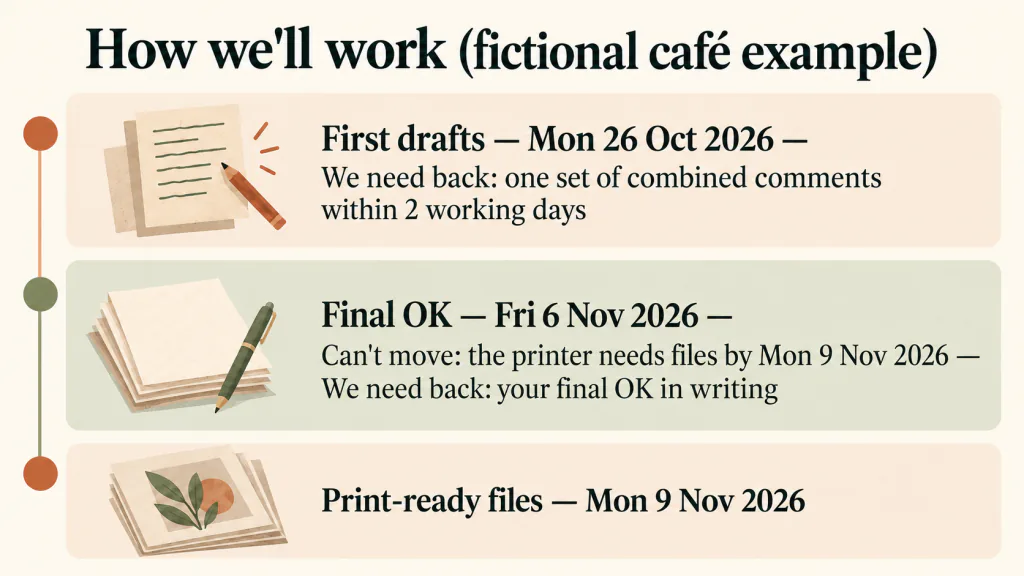
Set out the stages in order. For each one, say what the client will see, roughly when, and what you need back from them, such as one set of combined comments within two working days. Clients often worry less about the price than about not knowing what happens after they say yes. A short table answers that.
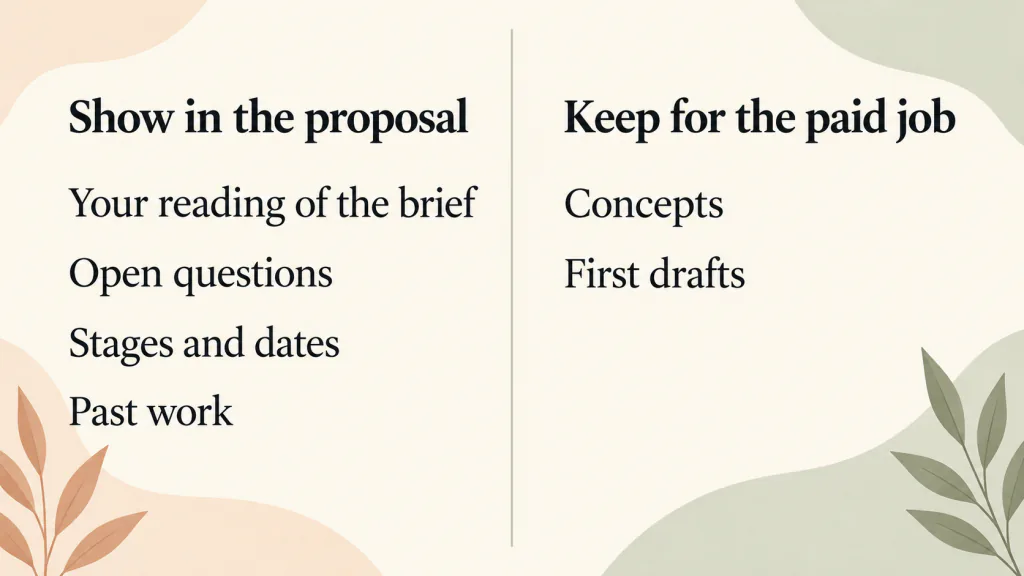
Describe the stages. Do not do them. This section is where designers are tempted to slip in a first concept to show what they would do. The next section of this guide explains why that is a bad trade.
4. What you’ll get, and what’s not included
List each deliverable so it can be counted: what it is, how many, what size, which file types, and how you will hand it over. AGDA’s template says to “Create a list of deliverables, including specific file formats and how they will be delivered.” Then list what is not included. For a café menu, that might be printing, photography and writing the menu text.
Say how many rounds of changes are included, because clients compare that between designers. AGDA’s template puts revisions under what is included. Keep the rest short: the proposal only needs enough for the client to compare options. What counts as a round, what happens after the last one and what counts as finished go into the scope of work after they say yes. If you want words for handling requests that go beyond the agreed list, see how to stop scope creep.
5. Key dates
Give the client the dates that matter to them: first drafts, final approval, final files. Mark which dates cannot move and why, such as a printer’s deadline or an opening day. Mark the dates that depend on the client too: if their text arrives late, the later dates move with it.
6. Price and options
The template leaves the price out of the proposal on purpose. There is a line to point to the quote by its number, and the price itself goes in the quote, where you set out GST, payment terms and the expiry date in one place. That keeps the proposal readable and means you only have to update one document if the price changes.
Use this section for the options. Two or three are plenty, each a clear difference in scope rather than the same work at different prices. If you are registered for GST, say whether your prices include it. Under invoice terms, AGDA’s template says, “Make sure to mention GST if you’re registered.” business.gov.au lists, among the things a quote should include, “Include goods and services tax (GST) if applicable” (business.gov.au: Prepare quotes). The filled-in example ticks “Prices exclude GST”, so its quote has to show the GST amount and the total. Our guides to GST for freelancers and freelance quotes cover how to show it.
7. Who owns the work, and licences
Say what happens to the copyright in the final design. business.gov.au puts the default plainly: “Under IP laws, the contractor automatically owns any IP they create. If the hirer wants to own the IP, the contract must state this.” (business.gov.au: Prepare a contract). So if the client expects to own the logo outright, it needs to be written down. AGDA’s template adds: “If you assign copyright, ensure this is reflected in the project fee.”
Name the licences the client will need to know about, such as stock photos or a paid font for the logo, and who pays for them. AGDA’s template lists licensing fees among the extras that can add to the cost.
8. About us
Two or three past jobs that look like this one, each with one line on what the client needed and what you delivered. Only include client names, logos and testimonials you have permission to use. The filled-in example leaves this section in square brackets for that reason: invented testimonials are worse than none.
9. Next steps
Tell the client exactly how to say yes (sign the last page, or reply by email), by when, and what happens next. business.gov.au says a quote should include “space for the customer’s acceptance (signature and date)”, and warns: “If a customer accepts your quote, it becomes a legally binding contract.” The template ends with a signature block and points to your quote by number. If the client signs it, or confirms an option by email, assume you may have an agreement on the terms of both documents, and check both before you send them.
Should you show design concepts in a proposal?
No. AGDA’s proposal template is direct about it: “AGDA does not support pitching strategic or creative solutions.” Our own view is the same. When you send concepts with a proposal, you do the most valuable part of the job before anyone has agreed to pay for it, and nothing stops the client from taking the idea to someone cheaper.
You can still show the client how you think without giving the work away:
- Section 1 shows you understood the brief.
- Section 2 shows you spotted the gaps in it.
- Section 3 shows exactly what they will see, and when, once they say yes.
- Section 8 shows finished work from past jobs that the client can judge you on.
If a client insists on seeing ideas before they choose a designer, that is a paid stage of its own. Offer it as an option in section 6, with its own price in the quote.
A filled-in example: a café rebrand (fictional)
The example file continues the café job from our creative brief and scope of work examples. The order of events:
- Fri 16 Oct 2026: the café sends back the filled-in brief.
- Mon 19 Oct 2026: the studio sends the proposal with quote Q-0001 attached, valid until Thu 22 Oct 2026. In the example, the café replies yes the same day.
- Tue 20 Oct 2026: the next business day, the studio sends the scope of work (v1) for the café to check and sign. Work starts on Wed 21 Oct 2026.
What each section shows:
- What you asked for ties the job to the café’s reopening on Sat 21 Nov 2026, so every date in the proposal has a reason.
- What we’re assuming names Jane, the owner, as the person who gives the final OK, and says the café sends the menu wording, prices and the printer’s specs by Fri 23 Oct 2026.
- How we’ll work has four stages: the scope of work, first drafts on Mon 26 Oct 2026, up to 2 rounds of changes per item with the final OK by Fri 6 Nov 2026, and print-ready files on Mon 9 Nov 2026.
- What’s not included names six things, including printing, photography, writing the menu wording and website changes.
- Price and options has two options and no amounts. Option A is the logo refresh, the A4 menu and the A2 window poster. Option B adds six Instagram posts. The prices sit in the quote, and the GST box is ticked “Prices exclude GST”.
- About us is left in square brackets, because the example has no real clients to show.
What should you do once the client says yes?
Send the scope of work for the option they chose (and the quote, if it did not go with the proposal), and start only once it is agreed. The scope of work is where the detail you kept out of the proposal goes: what counts as a round of changes, what counts as finished, and how new requests are handled. Our scope of work template picks up the same café example from here.
It helps to keep proposals in the same place as live jobs. TASKUL is our own project management app, so this is not an independent review. A project you create in TASKUL starts with the status Proposal. Set its due date to the proposal’s “Valid until” date, and it appears under Upcoming Projects on the dashboard next to your live jobs, in date order. When the client says yes, change the status to In Progress and move the due date to the final-files date. You can also add your own items, such as “Scope of work signed”, to the project checklist under Before start.
One thing to know before you create a project for every proposal: the free plan allows up to 10 projects, and deleted projects still count towards that limit. A proposal that does not go ahead still uses one.
Design proposal template FAQ
What is the difference between a proposal and a quote?
A quote is the price for a defined piece of work, usually on one page. A proposal comes before it when the work is not fully defined yet: it explains your understanding of the job, how you will do it and the options. Many designers send both together, with the quote attached to the proposal.
How long should a design proposal be?
Three to five pages for most freelance and small studio jobs. If yours runs longer, check section 8 and any general description of your process first.
Should a design proposal include the price?
It can. This template points to a separate quote instead, for the reasons in section 6 above.
Is a design proposal a contract?
It can become part of one. business.gov.au notes that if a customer accepts your quote, it becomes a legally binding contract. This template has a signature block and points to your quote, so if the client signs it or confirms an option by email, assume you may have an agreement on the terms in both. Put the detail of what is included in a scope of work once the client says yes. If the job is large or the terms are unusual, get legal advice.
Can I use this for web design or graphic design proposals?
Yes. The sections are the same. For a website, section 4 lists pages, templates and who loads the content, and section 7 covers who owns the code, theme and plugin licences. For graphic design, section 4 lists sizes and file types, and section 7 covers fonts and stock images.
Can I use the template in Google Docs?
Yes. Upload the Word file to Google Drive and open it with Google Docs, or paste the plain-text version into a new document. Send the finished proposal as a PDF so the layout does not shift on the client’s screen.