
Basecamp counts every person you add, and that includes your clients. The free plan gives you one project and three people, clients included. The first paid plan, Freelancer, gives you up to three active projects and five people. So a freelancer who invites one contact from each client runs out of room at the second client on Free and the fourth on Freelancer, well before the work itself gets complicated. Most people searching for a Basecamp alternative have hit that, or need to get their data out and found that Basecamp’s export is a set of web pages rather than a spreadsheet.
Before you move, be clear about what Basecamp does well. Its strength is talking to clients: message boards, chat, stored files, and control over which parts of a project each client can see. In short: if your clients use those every week, upgrade Basecamp. If they rarely do and you mainly need several clients’ tasks and deadlines in one place, move. If you only ever run one client at a time, stay on Free.
TASKUL publishes this guide, and TASKUL is our product. It appears below as one option for freelancers and small studios who run work for several clients. We have an interest in that choice, so weigh our view accordingly.
How we checked the facts
Every Basecamp fact here was checked on 27 October 2026 against Basecamp’s own pricing page and its help centre for the current version of Basecamp, with the link beside each fact. We quote their wording where the exact words matter. We did not create a Basecamp account or open a Basecamp export file ourselves.
This guide quotes no Basecamp prices. The pricing page shows amounts with a bare dollar sign, and we could not find any page from Basecamp that says which currency an Australian customer is charged in. Changing the browser language did not change the amounts, though we loaded the page from outside Australia and could not test from an Australian connection. So we compare plans by what decides the fit for client work: how many projects and how many people each one allows.
How many users does Basecamp’s free plan allow?
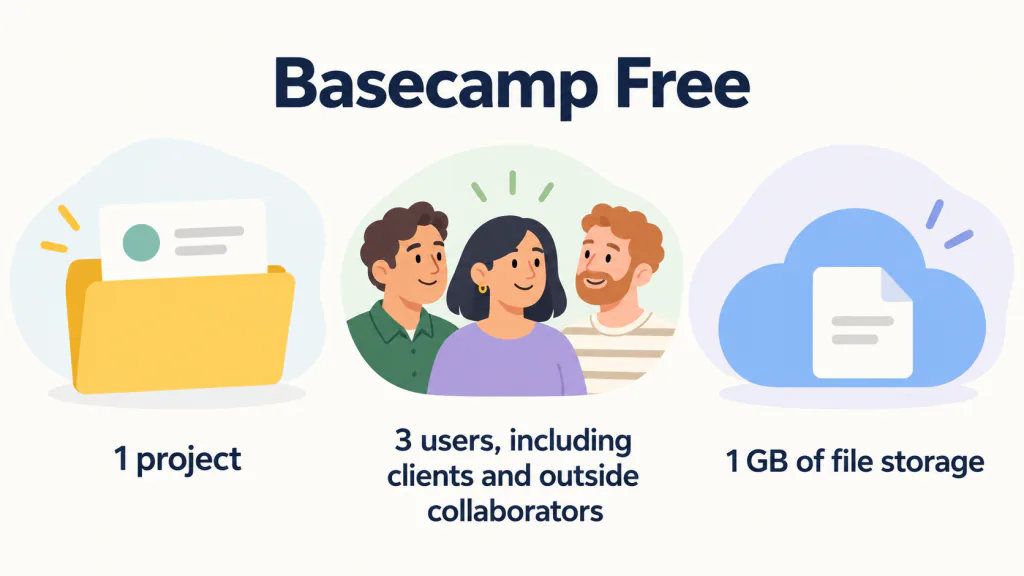
Three, and the three include clients. Basecamp’s free plan help article lists what is included:
1 project (with all project tools)
3 users, including clients and outside collaborators
1 GB of file storage
The pricing page sums the plan up as One project, free forever. Invite up to 3 people.
Its comparison table marks project templates and time tracking as not included in Free.
One project at a time is a hard limit, but it is not a dead end. The pricing page FAQ says if you complete a project, or just want to get rid of the one you’re currently running, you can delete it and free up the slot to start a new one. You can’t, however, keep more than one around.
That works for one client job after another. It does not work for two clients at once.
Two more lines from the same FAQ matter before you decide. We don’t require a credit card on the Free account, or for any of the free trials.
And going back is not possible: We do not allow downgrading from a paid package to the free package. If you want to go back to free you’ll need to sign up for another free account.
Do clients count as users in Basecamp?
Yes. The pricing page FAQ asks Are clients or contractors or guests included in the user count?
and answers Yes, every person you add is counted, but Pro Unlimited includes unlimited users.
Basecamp has three kinds of people, described on its inviting people page:
- Someone at your company:
Someone who works at your company.
- An outside collaborator, such as a subcontractor:
They have the same access as team members on the projects they’re added to, but can’t create new projects or invite others.
- A client:
Clients can access the projects you’ve added them to, but can’t create projects, invite people, or become admins. You can also control what parts of a project they see.

All three count. On the free plan that is three people in total. Basecamp’s pages do not spell out whether your own login is one of the three, so assume it is: then one client contact and one subcontractor fill the plan.
Why does Basecamp get expensive for freelancers?
Because every new client pushes you towards the next plan. The plans step up by projects and by people at the same time, and your clients are among the people. We do not quote the prices for the currency reason above, but the limits show where each step comes. The pricing page sets out the limits like this:
| Plan | Projects | People (clients included) | Storage |
|---|---|---|---|
| Free | 1 | 3 | 1 GB |
| Freelancer | 3 active | 5 | 10 GB |
| Pro | 8 | 10 | 25 GB |
| Pro Plus | 12 | 15 | 100 GB |
| Pro Unlimited | Unlimited | Unlimited | 1 TB |
Freelancer is the smallest paid plan, described as Everything you need to run a handful of concurrent projects with a few people.
Its comparison table says Archived or deleted projects don’t count against your total.
The pricing page does not say whether the same applies on the plans above it. But it also says Multiple tools per project, templates, and time tracking are not included in Freelancer.
Time tracking first appears on Pro Plus.
Work it through for a freelancer with four clients who invites one contact from each. That is five people, which fits Freelancer exactly, but four live projects, which does not. The next plan up is Pro. Add a subcontractor and a fifth client, and you are at seven people and five projects, still on Pro. The step is driven by the number of clients, not by how much work you do for them.
What will you lose if you leave Basecamp?
Mostly what we call the client room in this guide: the parts of Basecamp your clients use themselves. That is where Basecamp is strongest. Its working with clients page says Everything in a client project is private to your team by default, and you decide what to make visible.
According to Basecamp’s page on what clients can see and do, clients can Post messages, comments, to-dos, and files
. And a client does not even need to log in to reply: If you have email notifications turned on, you can reply to them directly from your inbox, no need to log into Basecamp.
(using Basecamp as a client)
Many task tools, including ours, do not have that. Before you decide, write down which of these you use with clients each week:
- A message board or chat where the client posts and replies
- Files stored in the project rather than linked from somewhere else
- Hiding some items from the client while showing others
- Clients replying to notifications by email
If most of those are ticked, the problem is the price of the client room, not the tool, and upgrading Basecamp will serve you better than moving to a task manager.
Stay, upgrade or move?

- Stay on Free if you work for one client at a time, delete each project when the job ends, and need no more than two other people in it.
- Upgrade if the client room is the reason you use Basecamp, and the only problem is the number of projects or people. The pricing page offers
a 30-day free trial
of the paid plans, so you can test the plan you need before you pay. Check the currency on the checkout page before you enter card details. - Move if your clients rarely post in Basecamp anyway, and what you really need is one place to keep several clients’ tasks and deadlines straight.
Which alternative fits the reason you are leaving?
If you decide to move, start from the reason. The facts below come from our other guides, where we read each tool’s own pages on the date shown in that guide. Free plans change often, so recheck the tool’s own page before you commit.
| Why you are leaving Basecamp | Worth testing | What to read first |
|---|---|---|
| You want a simple board and can keep clients out of it | Trello | Trello alternatives covers its 10-collaborator and 10-board free limits |
| You want unlimited free members and can live with full-permission guests | ClickUp | ClickUp alternatives covers its uses that never reset, 60MB of storage and guest permissions |
| Your briefs and notes matter more than the task list | Notion | Notion alternatives covers what changes when a second person joins |
| You want clients to watch progress as read-only viewers | monday.com (paid plans only) | Alternative to monday.com covers viewers, guests and how monday.com counts seats |
| You run several clients alone or in a small studio, and can do without comments and file storage | TASKUL (our product) | The section below, including its 10-project free limit |
Can you export Basecamp to Excel?
Not from what Basecamp’s help centre describes. Its export your Basecamp data page says Account owners can export a full HTML copy of Basecamp data at any time. They can export individual projects, a selection, or the entire account.
When we searched the help centre for CSV, the only result was about timesheets, which are part of Pro Plus and Pro Unlimited. We found no help article on exporting to-dos as a spreadsheet. That does not prove there is no other route, but it is the official one.
The export is for the account owner only: Only account owners have access to this feature.
The same page gives the steps:
- Adminland is Basecamp’s admin area.
From the Home page, click the ⚿ Adminland button on the left side, then select Export data from this account.
Check off the ones you want to export and click Export my data.
You’ll receive an email when it’s ready to download.
Do this before anything else if you plan to cancel. The page warns Planning to cancel? Export your data first, and let the download finish completely before canceling.
Basecamp’s cancellation page explains why: Cancellation is immediate and permanent.
Because the export is web pages, moving your to-dos into any other tool means copying them into a spreadsheet by hand, at least for the projects that are still running. Finished projects can stay in the export as a record.
Where our product fits
TASKUL is built for one person or a small studio running work for several clients. Clients, projects and tasks sit together, and the free plan’s description lists no limit on the number of people you invite. It is a task manager, not a client room, so start with what it does not have.
What TASKUL does not have
- No message board, chat or comments. If your clients post and reply inside Basecamp, TASKUL does not replace that.
- No file storage. You upload files to Google Drive, Dropbox or similar and paste the link into TASKUL.
- No way to hide some tasks from a client. Everyone you invite to a project sees its full task list.
- No time tracking and no CSV or Excel export of your tasks. Factor that in if you might leave later.
- No due-date reminder emails in English. TASKUL currently sends those to Japanese-language accounts only, so check deadlines in the app or its Google Calendar sync.
- A 10-project limit on the free plan. Unlike Basecamp, deleting a project does not free up a place: deleted projects still count towards the 10. Projects you are invited to by a paid user do not count towards yours.
What changes when you invite someone
People you invite to a project join as a Member unless you make them an Admin. A Member:
- cannot delete tasks. Only the Owner or an Admin can.
- can edit only tasks assigned to them, or tasks nobody is assigned to.
- does not see your estimates or cost details. TASKUL’s sharing settings say estimates and cost management are stored as private data and not shown to other members. What is shared is
Task list, project summary, and member list
.
That suits subcontractors well. For clients it is a shared task list, not a portal, so it fits clients who want to see progress rather than talk inside the tool.
Moving one live Basecamp project across
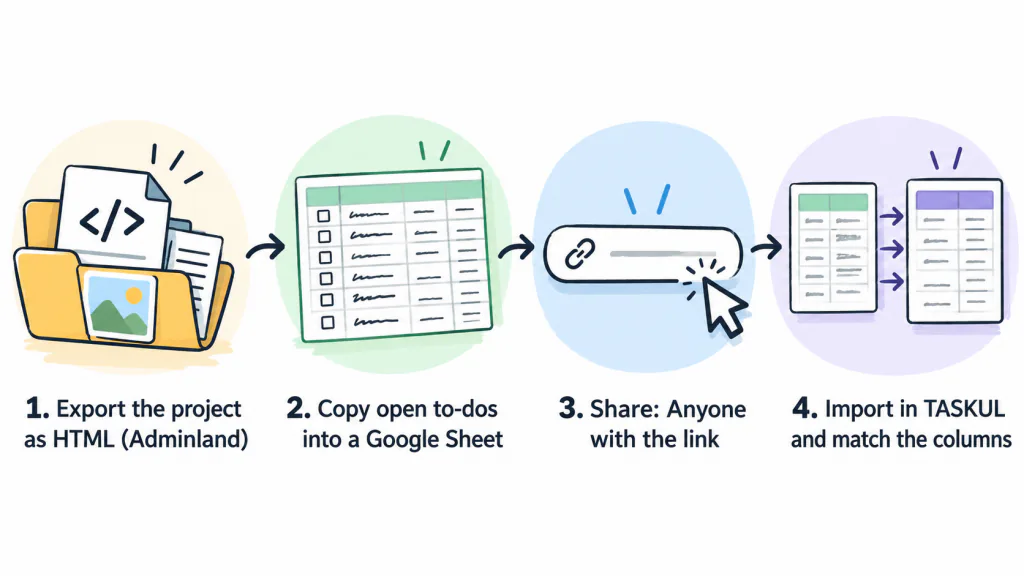
- Export the project from Adminland and keep the download.
- Copy the project’s open to-dos into a Google Sheet with these column headings: Task Name, Project, Client, Due Date, Assignee, Status and Notes. Dates written the Australian way, such as 23/10/2026, are fine.
- Set the sheet’s sharing to
Anyone with the link
. TASKUL’s Import button can read the sheet straight from its link, or you can download it as a CSV or Excel file and upload that. - Check the Match Your Columns screen, then import. Statuses such as done or complete come in as Completed, in progress as In Progress, and review as In Review. Anything else comes in as Not started.
Messages, comments and files do not come across. Keep the Basecamp export until the job is finished.
Your Basecamp decision checklist
Copy these into a note and fill them in before you pay or move. If the answers point to moving, run one client’s work in the new tool for a week alongside Basecamp before you move the rest.
- People: how many people are in your Basecamp now, counting every client contact and subcontractor.
- Projects: how many clients you run at the same time, and how many that will be in three months.
- Client room: which of message boards, chat, stored files, hidden items and email replies your clients use each week.
- Export: the date you downloaded the HTML export, and which live projects you copied into a spreadsheet.
- Changeover date: the day new work stops going into Basecamp.
For keeping several clients moving once the tool question is settled, see our guide to juggling multiple clients as a freelancer.