
Keep one row per client change request, with separate records of its assessment, client decision and implementation. Include the assumptions behind the fee and delivery proposal, then name the next action and its owner. That lets you distinguish work waiting for approval from approved work waiting for inputs—and spot when one request changes another’s delivery assumptions.
See three client requests in one completed log
This fictional project has an agreed scope, BROCHURE-SOW-v1: a four-page PDF using supplied English copy, one review round and a final PDF due 17 Nov 2026. One Designer handles the work; the Client lead makes the client decisions.
All people, events, dates, hours and quotes below are invented teaching data. The fees are not market rates or recommendations.
Here is the log at 10 Nov 2026, 16:00. Each request has its own row because the client can decide on each one separately.
| Request | Assessment and impact | Client decision and evidence | Implementation | Next action and owner |
|---|---|---|---|---|
| CR-01 · two-page case-study insert | Assessed · Q-CR01-v1 · 4 h · AUD 400. Final PDF proposed for 19 Nov if approval and final insert copy arrive by 10 Nov; excludes CR-02. | Approved · Client lead, 10 Nov · E-CR01-10NOV confirms the fee and conditional date proposal. | Blocked · final copy missing; no design work started. | Client lead supplies copy. Designer rechecks the date if the 10 Nov condition is missed. |
| CR-02 · six square social tiles | Recheck required · Q-CR02-v1 · 3 h · AUD 300 fee proposal. Standalone 18 Nov proposal assumed this was the sole addition; combined date: To recheck. | Pending · no decision received. | Not started. | Designer sends the combined delivery impact; Client lead then decides. Next review: 11 Nov. |
| CR-03 · final PDF requested for 13 Nov | Assessed · limited feasibility check: required review/input steps cannot fit the requested plan. Fee: Not assessed / no quote; no detailed estimate issued. | Declined · Client lead, 10 Nov · E-CR03-10NOV. | Not applicable. | Keep the request, reason and decision reference; create no production task. |
The useful contrasts are Approved / Blocked, Pending / Not started and Declined / Not applicable. Only CR-01’s AUD 400 is approved additional work. CR-02’s AUD 300 remains a proposal, so AUD 700 would misstate the approved amount. CR-03’s feasibility check is complete, but its fee has not been estimated; that does not make it a free change. Approval also says nothing about whether work is completed, invoiced or paid.
Today, the Client lead owes copy for CR-01, while the Designer owes a combined delivery assessment for CR-02. CR-03 needs no production task. Those are three different actions, even though all three requests belong to the same brochure project.
Build the register around the next action
Start with a stable request ID, the agreed scope being changed and the source of the request. Then keep three questions separate: has its impact been assessed, what has the client decided, and what has happened to the work?
For this example, the register uses the following 12 columns. This is a layout for a small project, rather than an official standard. The five groups above are a compact reading view of these same details.
Copy the blank register (CSV), compare it with the fictional three-row worked example (CSV), and follow the short usage note. Both CSVs use these same 12 columns. Keep the worked file as a reference and enter your live requests in a copy of the blank file, using your own agreed scope and source references.
The worked file is fixed at 10 Nov 2026, 16:00, with no timezone asserted. It excludes the later continuation below. Its dates, people, reference IDs and fees are invented teaching data. These are plain UTF-8 CSV value files, with no formulas, dropdowns, alerts, approvals or evidence storage. Office/Sheets opening has not been tested; check imported text and dates in a copy before live use.
| Column | What to record |
|---|---|
| Request ID | A stable reference, such as CR-01, for one independently decided request. |
| Request and source | Received date, requester, short request and source reference. |
| Agreed scope and change | The agreement reference and the concrete difference from it. |
| Assessment | Not assessed, Assessed or Recheck required for feasibility/impact. Assessed does not necessarily mean a fee quote exists. |
| Estimate and fee proposal | Quote reference, estimated extra effort, proposed amount and currency—or Not assessed / no quote. |
| Delivery impact and dependencies | Label requested, proposed and agreed dates; include input conditions and shared-work assumptions. |
| Decision | Pending, Approved or Declined. |
| Decision evidence and conditions | Decision maker, date, source reference and conditions; state when no decision has been received. |
| Implementation | Not started, Blocked, In progress, Completed or Not applicable. |
| Delivery owner and completion evidence | Who delivers the work, then the output check and delivery reference when completed. |
| Next action and owner | A concrete action and the person responsible for it. |
| Next review date | The next check date or trigger; use Not set or Not applicable where appropriate. |
The fields that change today’s action deserve the most attention. A fee proposal needs its assumptions; Approved needs its evidence and conditions; Blocked needs the missing input and the person supplying it. A review date is a prompt to revisit the row, not a response deadline imposed on the client. Here, 11 Nov is simply the next check chosen for CR-02.
Keep the proposal or email in its appropriate location and put its reference in the row. A long assessment can sit separately too. A log does not need the full correspondence copied into every cell.
If you need to establish the baseline first, use the scope of work template. If the uncertainty is whether feedback changes that baseline, turning client feedback into tasks addresses that earlier decision.
Update the impact, decision and plan in that order
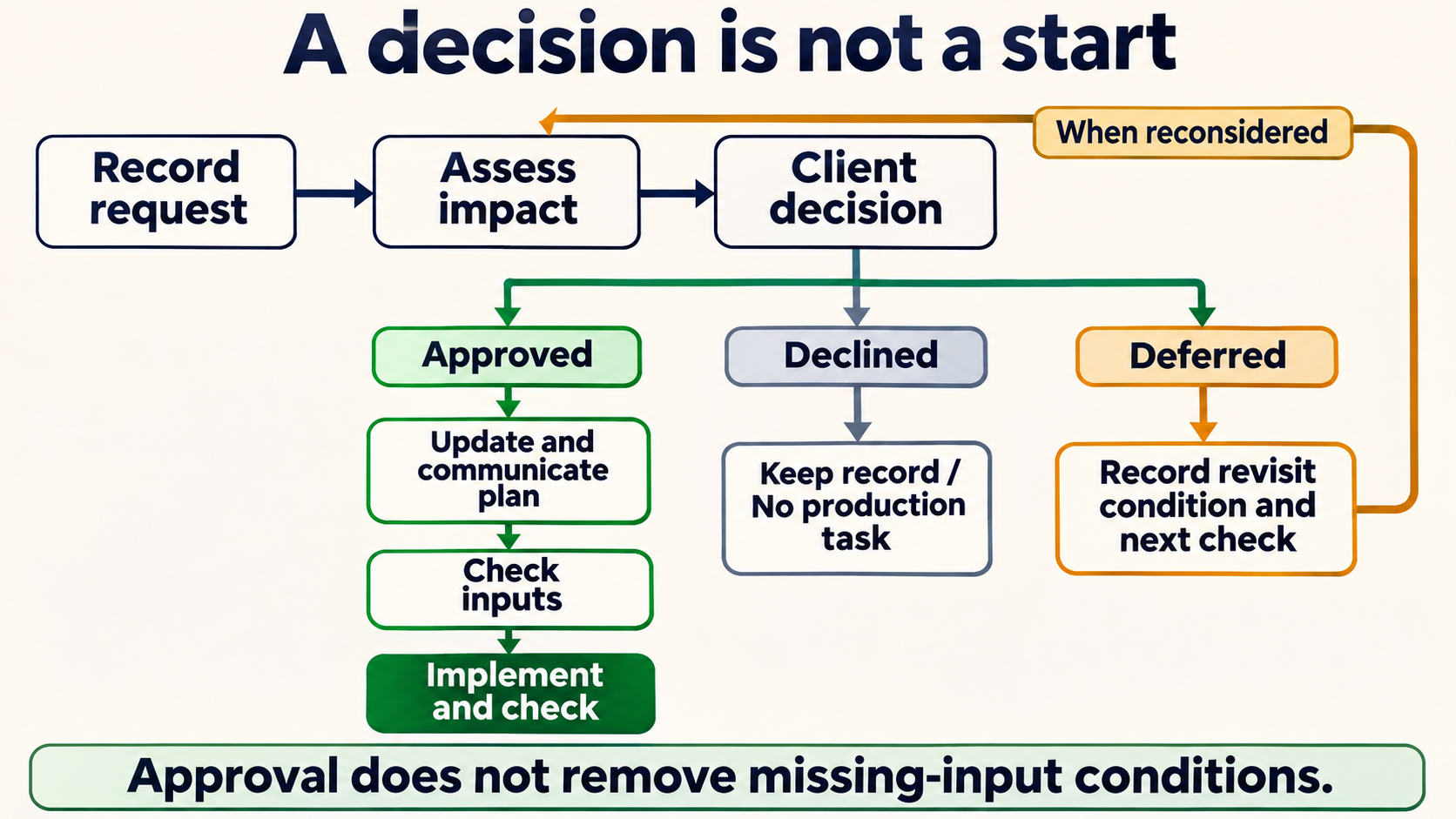
A new request first needs comparison with the agreed work. Assess the effect of doing it and of leaving it out, obtain a client decision, then update and communicate the plan for approved work before implementation. This sequence follows APM’s change-control guidance, which separates assessment and decision from plan updating and implementation. The state labels in this example are our practical way of recording those distinctions.
A declined request stays in the log with its decision evidence, without a production task. If you also use Deferred, record what would trigger reconsideration and when to check again. Deferral does not authorise future work; it returns to assessment when reconsidered. CR-03 is declined, not deferred. Its limited feasibility check is complete, so Assessment is Assessed, while its fee stays Not assessed / no quote. A request can end after that check without a detailed estimate or a production task. Approval, meanwhile, does not remove missing-input conditions.
When a reply arrives:
- Match it to the request ID and proposal it addresses. A reply about CR-01 does not decide CR-02.
- Update the assessment or decision with the source reference and any conditions. Keep a recommendation separate from the client’s actual decision.
- Check whether another row’s assumptions have changed. Revisit shared capacity, required inputs and delivery dates.
- Name the next action and owner, then communicate the agreed revised plan to the people carrying it out.
For changes to the agreement, business.gov.au’s variations guidance, section 13, recommends documenting agreed changes and covers scope, cost, timeline and when the change takes effect. Refer to the relevant proposal and agreement in the log so those details remain traceable.
If a row says Pending but the work has started, investigate the missing basis for starting. Do not change the decision to Approved merely to make the row look consistent.
Why CR-01 changes the date you can quote for CR-02
Q-CR02-v1 proposed 18 Nov on the assumption that the social tiles were the sole addition. Once the client selects CR-01, that assumption no longer describes the chosen work. Both requests need the same Designer, even though CR-01 is still blocked by missing copy.
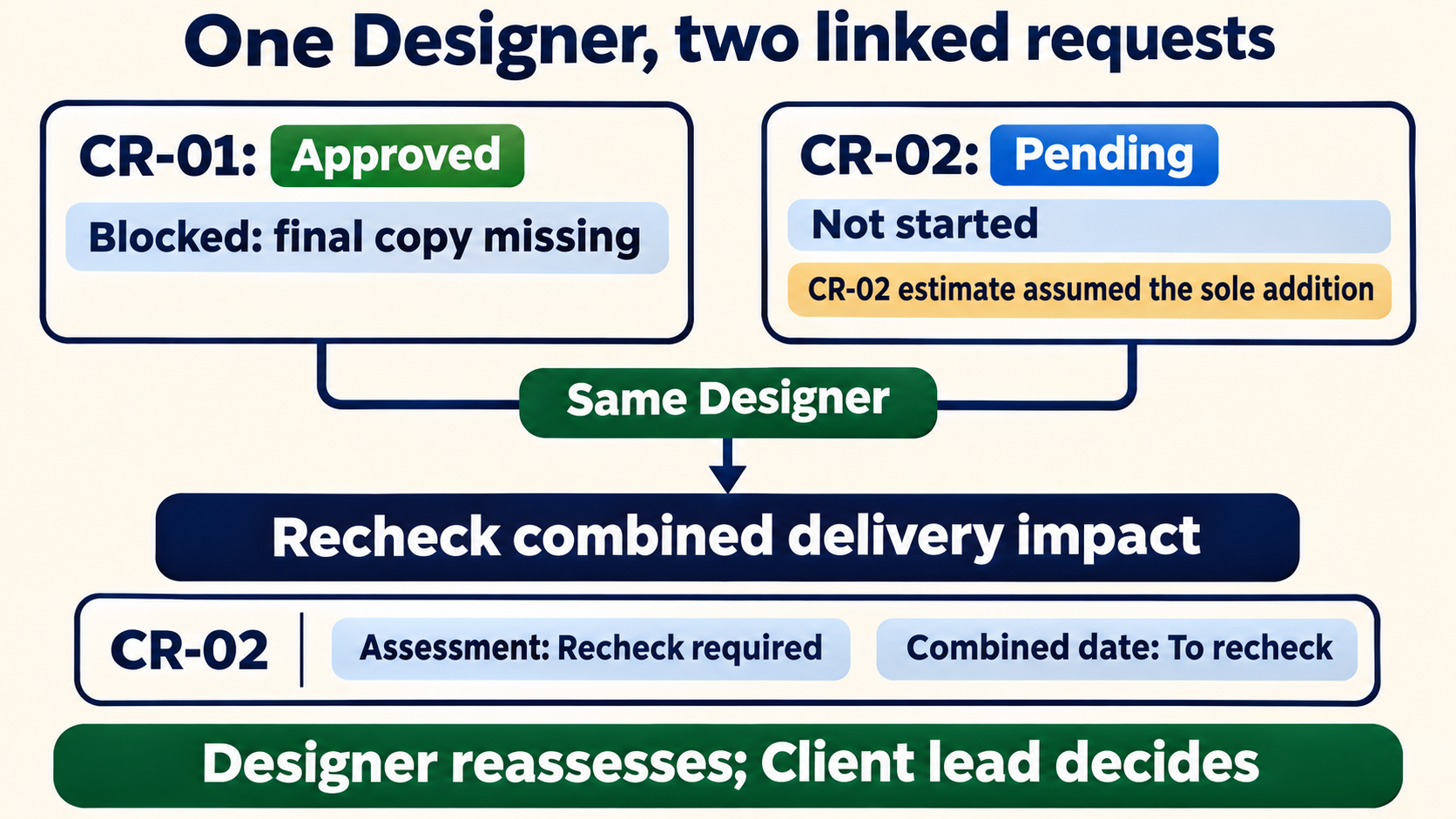
CR-02 needs a combined delivery assessment before a new date can be promised. APM’s practical article on controlling project changes discusses requests competing for shared resources. It is a contributor article published on 23 March 2015; the brochure interaction here is our fictional application of that principle.
The Designer needs to check the selected combination against available time, the original commitments and the copy needed for CR-01. Four hours plus three hours describes estimated effort. It does not establish a delivery date. Nor can the standalone 18 Nov and 19 Nov proposals be combined arithmetically into a new commitment.
Keep Q-CR02-v1 and its AUD 300 pending fee proposal visible, but change Assessment to Recheck required and show the combined date as To recheck. Send the revised delivery impact to the Client lead for a decision. Until that reply arrives, Decision remains Pending and Implementation remains Not started.
This preserves what was estimated without presenting an outdated timing assumption as a promise. The example does not supply a combined date or a later approval for CR-02.
Move CR-01 from missing copy to checked delivery
The following is a fictional continuation after the 10 Nov snapshot. It shows how CR-01 progresses; it does not change what was known in the earlier table.
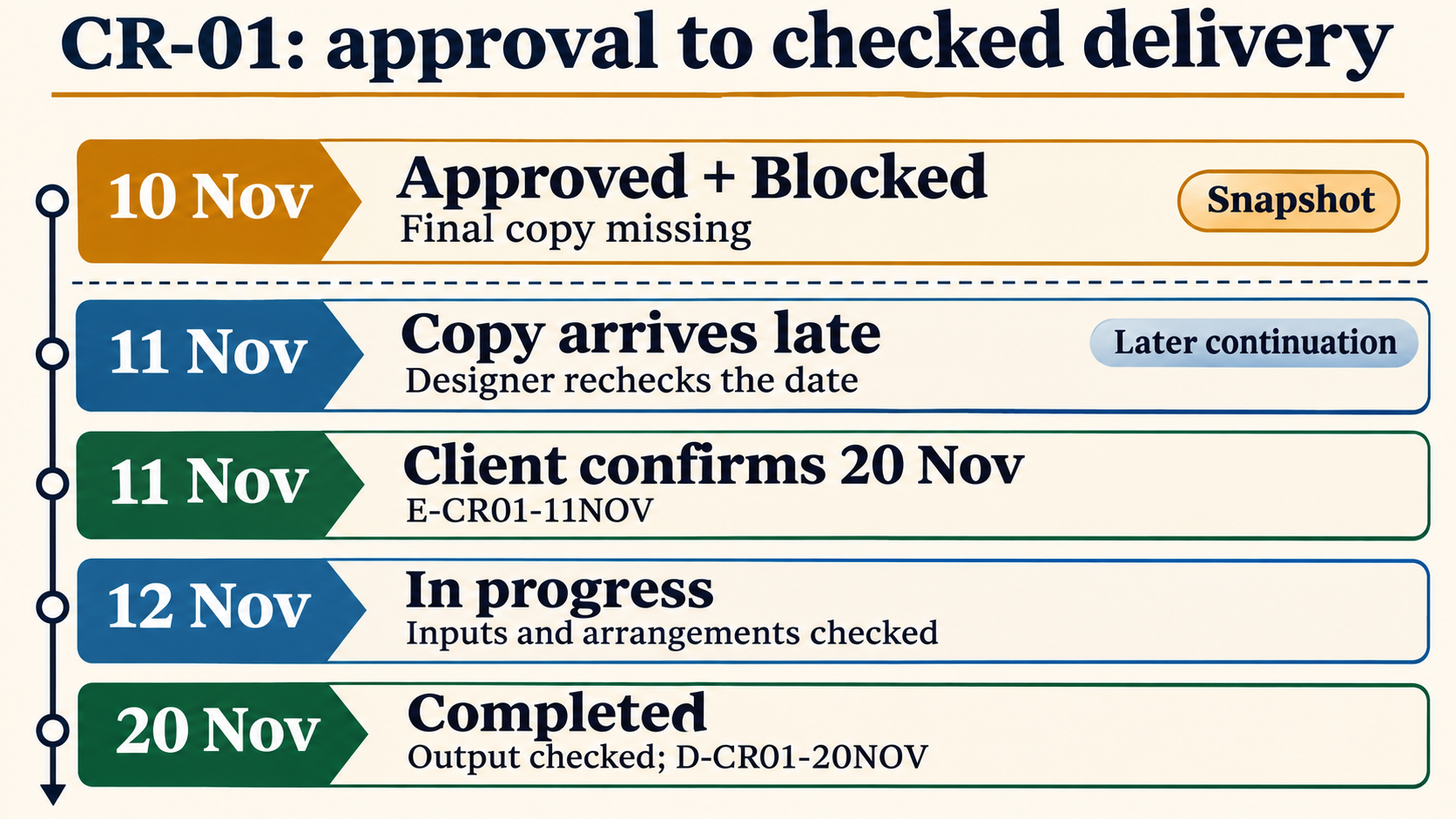
On 11 Nov, the final insert copy arrives late. The 19 Nov proposal required both approval and copy by 10 Nov, so that condition has been missed. The Designer checks availability and proposes 20 Nov. Later on 11 Nov, the Client lead confirms that date in E-CR01-11NOV. The date comes from that check and confirmation, rather than being calculated automatically from the copy’s arrival.
On 12 Nov, the Designer checks that the inputs and delivery arrangements are in place, then changes Implementation to In progress. The work handover refers to CR-01, Q-CR01-v1 and the confirmed delivery arrangement. CR-02’s unapproved tiles do not enter the production work.
Before marking CR-01 Completed on 20 Nov, check the output against what was agreed:
- The PDF has the original four pages plus the two-page case-study insert.
- It uses the supplied copy and matches the relevant quote scope.
- The checked delivery is recorded in D-CR01-20NOV.
Add that delivery-note reference to the completion evidence and set Implementation to Completed. In the live row, Delivery impact and dependencies now records agreed 20 Nov / E-CR01-11NOV; completion evidence records D-CR01-20NOV. Set Next action and owner to no further production action for this completed request, and Next review date to Not applicable for its implementation. Project acceptance and billing remain separate. Keep these later updates out of the downloadable 10 Nov snapshot.
Completed records this request’s implementation. It does not establish final acceptance of the entire project, an invoice or payment. CR-02 remains Pending because no later decision has been set in this example; CR-03 remains Declined.
Questions when adapting the log
Is a change request form the same as this log?
A form captures an individual request and its analysis; a log keeps several requests and their next actions visible together. The California Project Management Framework template directory distinguishes these purposes. It is a state IT framework, not an Australian freelancer requirement. Link the form or quote from the row when useful.
Does recording a request or sending a quote approve the work?
Neither event supplies evidence of the client’s decision. Record who decided, the relevant reply and any conditions; silence stays Pending. The register organises the record and does not itself determine the legal effect of an agreement.
Can an approved change still be blocked?
Yes. CR-01 has approval but lacks final copy at the snapshot. Its delivery proposal also needs rechecking if the copy condition is missed. Client approval, available inputs and production progress answer different questions.
What should I record when the fee has not been assessed?
Use Not assessed / no quote in Estimate and fee proposal, as with CR-03. Its separate Assessment field is Assessed because the Designer completed a limited feasibility check before the request was declined. No detailed effort or fee estimate was issued. AUD 0 would imply a zero fee rather than an unknown one. Keep pending proposals separate from approved amounts, and use an explicit decision and its conditions if work is agreed at no additional fee.
Enter each live request against its agreed scope, identify its three current states and name the person who must act next.