
A useful decision log lets you follow an approved direction back to its source and forward to the work it changes. Give each meaningful choice a stable ID, name the exact version, and keep an authorised replacement linked to the original. A later suggestion stays a proposal until the agreed decision-maker approves it and the change takes effect.
Which decision is approved now? Start with this completed record
Fictional worked example: Harbour Lantern Studio is preparing a visitor guide for Pine Jetty Tours, project PJT-GUIDE. All people, messages, dates and work records below are invented. In this project, the client has already named Elise as the decision-maker for the route and format.
DEC-003: current route
At the 30 October 2026 snapshot:
| Record | Completed entry |
|---|---|
| Decision | Use the east entrance and three-stop route in the visitor guide |
| Item/version | route-map-v2 |
| Status | Approved; effective 29 October 2026 |
| Approved by | Elise, 29 October 2026 |
| Replaces | DEC-001, the retained original route |
| Next work | ACT-004: Priya to prepare the updated proof for review by 2 November 2026 |
Approval source: Fictional email: Re: replace DEC-001 route, Elise, 29 Oct 2026, 10:20 AEDT, paragraph 1.
DEC-002 still requires one double-sided A4 sheet. The route approval makes the updated proof ready to prepare; no approval of the final guide for publication is recorded.
Start with a copy of the blank decision log CSV for your own project and inspect the completed fictional example — 30 October 2026 separately. The completed CSV shows how to fill the log; keep its fictional project data out of your live records.
The instructions, complete history data and confirmation example (TXT) explain all 23 columns and retain each snapshot’s work notes, the complete 27 October before and 28 October pending CSV data, and the fictional, unsent request with its bounded reply. Use those two earlier snapshots to check how the record changes; they are labelled, copyable history sections within the TXT, rather than separate download files. To compare them in a spreadsheet, copy each complete CSV section into its own UTF-8 CSV file, keeping the header and quoted fields; the TXT marks exactly where each section begins and ends. Keep the full log when you filter a current view. These are manual spreadsheet records; TASKUL import compatibility has not been tested.
The short record above is the view a colleague needs first. The supporting columns preserve how it became current. To see why both matter, go back to the route Elise approved before the conflicting suggestion arrived.
What stays approved when a later suggestion conflicts?
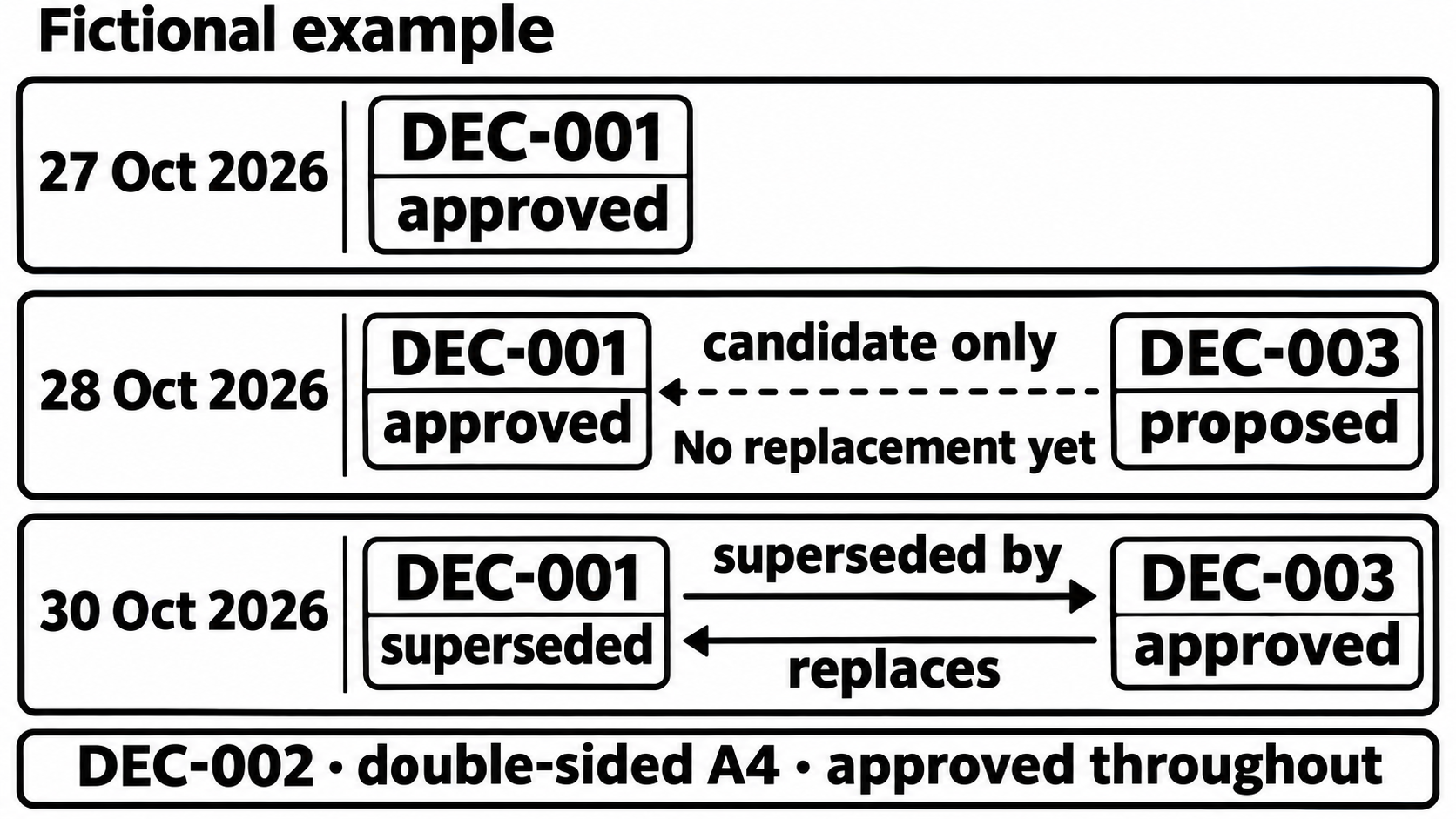
On 27 October, Priya enters two choices approved the previous day:
| ID | Approved direction | Version | Approval evidence |
|---|---|---|---|
| DEC-001 | North entrance and two-stop route | route-map-v1 | Elise’s 26 October email, paragraph 1 |
| DEC-002 | One double-sided A4 sheet | guide-format-v1 | Same email, paragraph 2 |
The email is the fictional Guide route and format confirmed, sent by Elise on 26 October 2026. Both rows have an approval date of 26 October and a first recorded date of 27 October. The route and output format are separate choices, so the project has two current approved records.
On 28 October, Rory, an operations contributor, suggests using the east entrance and three stops. Priya captures that suggestion as follows:
DEC-003 · proposed · recorded 28 October 2026
Direction: east entrance and three-stop route, route-map-v2.
Candidate replacement for: DEC-001 (proposed_replacement_for).
Approval date, effective date and approval reference: blank.
Actual replacement links,replacesandsuperseded_by: blank.
Source: Fictional review call notes, 28 Oct 2026, item 3, comment by Rory.
Elise is named as the required approver in the row, but that name does not mean she has approved it. DEC-001 remains approved, with no successor recorded. A proposal does not supersede an approved decision.
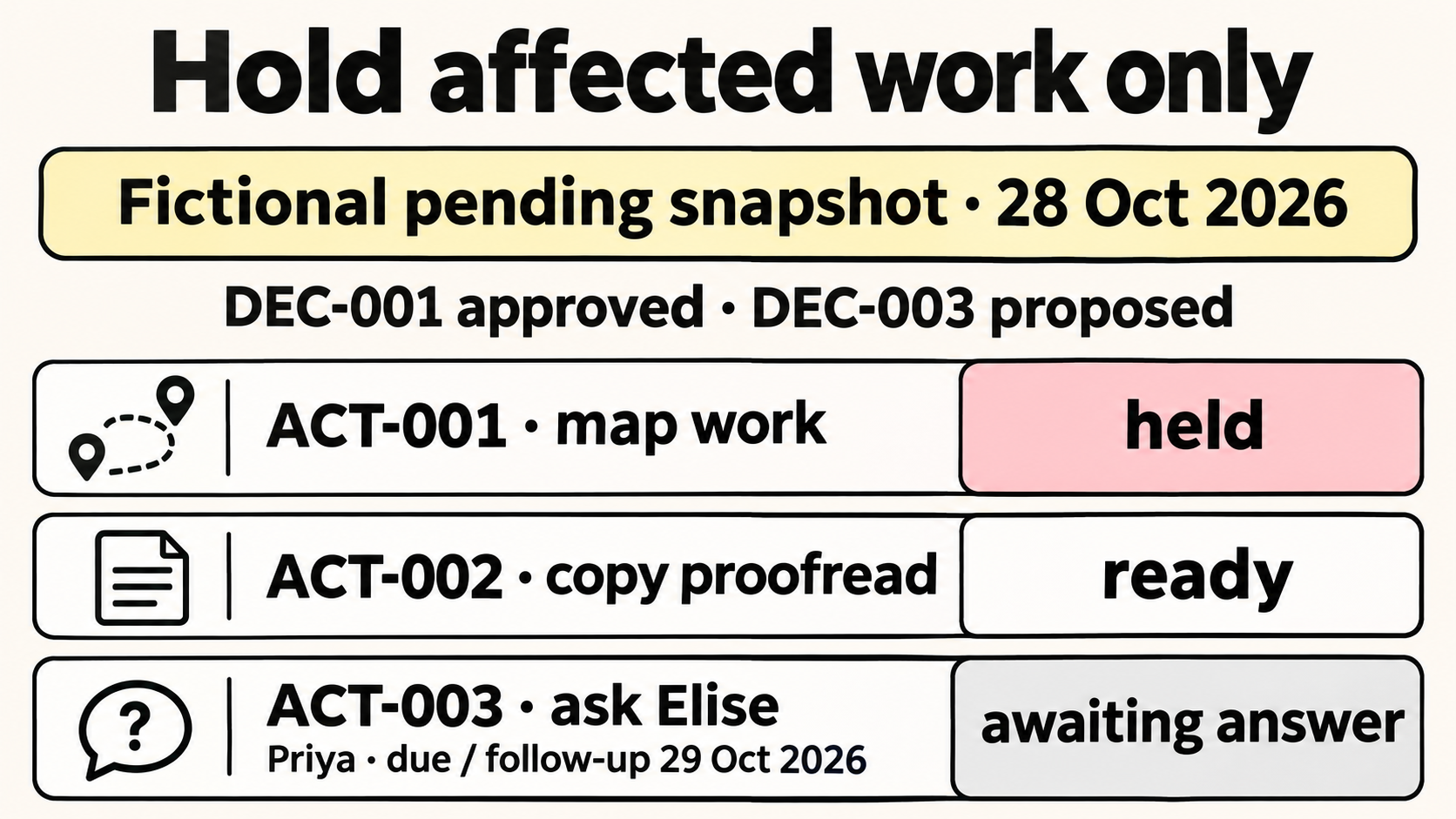
That answers the history question. Work needs a separate answer because the route is now disputed. In this example, the team holds the affected map work while seeking Elise’s direction:
- ACT-001 — held: pause work on route-map-v1 pending the answer.
- ACT-002 — ready: Noah can continue the independent non-route copy proofread within the A4 layout.
- ACT-003 — awaiting client: Priya asks Elise to confirm the replacement; the request is due, with follow-up, on 29 October.
The hold is this template’s suggested operating approach. It does not change DEC-001’s decision status or freeze unrelated work. If the contributor’s feedback is unclear before a concrete alternative can be recorded, the client feedback guide covers that clarification.
Here is the fictional, unsent confirmation request:
Subject: PJT-GUIDE: confirm whether DEC-003 replaces DEC-001
Elise, DEC-001 currently records the north entrance and two-stop route in route-map-v1. Rory has proposed the east entrance and three-stop route. Please confirm whether route-map-v2 should replace that route now. If approved, Priya will prepare the updated proof for review by 2 November; DEC-002’s double-sided A4 format stays the same. This request is for the map direction and next proof only, not final publication approval. We will hold the affected map work until your answer; the independent copy check can continue.
The request gives Elise a specific choice and states its limits. Neither Rory’s contribution nor an unanswered request supplies the missing approval.
How do you replace an approved decision without losing it?
Elise’s fictional reply arrives on 29 October 2026 at 10:20 AEDT:
Yes, replace DEC-001 with the east entrance and three-stop route in route-map-v2, effective today. Keep the double-sided A4 format. Send the updated proof for review by 2 November. This does not approve the final guide for publication.
Priya updates the log on 30 October. The reply makes the new direction effective on 29 October, so the maintained record now shows the actual replacement in both directions.
DEC-001: retained original route
DEC-001 retains its wording, route-map-v1 version, original rationale and 26 October approval source. Its status becomes superseded, and superseded_by points to DEC-003.
DEC-003 becomes approved, and replaces points back to DEC-001. Its candidate field, proposed_replacement_for, is cleared. The original 28 October call-note reference remains the proposal source; Elise’s reply is added separately as the approval source.
This retention method adapts Michael Nygard’s architecture decision records, which distinguish proposed and accepted decisions and retain superseded records with a reference to their replacement. The client-project fields here are our suggested workflow, rather than a compulsory standard.
Someone following the old map ID can now find its successor and inspect the authorising message. Keep the old impact text as history, too: DEC-001’s instruction that Priya can lay out route-map-v1 describes the earlier position. After replacement, today’s work comes from DEC-003 and the action records.
If Elise rejects the proposal, mark DEC-003 rejected, clear its candidate target and leave DEC-001 approved with no replacement link. Do not create a successor merely to close the discussion.
A future-effective or conditional approval needs another check. Record the actual approval and its effective date or condition, but keep the old decision unsuperseded and the actual replacement links inactive until that date arrives or the condition is verified. Use the impact note and follow-up date to make the activation check visible. An approved label alone would not identify the applicable direction in that interval.
The worked example has immediate effect; it does not demonstrate that later activation. A further substantive change after approval gets a new stable decision ID. While a proposal is being discussed, preserve the version each comment refers to so later wording does not erase what someone actually considered.
Which dates and sources belong in the log?
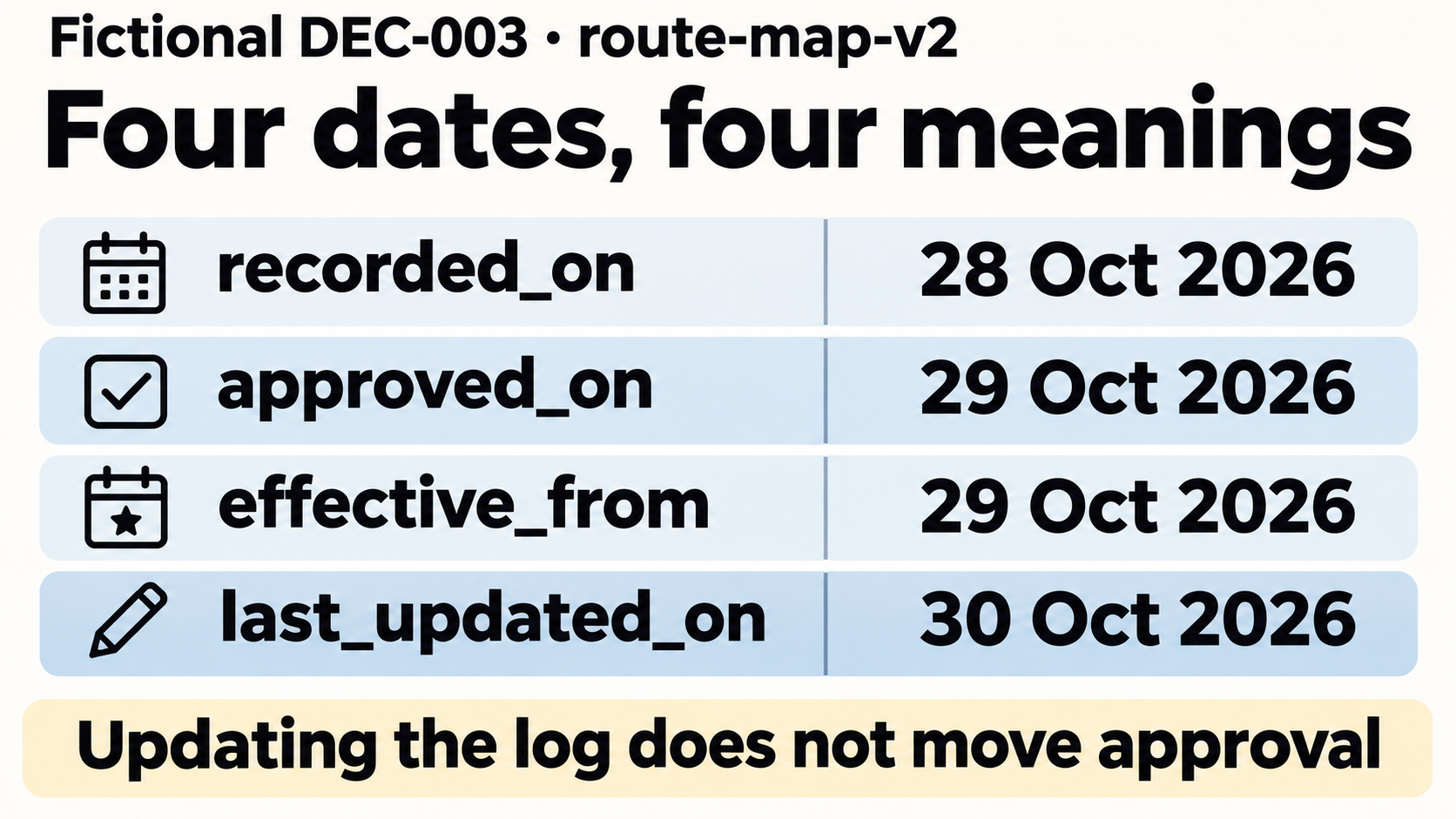
DEC-003 has four date fields because four different things happened:
| Field | Example value | What it records |
|---|---|---|
recorded_on |
28 October 2026 | Priya first entered the proposal |
approved_on |
29 October 2026 | Elise gave the referenced approval |
effective_from |
29 October 2026 | The approved route started applying |
last_updated_on |
30 October 2026 | Priya maintained the ledger |
Updating a row does not move its approval date. DEC-001 similarly keeps its 26 October approval even though it was first entered on 27 October. Approval and effect coincide in this example, but they have separate columns to accommodate a later start.
The full CSV has 23 columns. They support four reading tasks; you do not need to display them all in the everyday view.
Find the choice. decision_id, project_ref, subject_key, decision, item_version and status identify it. Keep IDs unique across the project and do not reuse or renumber them after sorting. walking-route groups DEC-001 and DEC-003; output-format keeps DEC-002 separate. Spreadsheet row numbers are unsuitable references because they move.
Check authority and timing. recorded_on, approved_on, effective_from, approver, rationale, source_ref, approval_ref and last_updated_on preserve the evidence. Here, source_ref names Rory’s 28 October call-note item. approval_ref names Elise’s 29 October email, paragraph 1, including its limits. Replacing the former with the latter would lose where the proposal began. The meeting notes template helps create the underlying discussion record.
Priya maintains the log and owns the design work; Elise authorises the route. This distinction follows the separation of coordinator, approver and contributors in Atlassian’s DACI framework. For your own project, use its agreed approval arrangement. Writing a name into this template cannot grant that person authority.
If the approver is unknown, enter “To confirm” and leave the choice unapproved. For an unknown rationale, use “Not recorded — confirm with [person]” rather than supplying a plausible reason. Where a source is confidential, use a precise private reference available to the relevant colleagues instead of copying the whole conversation into a widely shared sheet. When same-day order matters, retain the source’s timestamp and timezone; row order is insufficient.
Follow the change. proposed_replacement_for identifies a candidate target. replaces and superseded_by record the actual relationship after an authorised replacement takes effect. Preserve both sides.
Find the work and unanswered question. impact, next_action_ref, next_action, action_owner, action_due and follow_up_on connect the choice to its consequences. The action deadline is when work is due; the follow-up date is when to seek an answer or check an unresolved entry. Neither is an approval date.
How do you turn the approved change into the next task?
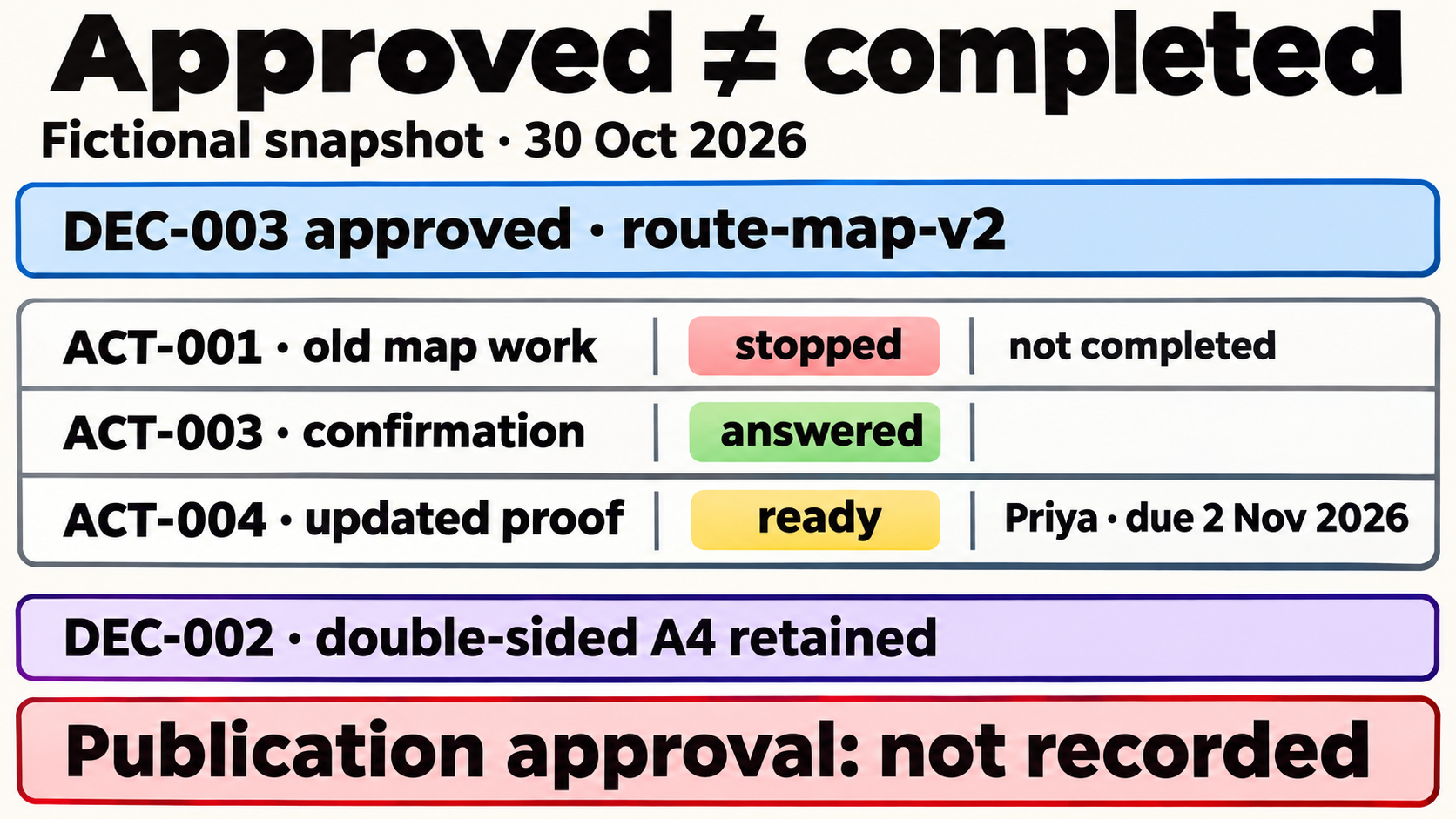
At the 30 October snapshot, DEC-003 changes the map work as follows:
| Action | Work state | Governing decision or evidence |
|---|---|---|
| ACT-001: old map work | Stopped after replacement; not completed | DEC-001 is superseded by DEC-003 |
| ACT-003: ask Elise | Answered | Elise’s reply authorises DEC-003 |
| ACT-004: prepare updated proof | Ready; Priya; due 2 November 2026 | DEC-003, within DEC-002’s A4 format |
ACT-004 includes checking the entrance and all three stops before sending the proof for review. Nothing in this snapshot says that the proof has been delivered or approved. ACT-002’s later completion is also unrecorded.
Approved direction, work progress and publication sign-off are separate checks. Atlassian’s decision documentation template likewise records decision status, impact, action items and the final outcome separately. Here, action progress stays in the action records and accompanying notes; the CSV’s status column accepts only proposed, approved, rejected or superseded.
To use the template on a live project:
- Copy the blank CSV and keep the fictional examples separate. Record each meaningful choice under a stable ID, with its exact version and source.
- Create a current view for the project and subject. Exclude proposed, rejected and superseded rows, then check actual approval, effective dates and unresolved conditions. Retain the unfiltered history.
- Read affected action records alongside that view. A conflict or blocker can hold work even when the earlier decision remains approved. Ask the agreed decision-maker, and update reciprocal replacement links only when the change takes effect.
- Test the handover from an old ID: follow DEC-001 to DEC-003, inspect Elise’s approval, return to DEC-001, then find ACT-004 with Priya and its due date. Compare the before, pending and after snapshots, including the proposal’s empty approval fields.
The three downloads are the blank CSV, the completed 30 October CSV and the instructions TXT. The TXT retains the complete before and pending CSV sections, action states, field meanings and the fictional request and bounded reply. Start a live log from the blank CSV; use the completed CSV as a filled-in example and the earlier history sections to check the transition. Keep identical headers and all 23 fields when saving. These October and November dates belong to the historical teaching example, not your live task list. Check that commas and quotation marks survive a save and reopen before sharing your copy.
For this example, a colleague taking over the project can identify the approved route, recover its original approval and find the next proof task. Use that same old-ID-to-current-work check on the first real choice you enter.