
A project issue log keeps an observed problem, the work done about it and the outcome of each check together. Use one issue ID through the attempted remedy, an unsuccessful check and any further work. The useful question is: what does this problem still need, and who acts next?
For example, two repair tasks can be complete while the exported file still has the original problem. Leaving the tasks complete and recording the unsuccessful check gives the next person a more accurate starting point than changing everything to “done” or reopening every task.
This guide follows one fictional three-page workshop handout. All people, files, dates, observations and results are invented teaching records. No real PDF was exported or tested. The example clock is UTC+11 on 17 November 2026. The files below work as plain manual records, without TASKUL or an issue-tracking product.
Start with the problem that has already happened
At 09:30, Ari records IS01: the exported handout-v01.pdf is missing the venue lines on pages 2 and 3. Page 1 contains its venue line. The review handout therefore lacks two pieces of agreed information.
The agreed comparison for this example is small and explicit:
| Exported page | Full venue label required from the agreed copy |
|---|---|
| 1 | Fern Room |
| 2 | Wattle Room |
| 3 | Banksia Room |
Dev, the outcome verifier, will compare all three labels in the exact exported PDF at 100% and 200%. Each full label must match the agreed copy and remain visible. Checking only page 2 would leave page 3 unanswered; checking the working source would not establish what the export contains.
That is the boundary of this example’s outcome criterion. It does not cover every handout requirement, print quality, accessibility, every viewer or device, or the client’s acceptance. Choose the actual conditions needed for your own problem rather than copying these zoom settings as a general PDF standard.
An issue entry is useful here because a problem has occurred and its outcome must be followed across attempts. Routine production tasks do not each need a second entry in an issue log. Keep normal work in the project task list and reference the relevant task IDs.
Margaret L. Love’s 2002 conference paper hosted by PMI distinguishes current issues, future risks and changes, and discusses cross-referencing the resulting work with the project schedule. It is the author’s conference guidance, rather than a current mandatory standard. The manual records and labels here are our proposed example.
Download three records and a worked sequence
The download set separates the issue, its actions and its outcome checks:
- Issue record: blank CSV and fictional example CSV.
- Action references: blank CSV and fictional example CSV.
- Outcome checks: blank CSV and fictional example CSV.
- Four current-view examples (CSV) and hand-reading notes (TXT).
The three blank files have the same columns as their corresponding examples. The action file is a compact stand-in for an existing task list; you do not need to maintain both in a real project. The current-view file shows what the same issue needs at four moments. It contains summaries, not additional observations.
These are UTF-8 CSV value files, without formulas, alerts, history capture or automatic state changes. Office, Excel and Sheets import has not been tested. Keep an unchanged copy and check column boundaries, IDs, times and wording when importing into your chosen tool. The notes let you follow the complete example by reading the rows, without running code.
The evidence notes are self-contained fictional accounts. There is no missing attachment behind an invented reference and no real PDF supplied as proof. In your own permitted workspace, retain the actual source, exact output and check evidence that support each entry.
Keep action completion separate from the outcome check
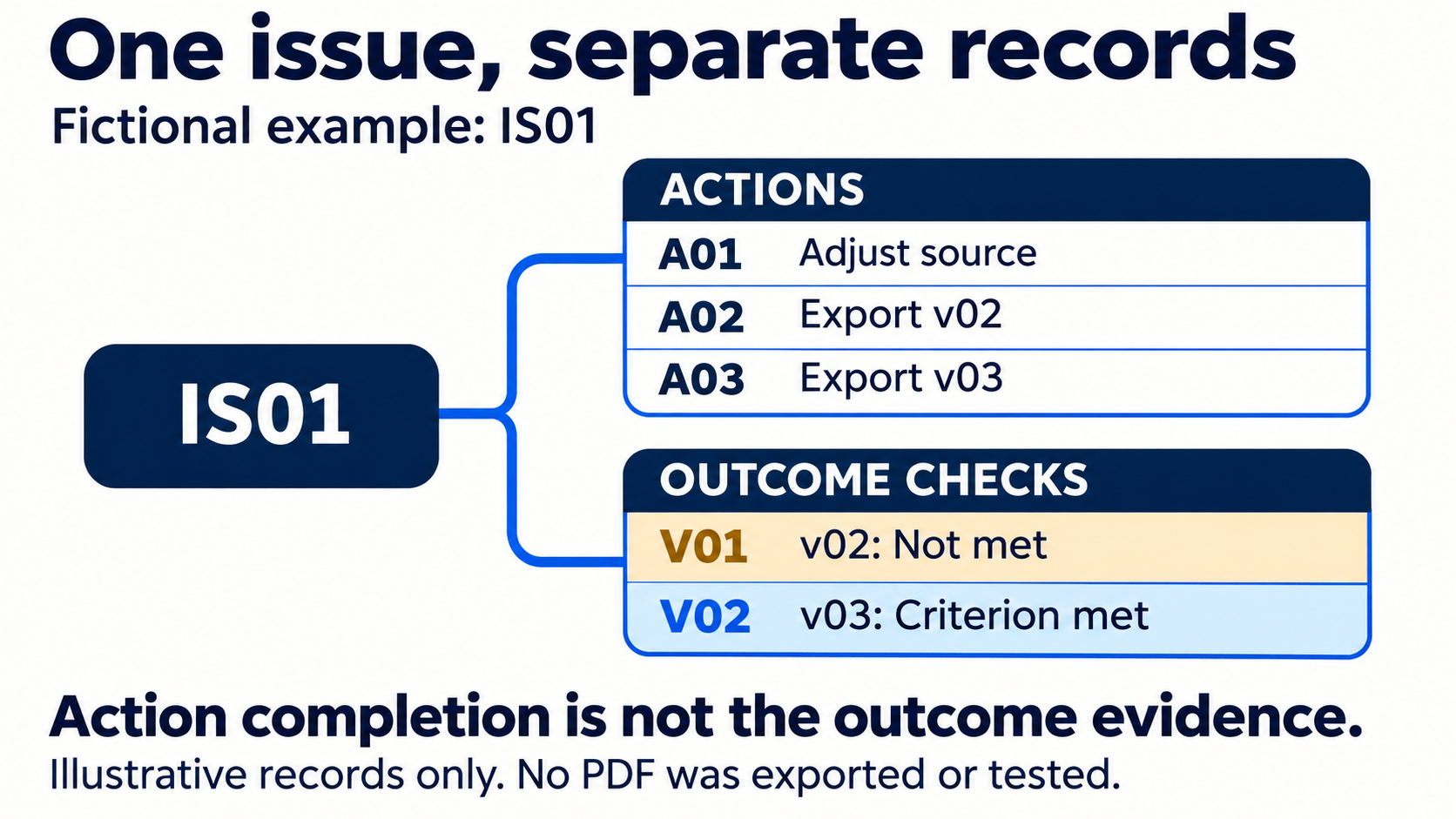
Ari makes two initial actions under IS01:
| Action | Work and output | Recorded completion |
|---|---|---|
| A01 | Adjust the page 2 and page 3 venue frames in the working source; output working-source-v02 |
11:00, Ari |
| A02 | Export the revised three-page handout; output handout-v02.pdf |
11:15, Ari |
At 11:30, both actions are complete. Their notes establish that Ari adjusted the source and produced an export in the fictional account. Neither note says Dev has checked the venue labels in that export.
The issue’s current state is therefore Awaiting outcome check, and its next owner is Dev. The next action is to compare handout-v02.pdf against all three required venue lines. Ari does not need another reminder to perform A01 or A02 merely because the issue remains open for checking.
This is where a running issue record earns its place beside the tasks. If a colleague sees only the two completed actions, the remaining check is easy to miss. If the issue simply says “not done”, the colleague cannot tell whether to repeat the remedy or inspect its output. The linked action and check records resolve that choice.
Status wording varies between tools and teams. Google Issue Tracker’s official issue concepts distinguish a fix from verification, while allowing team-dependent workflow definitions. In that product, Fixed is classified as Closed even when verification remains. Do not assume that a label such as Closed has the same meaning in your manual record or another product.
Here, Awaiting outcome check is an editorial label for the fictional team’s next work. It is not a claim about TASKUL’s available statuses or an instruction to configure Google’s workflow.
Record an unsuccessful check without erasing the work
At 11:45, Dev performs fictional check V01 on handout-v02.pdf. The record repeats the target version, comparison conditions and expected labels so that the result can be understood without guessing which export was reviewed.
| V01 comparison | Recorded result |
|---|---|
| Page 1: Fern Room | Fully visible and matching |
| Page 2: Wattle Room | Fully visible and matching |
| Page 3: Banksia Room | Still cut off |
| Outcome against the three-page criterion | Not met |
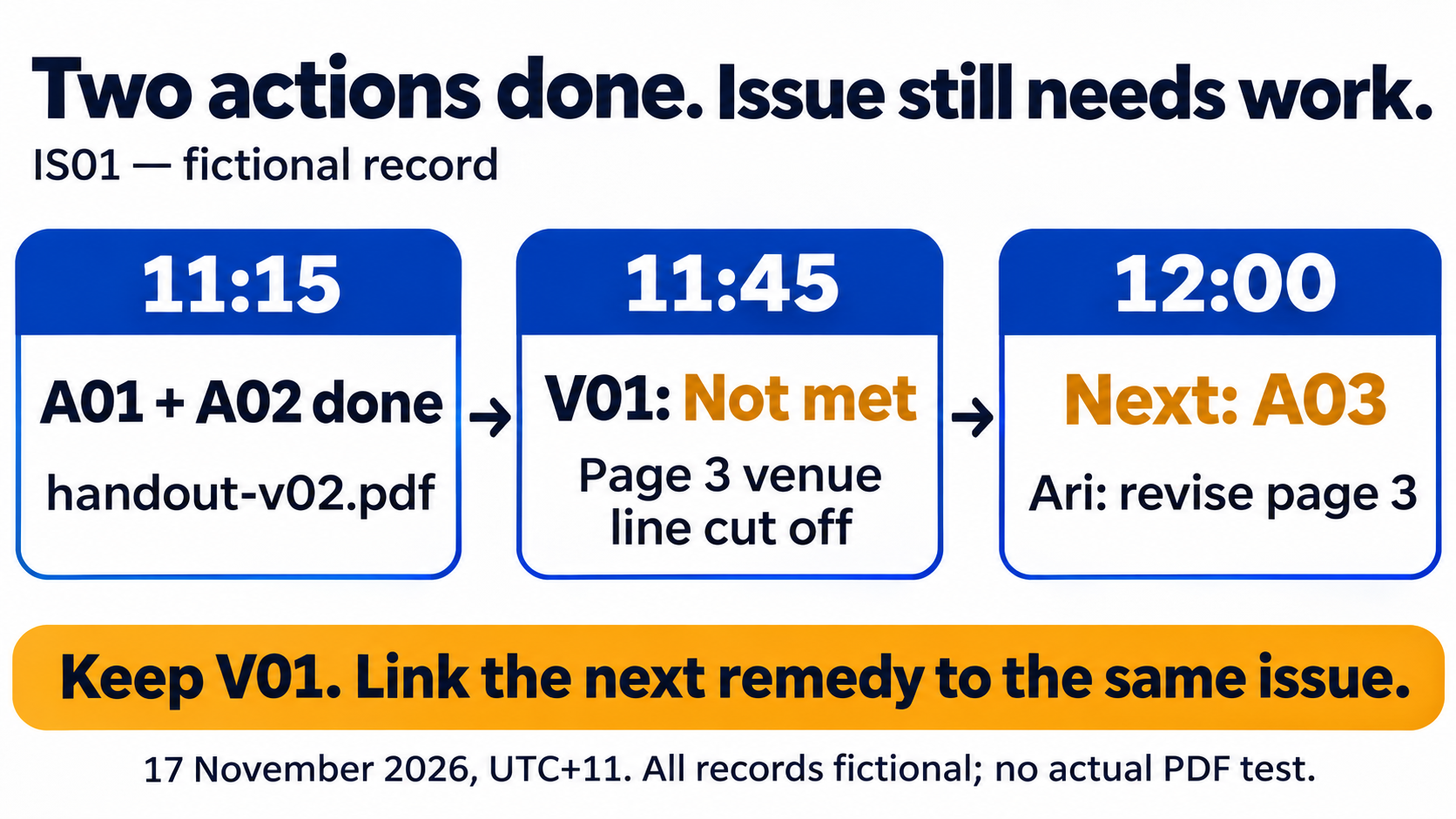
The result narrows the remaining discrepancy to page 3. It does not prove why the first remedy failed, and Dev does not invent a technical cause from the visual result. Ari needs to investigate and correct that specific output problem.
At 12:00, IS01 reads Further remedy needed. Its next owner is Ari, and the next action is A03: revise the page 3 venue frame and export a new three-page handout. Dev will then check the new export against the same three-page criterion.
A01 and A02 remain complete. Their recorded work happened; the outcome was insufficient. Reopening both actions would hide that distinction and make it unclear whether the first export ever existed. Keep V01 as Not met, including its exact version and residual page 3 problem.
If the check could not be performed, record that instead of inventing a failure or a pass. For example, an unavailable export means the outcome remains unverified. Name the missing input and who will supply it. That is a different next action from a check that found a specific defect.
Check the new export and retain the earlier result
Ari completes A03 at 14:00, producing handout-v03.pdf. At 14:10, the issue is back to Awaiting outcome check and Dev owns the next action. A new filename and a completed remedy do not supply the missing result by themselves.
V01 is still the latest completed check at that moment, but it applies to v02. It cannot describe the contents of v03. Keep that version distinction visible when summarising the issue.
At 14:30, Dev records V02 on handout-v03.pdf, using the same conditions and agreed copy:
| V02 comparison | Recorded result |
|---|---|
| Page 1: Fern Room | Fully visible and matching |
| Page 2: Wattle Room | Fully visible and matching |
| Page 3: Banksia Room | Fully visible and matching |
| Outcome against the three-page criterion | Met for the recorded check |
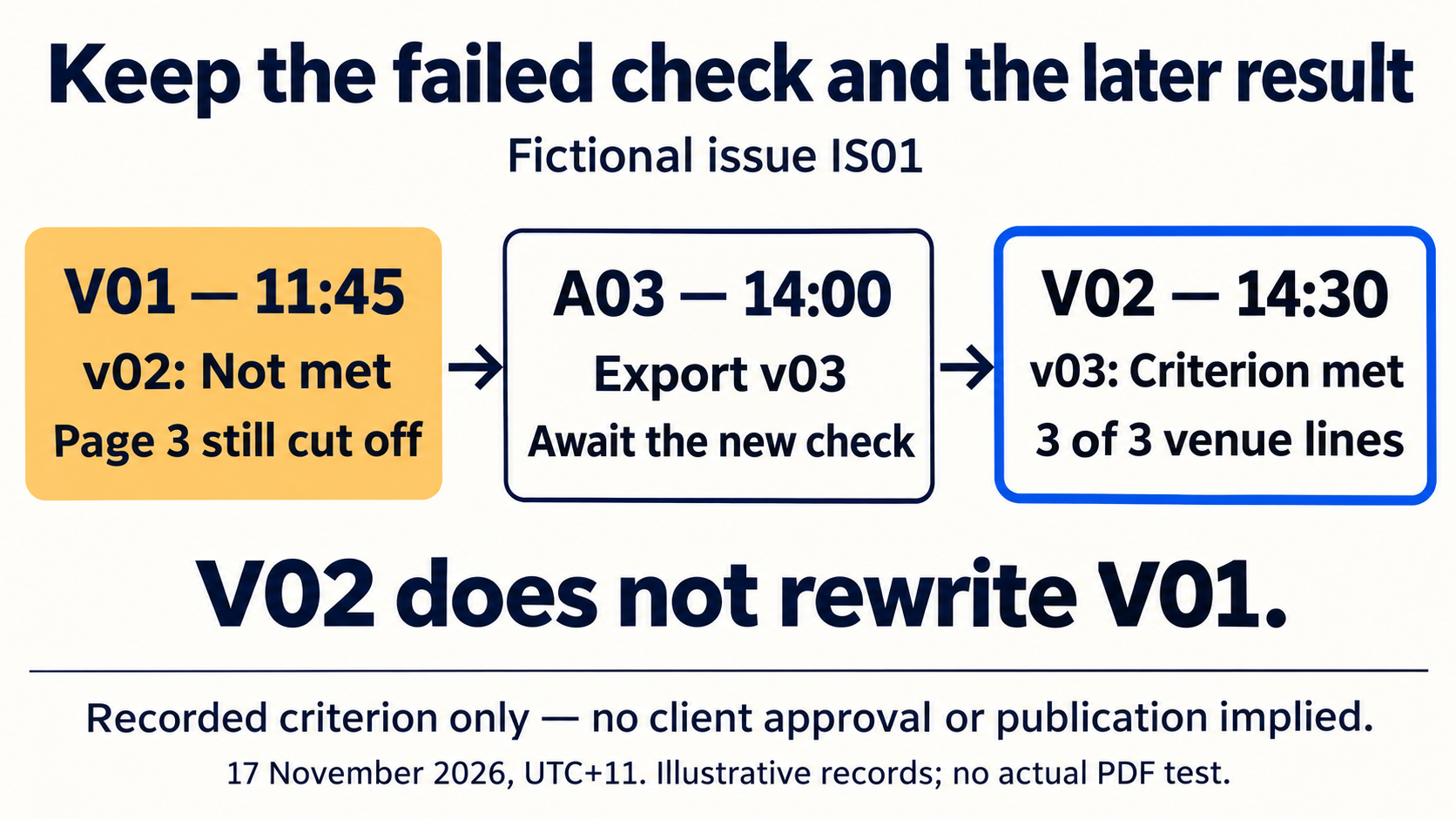
Checking all three pages also records whether the previously correct labels remain correct in the new export. Checking only the repaired page would leave that part of the agreed criterion unexamined.
IS01 can now be recorded as Criterion met in recorded check. No further IS01 remedy remains within that criterion. Keep V01 and V02: the first explains why A03 was needed, while the second explains the current conclusion. Do not replace V01’s unsuccessful result with the later success.
The four moments make the next action explicit:
| As of | Completed actions | Latest check | Current issue state | Next owner and work |
|---|---|---|---|---|
| 11:30 | A01, A02 | None | Awaiting outcome check | Dev checks v02 against all three venue lines |
| 12:00 | A01, A02 | V01 on v02: not met | Further remedy needed | Ari completes A03 for the page 3 discrepancy |
| 14:10 | A01, A02, A03 | V01 on v02: not met | Awaiting outcome check | Dev checks v03 against all three venue lines |
| 14:30 | A01, A02, A03 | V02 on v03: criterion met | Criterion met in recorded check | No remaining IS01 remedy within that criterion; retain both checks |
A later result belongs in the later view. Do not rewrite the 11:30 summary to imply that V02 had already happened. These four rows illustrate manual summaries; the files do not automatically reconstruct historical states.
If the same problem appears again, preserve what V02 actually established and record the new observation, version and conditions. The earlier bounded check need not have been false for a later output to have a problem. Decide whether to continue the same issue or link a new one according to the relationship between the observations and your team’s rules.
Use the log to decide the next work, not to duplicate every register
Start with one observed problem and a criterion that can answer it. Record the initial evidence and impact, then link the remedy tasks. At the next review, ask whether the missing piece is work, an outcome check, or a decision that prevents either.
If it is work, name the remaining discrepancy and the action owner. If it is a check, name the exact output, conditions and verifier. If an authorised decision is missing, use the project’s decision or escalation record and link the answer when it arrives. An escalated message or an approved direction does not itself establish that a remedy worked.
Use the risk register guide for a possible future event. Use the escalation matrix guide when the issue needs an answer from someone with the relevant authority. Neither needs to be copied into this issue record.
For a short agreed revision, the feedback-to-tasks guide may already provide enough structure. A running issue log becomes useful when several remedy attempts and their different results must survive handover. Do not create a separate register merely to rename an acceptance checklist.
Try the blank records on one non-confidential issue. Another person should be able to identify the latest checked output, the exact residual problem and the next owner without reading every project message. If the record cannot answer that, improve those references before adding more columns.
TASKUL’s English product page is available if you are evaluating project tools. The method and downloads here do not depend on a product feature. No automatic issue workflow, verification or notification is demonstrated in this guide.
Questions about keeping an issue log
Should every unfinished task become an issue?
No. Keep routine work in the task list. Use an issue record when an observed problem needs its impact, remedy attempts and outcome checks followed together. Link the existing task IDs rather than maintaining duplicate task states.
Should completed remedy tasks be reopened after an unsuccessful check?
Record what actually happened. If the work was completed but did not meet the issue’s outcome criterion, retain that completion and record the unsuccessful check with the remaining discrepancy. Add the needed follow-up action. Correct a task’s completion entry if it was inaccurate; do not change it solely to match the issue’s state.
Does a successful check mean the project is approved or ready to publish?
Only the recorded criterion has been met under the recorded conditions. In this example, V02 concerns three venue labels in v03. Other requirements, client acceptance and publication permission remain separate. Retain the exact version and check result so the conclusion is not widened later.