
The best project management software for creative agencies should help you answer practical questions: how many revision rounds remain, whose approval is outstanding, and whether the designer can take another job. A board full of completed tasks does not answer those questions by itself. For an Australian creative studio, I would choose software by testing those situations before moving any live work.
This guide is for owners and producers choosing or reconfiguring software for design, web, video and content work. Vendor details were checked on 29 September 2026. TASKUL is our product; it appears below as an option for turning client messages into planned work. The comparison uses published plan details, with gaps identified rather than treated as confirmed features.
Testing a tool against studio work
Start with a rehearsal project. Use the same brief, revision history and approval request in every candidate so you can compare the work involved. A polished demonstration is less useful than finding out whether a producer can see an exhausted revision allowance while answering a client.
Here is an explicitly invented test case: a studio called Paper Kite has a homepage project with two rounds quoted and two used. The client asks for another layout. Meanwhile, a video project is waiting for approval and shares the same designer. The producer needs to record the new request, check the designer’s commitments and decide what to tell the client before anyone starts.
A trial checklist you can reuse
- Can it hold a rounds field? Enter rounds quoted and rounds used separately. Check whether those values are visible from the project overview. If you must use a description instead of fields, try finding every project at its allowance. Decide whether that manual check is acceptable.
- Can waiting have an owner and a chase date? Move the test project to “waiting on client”. Keep an internal person responsible, record the requested decision and add a chase date. Check that the chase date is distinguishable from the delivery deadline.
- Can you see each person’s work across projects? Assign the same designer work in both test projects. Open a view that shows their combined commitments. Add the possible return of the waiting project. A project calendar alone does not demonstrate a useful capacity view.
- Can clients use it safely and easily? Test with a separate client account and dummy content. Check what the client can read, comment on and change, whether unrelated projects stay private, and how the account counts towards the plan’s limits.
- Can you retrieve an approval record? Attach or link a specific version, record the approver, decision and date, then replace the working file. Confirm that the earlier approved version and its decision remain identifiable. A generic “done” status is not enough for this test.
- Can the next producer understand the project? Hand the rehearsal to someone who did not set it up. Ask them to find the current version, outstanding decision, remaining rounds and next action without an explanation from you.
Keep a note beside each test: works as supplied, works with a manual convention, or remains unverified. Record which subscription was active during the test. If a temporary feature made the workflow possible, repeat that part using the access you intend to keep.
What the free plans actually include
The following free-plan details were checked on 29 September 2026 against the linked vendor pages. “Not listed” means the vendor’s pricing page does not mention it for the free plan; it does not mean the product lacks it. Published calendar access does not establish cross-project capacity planning, and guest access does not establish an approval workflow.
| Tool | Rounds fields | People and client access | Calendar and timeline | Studio test to prioritise |
|---|---|---|---|---|
| Trello Free | Custom fields start at Standard. | Up to 10 collaborators per Workspace; up to 10 boards. Separate guest access is not listed. | Free includes a view-only Planner. Board Calendar and Timeline views, plus Workspace calendar/table views, start at Premium. | Test a written rounds convention and whether the available views reveal overlapping assignments. |
| Asana Personal | Custom fields on Personal are not listed. | 2 users. Unlimited free guests are listed for Starter; guest access on Personal is not listed. | List, board and calendar views are included. Timeline and Gantt start at Starter. | Check who needs a user account before designing a shared studio workflow. |
| ClickUp Free Forever | Custom Fields are marked “Trial”. | Unlimited Free Plan Members. Separate guest access is not listed. | Calendar View and Kanban Boards are included. Gantt and Timeline are marked “Trial”. | Repeat the rounds and scheduling tests without temporary features. Total file storage is 60MB. |
| Notion Free | No rounds field is listed; you would build one as a database property. Database items can have a Date property. | 10 external guests. Pages and blocks are unlimited for individuals, limited for 2+ members; this is not a stated member-seat cap. | Calendar is a database layout based on the Date property and is not listed as paid-only. Whether timeline is free is not listed. | Test the shared workflow and approval retrieval. Page history is 7 days; uploads are limited to 5 MB each. |
| monday.com Free | 8 column types are listed; whether one suits a rounds count is not listed. | Up to 2 seats and 3 boards. Guest access is listed in Standard. | Calendar, Timeline and Gantt views are listed in Standard. | Check the seat fit first, then whether the available columns can hold the project record. |
For Notion’s calendar behaviour, the source is its database views documentation. Across this comparison, the published details do not establish the full waiting-state setup, by-person capacity view or approval record on each free plan. Those remain hands-on tests. Do not buy on the strength of a tick beside “calendar”.
Choose a shortlist from your actual constraint
My starting point would be the restriction you cannot work around. If everyone needs access, eliminate plans whose seat or collaborator allowance does not fit. If rounds must be searchable fields, do not accept a temporary demonstration as proof of ongoing access. If the client must approve inside the tool, verify their permissions before teaching the team a new process.
For a freelancer working largely alone, I would favour the setup that makes today’s commitments and the next client response easy to find. For a studio sharing people across jobs, I would put the combined assignment view ahead of the prettiest project board. That is why a recommendation for the best project management tool for freelancers may not suit a producer coordinating a team.
If you already use Trello, the Trello alternatives guide is a useful next comparison. First run this rehearsal in your existing setup. Move only when you can name the missing capability and demonstrate it in the replacement.
Make revision rounds visible
Track rounds quoted and rounds used beside the project name. Completed tasks tell you what happened. A revision allowance tells you when to discuss whether the next request fits the agreement.
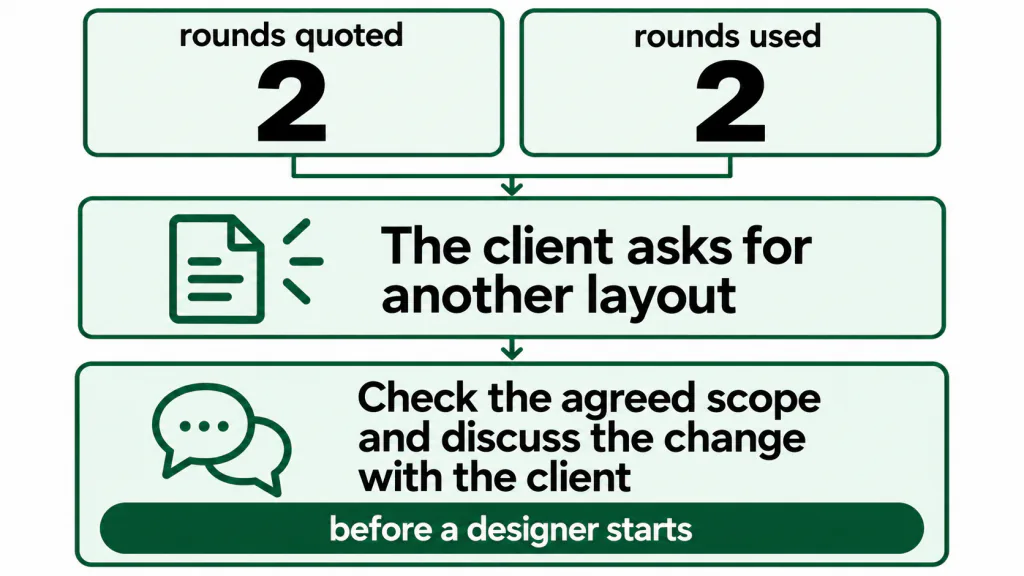
In the invented Paper Kite example, the homepage has used its two agreed rounds. The request for another layout should prompt a decision before a designer starts. It does not automatically establish that extra work is chargeable. Check the agreed scope and discuss the change with the client.
Define what consumes a round at the start. My preferred convention is to count it when consolidated feedback arrives and the team begins acting on it. Agree how corrections and fragmented feedback will be handled. Otherwise the field looks precise while the people reading it count differently.
Review completed projects to compare the allowance with the work actually requested. Keep the reasons for extra rounds alongside the counts: changed brief, additional stakeholder, or correction. Use that record when preparing the next freelance quote, rather than assuming every revision has the same cause.
Give “waiting on client” an owner
I would treat waiting as a distinct project state. Leaving an approval request mixed with active production makes the next action harder to see. The person who can unblock the work may be outside the studio, but someone inside still needs to follow up.
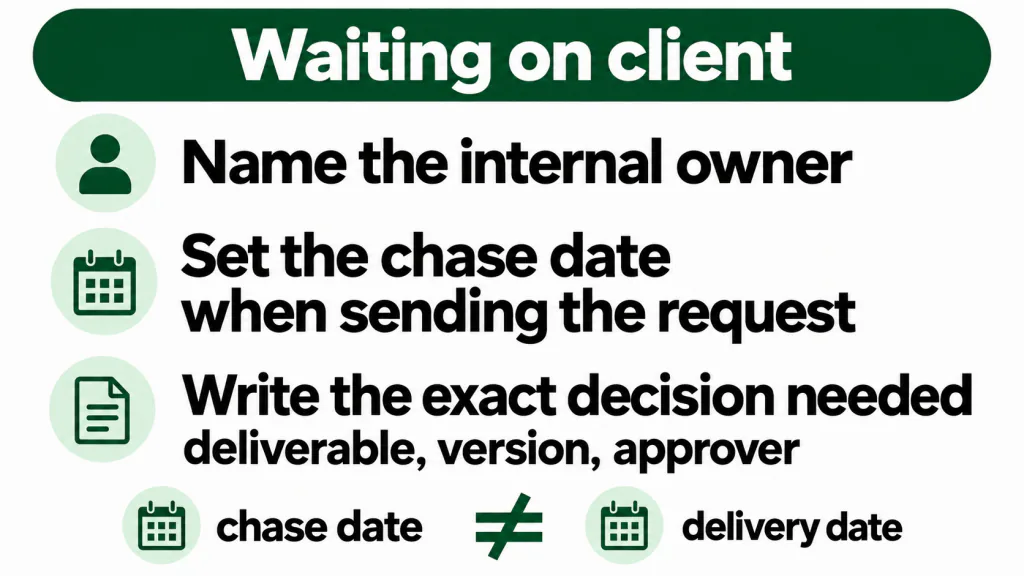
- Name the internal owner. Assign responsibility for chasing the decision and updating the project.
- Set the chase date when sending the request. Keep it separate from the promised delivery date.
- Write the exact decision needed. Name the deliverable, version and approver, so the follow-up asks for something specific.
Review waiting work alongside active work. When approval arrives, check the production schedule before confirming the next delivery date. A delayed response should not silently turn into an urgent assignment for whoever happens to be available.
See capacity by person across projects
A project schedule is useful, but I would not use it alone to accept another booking. Check the same person’s commitments across all live projects, including internal work and leave. Then add the work that could return from client review.
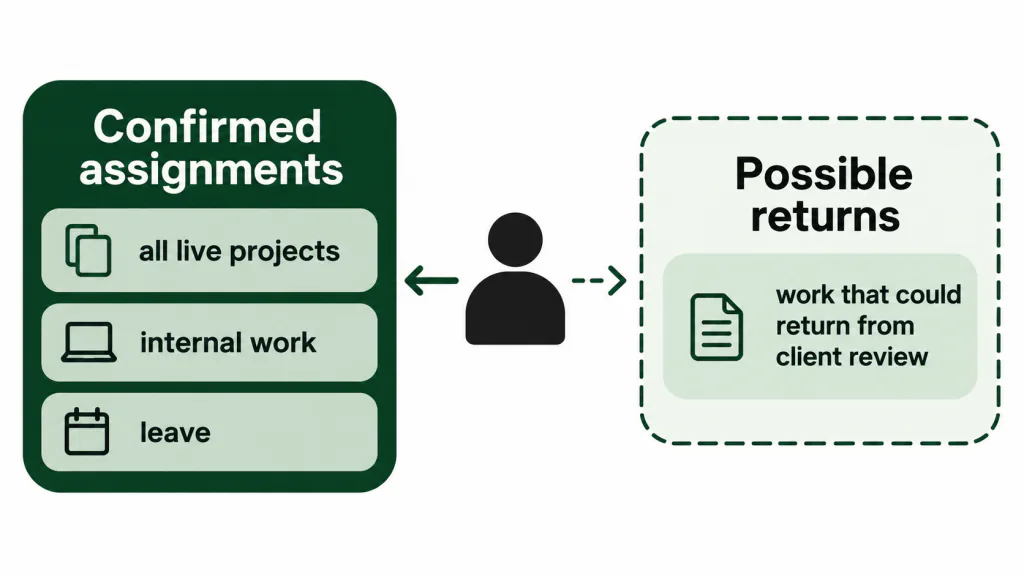
Keep confirmed assignments separate from possible returns. If you treat every waiting project as fully booked work, the view becomes difficult to use. If you omit all of them, you hide the work that might arrive next. Label the assumption and identify who will confirm it with the client.
Dates alone are not enough to judge a person’s load. Add an effort estimate or an agreed working block, then compare it with their actual availability. Mark uncertain estimates. The practical calculation belongs in freelance capacity planning; the software test is whether you can see and update those commitments without rebuilding the schedule elsewhere.
Tie the approved version to the revision round
Use a file name or version label that identifies both the round and the version within it. Keep the current working version and the current approved version distinguishable. They may differ while a change is under review.
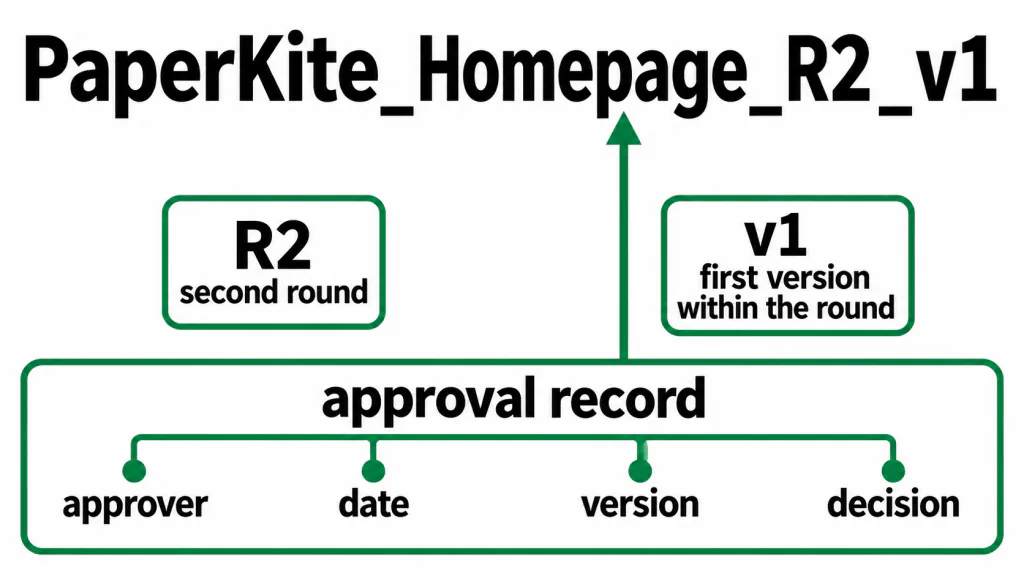
For the invented Paper Kite homepage, PaperKite_Homepage_R2_v1 means the first version within the second round. That label is useful only if the approval record points to that exact file or snapshot. A link that always opens the latest file can lose the connection you were trying to preserve.
Record the approver, date, version and decision together. Retain the actual response as well as your summary. If approval has conditions, record them as outstanding work. Test retrieval after updating the working file, rather than discovering later that the original reference has changed.
Write requests down before deciding
A friendly message can contain a genuine change to the brief. My rule is simple: record every incoming request in the project before deciding whether to accept it. Writing it down does not commit the studio to doing it.
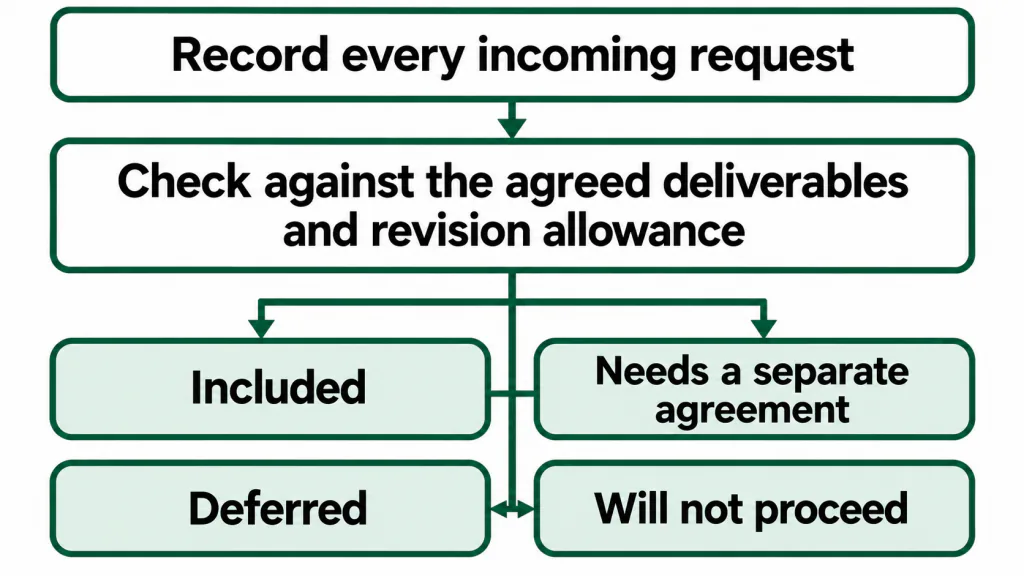
Keep the original message or a reference to it, the requested change and the decision still needed. Check the request against the agreed deliverables and revision allowance. Then record whether it is included, needs a separate agreement, is deferred or will not proceed.
This gives the producer a list to discuss with the client. It also lets the team distinguish a request from an authorised task. The working habits are covered in stopping scope creep and turning client feedback into tasks.
Where TASKUL fits
TASKUL, our product, is an option if turning scattered client messages into planned work is the problem you want to address. Paste a client brief, email, chat thread or call notes and its AI writes tasks and due dates. It also notices when the client adds something or changes their mind. These capabilities are described on the TASKUL product page.
Review the suggested tasks and dates against the agreement before assigning work. Those intake capabilities do not establish that TASKUL meets every test in the checklist above; verify the studio workflow separately. For a wider comparison of this category, see AI project management tools.
Turn the brief into decisions people can act on
I would resolve an unclear brief before spending time customising a board. List the deliverables, revision allowance, exclusions and client inputs. Name the person who can approve the work and agree how feedback from other stakeholders will reach that person.
For every client input, record an owner and required date. Copy, access details and photography belong in the plan if production depends on them. If an input is late, identify the affected work and discuss the revised sequence instead of leaving the original dates untouched.
Use client onboarding to collect these details, then turn the brief into a project plan. Configure the software around those decisions. A template cannot decide who has authority to approve a design.
Keep billing triggers beside delivery milestones
Include a reminder for the agreed billing event in your studio workflow. Name the event, the evidence that it occurred and the person responsible for taking the next action. Use the agreement to define the trigger; do not assume that moving a task to “done” means a billing milestone has been met.
Keep the financial record in your accounting process and give the producer enough information to coordinate the handover. When a milestone is reached, check the supporting approval and notify the responsible person. This is a workflow recommendation, not a claim that any product compared here provides billing features.
For the document itself, see what to put on a freelance invoice in Australia. Once it is sent, give follow-up an owner and date. The next steps are covered in chasing late payments in Australia.
Make the software decision with a working project
Finish the rehearsal with a project record another producer can use. It should contain the agreed scope, rounds quoted and used, current state, internal owner, next action and date, working version, approval record and milestone handover. Include the person’s assignments from other projects in the scheduling check.
Keep your existing software if that record is clear and maintaining it is manageable. If a manual workaround repeatedly hides an important decision, use that specific failure to assess a replacement. Before migrating, agree who will maintain the fields and when they will be reviewed.
For live projects, populate revision counts and approvals from the records you hold. Mark missing information as unconfirmed and resolve it with the responsible person. Do not turn someone’s memory into an apparently verified project history. The useful result is a setup where the team can see what happens next and what still needs a decision.